

DYann.1
Senior II
August 21, 2023
Question

CODEC with STM32

  • August 21, 2023
  • 30 replies
  • 8287 views

Hello,

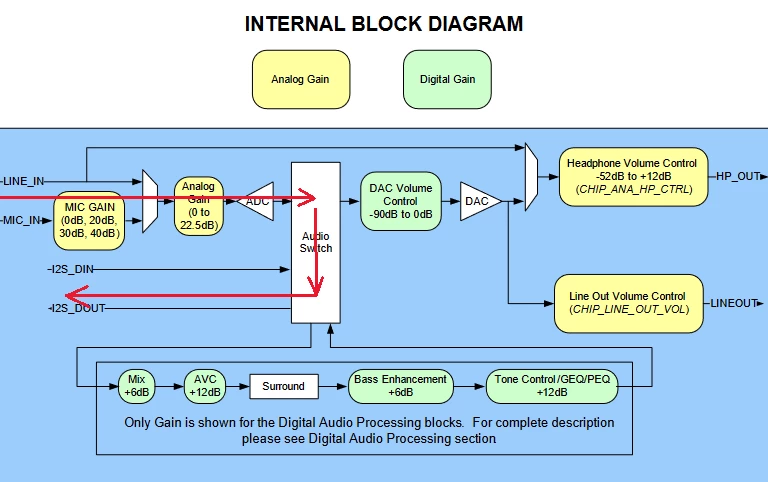
I would like to know how to retrieve the acquisition values ​​: INPUT -> ADC -> SAI -> µP like the diagram below :
DYann1_0-1692602441481.png

I have a program that works for this : DMA -> SAI -> DAC But this is not the way I would have wanted to make my CODEC work. Do you have any idea how should i proceed ? Thanks in advance

This topic has been closed for replies.

30 replies

jiangfan
ST Employee
August 21, 2023

some STM32 example(s) and application(s) may be a good reference.

for example, AN3997 Audio playback and recording using the STM32F4DISCOVERY

DYann.1
DYann.1Author
Senior II
August 21, 2023

Hi,

I saw but it does not correspond to what I want to do, it takes the recordings via an SD card and goes through a DAC and then the HP which does not correspond to what I am looking for. If you have an example of the taking into account of the microphone via ADC and SAI via the microprocessor that would interest me

jiangfan
ST Employee
August 22, 2023

what audio codec you use?

if you also use AUDIO_CODEC WM8994 (or a similar one), stm32h743i_eval_audio.c may be a good reference: SAI and record.

STM32CubeH7/Drivers/BSP/STM32H743I-EVAL/stm32h743i_eval_audio.c at master · STMicroelectronics/STM32CubeH7 · GitHub

DYann.1
DYann.1Author
Senior II
August 22, 2023

I use CODEC SGTL5000 (but it's the same principle except for a few details). I can see the example but 
I do not see where is the part of code that interests me and the configuration under CUBEMX.

Besides, why go looking for an example of another evaluation board with another CODEC or I have an STM32L552E-EV evaluation board with a CODEC on this board already.

jiangfan
ST Employee
August 23, 2023

I suppose CODEC SGTL5000 not used by STM32 boards (from ST).

if you want to start from STM32L552E-EV evaluation board, on which codec CS42L51 used, in similar way, BSP driver is stm32l552e_eval_audio.c, component driver is cs42l51.c.

https://github.com/STMicroelectronics/STM32CubeL5/blob/master/Drivers/BSP/STM32L552E-EV/stm32l552e_eval_audio.c

DYann.1
DYann.1Author
Senior II
August 24, 2023

Hi jiangfan, 

Thank you for this link but where is what is the code where it uses the CODEC to retrieve the values ​​via an ADC ? I've explored all examples of this CODEC with this card and haven't seen a single place where one can retrieve the data via an ADC.

Thank you for your helps.

Regards

AScha.3
Super User
August 24, 2023

in this L552 example is:

+ Call the function BSP_EVAL_AUDIO_IN_Record() to record audio stream. The recorded data are stored to user buffer in raw
 (L, R, L, R ...).
 Instance : Select the input instance. Can be 0 (SAI) or 1 (DFSDM).

SAI input is from codec ADC ... so what is the problem ??

If you feel a post has answered your question, please click on " Best Answer ".
jiangfan
ST Employee
August 24, 2023

as you mentioned, path is INPUT -> ADC -> SAI -> µP.

for codec CS42L51 on STM32L552E-EV evaluation board, BSP_AUDIO_IN_Init(), BSP_AUDIO_IN_Record() should be the functions to follow.  Instance : Select the input instance. Can be 0 (SAI)

DYann.1
DYann.1Author
Senior II
August 24, 2023

Yes jiangfan this is the case for INPUT -> ADC -> SAI -> µP. In this cas I use the link that you give me before

https://github.com/STMicroelectronics/STM32CubeL5/blob/master/Drivers/BSP/STM32L552E-EV/stm32l552e_eval_audio.c#L1912

Or I can find in the example provided by stmicroelectronics ? But the function BSP_AUDIO_IN_Record(), I can use a microphone to record my voice for example and where is the .ioc configuration file that goes with this project ?

jiangfan
ST Employee
August 25, 2023

You may walk around the github repo for STM32CubeL5 to find the example/application/Demonstration regarding audio recording. if you are familiar with STM32Cube architecture, you may find what you want easily.

STM32L552E-EV/Demonstrations should fit your requirements:

https://github.com/STMicroelectronics/STM32CubeL5/tree/master/Projects/STM32L552E-EV/Demonstrations/Demo
- An audio recorder sub-module provides a complete audio record solution and delivers a high-quality
record experience. It supports record in WAV format at 44.1khz sample rate in mono. The recorded file
rec.wav is saved on the SD card (it is overwritten at each new record).

SAI_AudioPlay example may be useful too (simpler)
https://github.com/STMicroelectronics/STM32CubeL5/tree/master/Projects/STM32L552E-EV/Examples/SAI/SAI_AudioPlay

jiangfan
ST Employee
August 27, 2023

you mentioned you have STM32L552E-EV board. Have you tried the STM32L552E-EV Demonstration? the STM32L552E-EV Demonstration contains different modules including Audio module: inside Audio module, two audio solutions with an audio recorder sub-module - this should be feature that you need.

in my opinion, you have everything needed: the STM32L552E-EV board, the FW from ST. you just need to do test with STM32L552E-EV Demonstration, and port part of Demonstration to your application. and these are enough.

DYann.1
DYann.1Author
Senior II
August 27, 2023

Hi jiangfan, 

Thank you for your answer, yes I tried the STM32L552E-EV Demonstration, there is no '.ioc' configuration file and how to use the sub-module audio recorder if we don't have the .ioc in the Project ? 

Do you have a specific example with code ? I uploaded the project to Github with your link and I don't see the difference with the examples provided by ST ?

DYann1_0-1693161630963.png

jiangfan
ST Employee
August 28, 2023

in my opinion, .ioc file will provide some convenience when starting work with STM32CubeMX, but .ioc file is not mandatory. Take STM32L552E-EV Demonstration as example, there is no '.ioc' configuration file, but all GPIO and clock configuration are in the source files, .h for GPIO and .c for clock setting in the package. from .ioc file, STM32CubeMX may automatically generate .h/.c files, user may also re-use the existing .h/.c files to implement needed features.

DYann.1
DYann.1Author
Senior II
August 29, 2023

Hi jiangfan, 

Thank you for this information but after me, It's easier to have the .ioc configuration file than the opposite. Now after downloading the demo project on my card I have this screen and do you know how to proceed for the registration ? 

DYann1_0-1693291596965.png

I have this information below, but how to register ? It probably saves on the SD card on the evaluation board ?

DYann1_2-1693291674625.png

jiangfan
ST Employee
August 30, 2023

I agree with you that it is better to have the .ioc configuration file. but you cannot imagine to see .ioc configuration file for each project of STM32 cube FW package, like the case of STM32L552E-EV/Demonstration.

sorry, I don't understand what you mean "how to proceed for the registration".

STM32L552E-EV/Demonstration readme.txt clearly mentions:

- An audio recorder sub-module provides a complete audio record solution and delivers a high-quality
record experience. It supports record in WAV format at 44.1khz sample rate in mono. The recorded file
rec.wav is saved on the SD card (it is overwritten at each new record).

which means you have to plug a SD card into the SD card slot before you start a recording.

MM..1
Super User
August 29, 2023

Hi boys, ioc files and all MX is big help from ST, but too big issue. I agree, that examples without ioc is ...
But when anybody create custom board with slightly other chip as example , then need create new ioc from scratch.
And @DYann.1 for some hw based peripherals as SAI is, you in code found only init and one line code to start record. I recommend you try create own project from start and use or create only BSP file for chips around STM.

DYann.1
DYann.1Author
Senior II
September 1, 2023

Hi,

After trying with the headphones provided in the kit, it does not work either.

DYann1_0-1693565845878.png

I don't know if I need to put a jumper somewhere on the board for this to work ?

jiangfan
ST Employee
September 2, 2023

The later one, white headphone, should be the CTIA type headphone with microphone - as I remember, white join between points is CTIA type headphone.

I suppose the white headphone provided in the kit should support the board demonstration. You may plug it to your mobile phone to check if it can record voice. 

about jumper setting, you may refer to readme file already shared at github.

DYann.1
DYann.1Author
Senior II
September 2, 2023

@jiangfan wrote: You may plug it to your mobile phone to check if it can record voice.

Now phones no longer have a headphone jack, only with bluetooth. And about the readme file there is nothing special :

DYann1_0-1693647259921.png

In principle this should work but it doesn't. Where is the error ?


Zaher
Senior II
October 15, 2023

I'm designing a custom board with the WM8994 audio codec. I noticed that 'G2' pad (CS#/ADDR) is pulled up to VDD through a 10k resistor. However, on some other evaluation boards, the resistor was NC (omitted). I wonder what was the correct setting on this pad?

AScha.3
Super User
October 15, 2023

...depends on interface , you want to use. -> cifmode setting !

if only I2C , then addr function, set 1 or 0 , selects address. (if internal pullup...leave open - but i didnt see spec for this ! so better pull to 0 or 1 . )

AScha3_0-1697376961259.png

just see ds .

If you feel a post has answered your question, please click on " Best Answer ".
Zaher
Senior II
October 22, 2023

I got it. Thank you!