Palitsky.Gennady
Associate III
April 7, 2018
Solved

Clock configuration for stm32l432

  • April 7, 2018
  • 15 replies
  • 5251 views
Posted on April 07, 2018 at 03:44

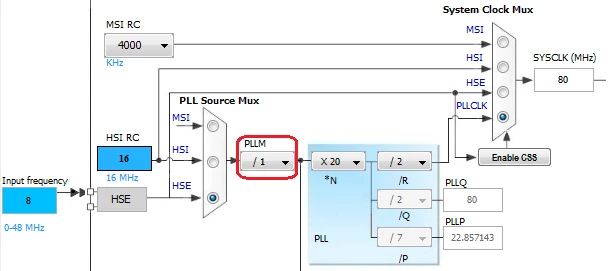
I am working on a project with stm32l432kb. It uses 8 MHz external clock in order to achieve 80 MHz system clock. I've configured clock with the Cube. The diagram shows system clock at 80 MHz, nevertheless the real clock seems to be about 16 MHz. Reading clock with  HAL_RCC_GetHCLKFreq() gives value of 15875000. I've verified that the defined HSE_VALUE is 8 MHz. Here is the Cube generated code for clock configuration:

void SystemClock_Config(void)

{

RCC_OscInitTypeDef RCC_OscInitStruct;

RCC_ClkInitTypeDef RCC_ClkInitStruct;

RCC_PeriphCLKInitTypeDef PeriphClkInit;

/**Initializes the CPU, AHB and APB busses clocks

*/

RCC_OscInitStruct.OscillatorType = RCC_OSCILLATORTYPE_HSE;

RCC_OscInitStruct.HSEState = RCC_HSE_BYPASS;

RCC_OscInitStruct.PLL.PLLState = RCC_PLL_ON;

RCC_OscInitStruct.PLL.PLLSource = RCC_PLLSOURCE_HSE;

RCC_OscInitStruct.PLL.PLLN = 40;

RCC_OscInitStruct.PLL.PLLP = RCC_PLLP_DIV7;

RCC_OscInitStruct.PLL.PLLQ = RCC_PLLQ_DIV2;

RCC_OscInitStruct.PLL.PLLR = RCC_PLLR_DIV4;

if (HAL_RCC_OscConfig(&RCC_OscInitStruct) != HAL_OK)

{

_Error_Handler(__FILE__, __LINE__);

}

/**Initializes the CPU, AHB and APB busses clocks

*/

RCC_ClkInitStruct.ClockType = RCC_CLOCKTYPE_HCLK|RCC_CLOCKTYPE_SYSCLK

|RCC_CLOCKTYPE_PCLK1|RCC_CLOCKTYPE_PCLK2;

RCC_ClkInitStruct.SYSCLKSource = RCC_SYSCLKSOURCE_PLLCLK;

RCC_ClkInitStruct.AHBCLKDivider = RCC_SYSCLK_DIV1;

RCC_ClkInitStruct.APB1CLKDivider = RCC_HCLK_DIV1;

RCC_ClkInitStruct.APB2CLKDivider = RCC_HCLK_DIV1;

if (HAL_RCC_ClockConfig(&RCC_ClkInitStruct, FLASH_LATENCY_4) != HAL_OK)

{

_Error_Handler(__FILE__, __LINE__);

}

PeriphClkInit.PeriphClockSelection = RCC_PERIPHCLK_USART1;

PeriphClkInit.Usart1ClockSelection = RCC_USART1CLKSOURCE_PCLK2;

if (HAL_RCCEx_PeriphCLKConfig(&PeriphClkInit) != HAL_OK)

{

_Error_Handler(__FILE__, __LINE__);

}

/**Configure the main internal regulator output voltage

*/

if (HAL_PWREx_ControlVoltageScaling(PWR_REGULATOR_VOLTAGE_SCALE1) != HAL_OK)

{

_Error_Handler(__FILE__, __LINE__);

}

/**Configure the Systick interrupt time

*/

HAL_SYSTICK_Config(HAL_RCC_GetHCLKFreq()/1000);

/**Configure the Systick

*/

HAL_SYSTICK_CLKSourceConfig(SYSTICK_CLKSOURCE_HCLK);

/* SysTick_IRQn interrupt configuration */

HAL_NVIC_SetPriority(SysTick_IRQn, 0, 0);

}

What can be wrong with configuration?

Thank you

    This topic has been closed for replies.
    Best answer by Szymon PANECKI
    Posted on April 07, 2018 at 10:02

    Hello,

    In one of non up to date SM32CubeMX revisions there was an issue with correct code generation for STM32L4 clock configuration. The issue was that PLLM parameter was set to different value than indicated by STM32CubeMX and as a result system clock frequency was not correct (lower than expected). For example STM32CubeMX was indicating PLLM  = 1, while the generated code was using something else.

    0690X0000060ASEQA2.png

    Here in your code I don't see PLLM parameter, so maybe this could be a root cause. Could you please try to add PLLM parameter between those two lines of code?:

    RCC_OscInitStruct.PLL.PLLSource = RCC_PLLSOURCE_HSE;

    RCC_OscInitStruct.PLL.PLLN = 40;

    I guess that in your case PLLM is equal to 1, so it would look like this:

    RCC_OscInitStruct.PLL.PLLSource = RCC_PLLSOURCE_HSE;

    RCC_OscInitStruct.PLL.PLLM = 1;

    RCC_OscInitStruct.PLL.PLLN = 40;

    Could you please try this solution and let us know if it helps?

    Anyway please make sure that you use the latest revisions of STM32CubeMX and STM32L4Cube package.

    Regards

    Szymon

    15 replies

    Tesla DeLorean
    Guru
    April 7, 2018
    Posted on April 07, 2018 at 04:04

    Is this an external source, or a crystal?

    Can you try selecting the various internal clocks and outputting via PA8 (MCO) pin?

    Tips, Buy me a coffee, or three.. PayPal Venmo (See Profile) Up vote any posts that you find helpful, it shows what's working..
    Palitsky.Gennady
    Associate III
    April 7, 2018
    Posted on April 07, 2018 at 05:39

    It's an external clock. I will try to do what you recommend. Unfortunately, PA8 is an input from external source, But I will try to come up with the solution.  

    Jan Waclawek
    Visitor II
    April 7, 2018
    Posted on April 07, 2018 at 09:43

    Read out and check/post the relevant RCC registers.

    Did you fill in all RCC_OscInitStruct fields?

    JW

    Palitsky.Gennady
    Associate III
    April 7, 2018
    Posted on April 07, 2018 at 16:09

    As it was also mentioned in another post (Szymon Panecki), the PLLM assignment was missing. Assigning it to 1 solved the problem. 

    Thanks a lot,

    Gennady

    Szymon PANECKI
    Szymon PANECKIBest answer
    Senior III
    April 7, 2018
    Posted on April 07, 2018 at 10:02

    Hello,

    In one of non up to date SM32CubeMX revisions there was an issue with correct code generation for STM32L4 clock configuration. The issue was that PLLM parameter was set to different value than indicated by STM32CubeMX and as a result system clock frequency was not correct (lower than expected). For example STM32CubeMX was indicating PLLM  = 1, while the generated code was using something else.

    0690X0000060ASEQA2.png

    Here in your code I don't see PLLM parameter, so maybe this could be a root cause. Could you please try to add PLLM parameter between those two lines of code?:

    RCC_OscInitStruct.PLL.PLLSource = RCC_PLLSOURCE_HSE;

    RCC_OscInitStruct.PLL.PLLN = 40;

    I guess that in your case PLLM is equal to 1, so it would look like this:

    RCC_OscInitStruct.PLL.PLLSource = RCC_PLLSOURCE_HSE;

    RCC_OscInitStruct.PLL.PLLM = 1;

    RCC_OscInitStruct.PLL.PLLN = 40;

    Could you please try this solution and let us know if it helps?

    Anyway please make sure that you use the latest revisions of STM32CubeMX and STM32L4Cube package.

    Regards

    Szymon

    Palitsky.Gennady
    Associate III
    April 7, 2018
    Posted on April 07, 2018 at 16:01

    Yes, PLLM assignment was missing, and I haven't paid attention.

    Inserting 

    RCC_OscInitStruct.PLL.PLLM = 1;

    solved the problem.

    My fault - I needed to verify the registers

    :(

    Thanks a lot to everyone for taking time to help me with this issue.

    Gennady 

    ST Technical Moderator
    April 23, 2018
    Posted on April 23, 2018 at 10:36

    Hello,

    The issue on CubeMx 4.25 about 

    PLLM assignment missing passed along to our CubeMx team for fix in the next release.

    Best Regards,

    Imen

    In order to give better visibility on the answered topics, please click on 'Best answer' on the reply which solved your issue or answered your question. Thanks
    Nawres GHARBI
    ST Technical Moderator
    April 23, 2018
    Posted on April 23, 2018 at 11:00

    Hi Palitsky, 

    This will be fixed next release, as a workaround you can use the RCC LL driver where the PLLM is well configured

    Have a nice day 

    taraben
    Associate III
    May 29, 2018
    Posted on May 29, 2018 at 13:36

    Hi all,

    could you recheck using CubeMx 4.25.1? The releaseNotes claimes that this is fixed now, but in my project it did not help.

    regards, Adib.