
Associate II
July 25, 2023
Question

Clicker2 Clock Config (Newbie Errors I'm Sure)

  • July 25, 2023
  • 13 replies
  • 9224 views

Greetings, 

I have purchased a Clicker2 from MikroElectronica mainly because it has the facility to host their Click Boards ecosystem while working with the STM32CubeIDE. I can't say that I am a fan of their abstracted SDKs and code that is too dissimilar to that of HAL and so on. The issue I am having is with the clock configurations.

The Clicker2 features a 25 Mhz Oscillator that I am certain is for the HSE and also features a 32.768 KHz oscillator that I am certain was meant for the LSE. Leaving all the specs as factory as possible (using the the internal oscillators) in CubeIDE I can get code to work as expected. However, I would like to set the MCU at 168 Mhz (not sure that makes any difference yet).

As an expeirment, I used the 168 Mhz settings in the native MikroElectronica IDEs (which seems to set HSI instead of HSE) and it all works. But they do a really good jobs of abstraction and therefore I can not ascertain how they set it all up.

Here's my attempted settings in the CubeIDE:

I2C2: I2C (Facilitates the MikroBus 2 position)

I2C3: I2C (Facilitates the MikroBus 1 position) (Conflicts with RCC MCO1 on PA8 when enabled)

RCC HSE: Crystal/Ceramic Resonator

RCC LSE: Crystal/Ceramic Resonator

RCC MCO1: Checked

RCC MCO2: Checked
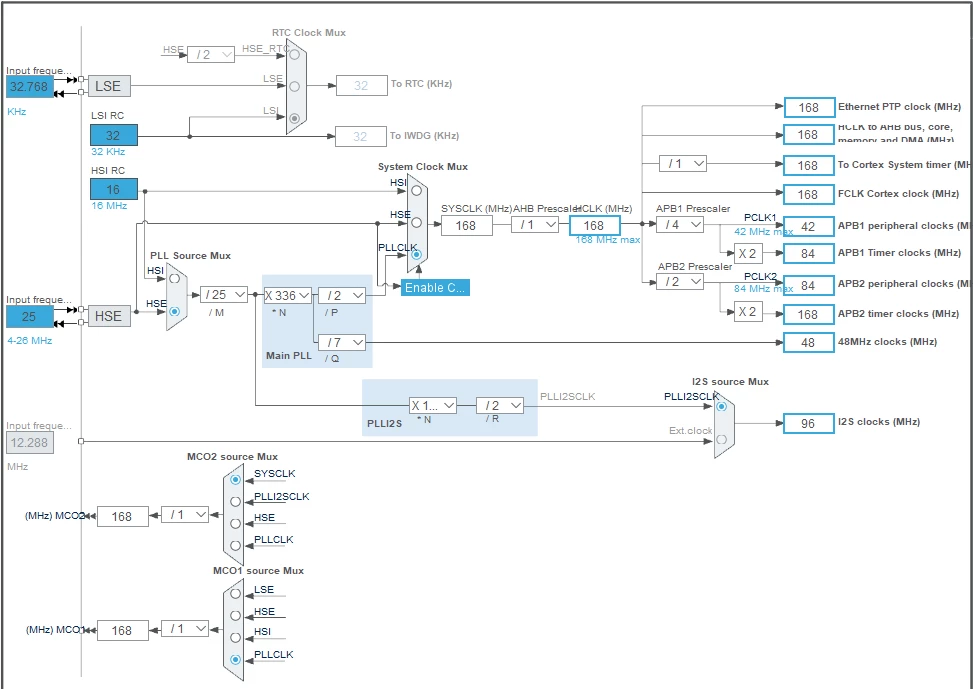
CoachTacamo_0-1690301098868.png

No matter what I do, I am missing something and I can't get it to run on 168 MHz as it does in the native MikroElectronica IDEs. I have tried bypassing HSE, Using HSI instead at /16 all to no avail. Would anyone be willing to guide me to a solution?


Cheers,



This topic has been closed for replies.

13 replies

AScha.3
Super User
July 25, 2023

hi,

how you test the core speed ? what its doing with your clocktree in pic , should run 168M ?

If you feel a post has answered your question, please click on " Best Answer ".
Graduate II
July 25, 2023

Hello

First of all, try without MCO1 / 2 enabled, since with quick look doens't make sense to drive clock these empty lines.

Have you debug it thru SWD etc or how you know its running or not ?

Br J.T


Associate II
July 25, 2023

I don't have a programmer yet. Currently loading Hex files and using a HID Bootloader to upload code. So I can't tell if its running. I tried without MCO1 MCO2 enabled and it has no effect.

@JTP1 

Associate II
July 25, 2023
Graduate II
July 25, 2023

Ok, but the led is not blinking in PE12 with 168MHz ? and lower freq -> led blinks ?

Can you share also your ioc file ?


Associate II
July 25, 2023

I would love to do so. But the system is saying the .ioc files are not allowed. Maybe my account is too new for that?

Graduate II
July 25, 2023

You can make rar- package, it is allowed file format. Or change file extension to .txt, i guess its also allowed.

Associate II
July 25, 2023
Graduate II
July 26, 2023

Hello

Try to comment out MX_SDIO_SD_Init(); or remove it from CubeMx. Does it affect to your problem ? It seem to end up to error handler if SD card not present.

Br J.T

Associate II
July 26, 2023

I have started a whole new project for sanity and did everything possible to ensure that SDIO is not enabled or mentioned anywhere in the code/IOC files. I set the device up once again using the 25MHz oscillator and the needed factors for a clock of 168MHz and still not working. Hmmm...

Graduate II
July 26, 2023

Hello

I guess there is nothing wrong in your ioc- file.

Could you give more information how know its not running, or is it running with HSE crystal if you decrease freq from 168 Mhz to lower.

How you load your program to MCU, are you using mikrobootloader with works with some custom USB-HID bootloader ?

Br J.T

Associate II
August 2, 2023

I wanted to drop an update in here for any that may stumble on this in the future. My STLINKv3 Set came in yesterday. The cable sets that ship with the device don't match the pin pitch on the Clicker2 board and therefore will need some small adapter PCB made. That's not terrible news. Just takes a little effort.

Interestingly enough, one of the cables that ship with the STLINKv3 kit DOES fit my Fusion for ARM v8 from MikroElectronica! I have been able to write code in the native STM32CubeIDE and upload to the very expensive development platform without using the company's very expensive (licensed) and proprietary IDE (MikroC for ARM).

This is good news for me as I care more about learning to develop for STM32 in the native HAL and LL. I have never been a fan of how abstracted the MikroE stuff is because it adds a layer of deciphering with Datasheets and their libraries. The flip side of this though, is that I have had to read their libraries for the various Click add-ons and see how they use them and further research various datasheets. This equates to a lot of work still but at least it's resulting in deeper learning.

I have only barely scratched the surface of all there is to learn.