


justinwoolich
Associate III
Nov 17, 2013 2:14 PM UTC
Question

Change Device Description for STM32 Virtual Com Port in Windows

Posted on November 17, 2013 at 15:14
Hi

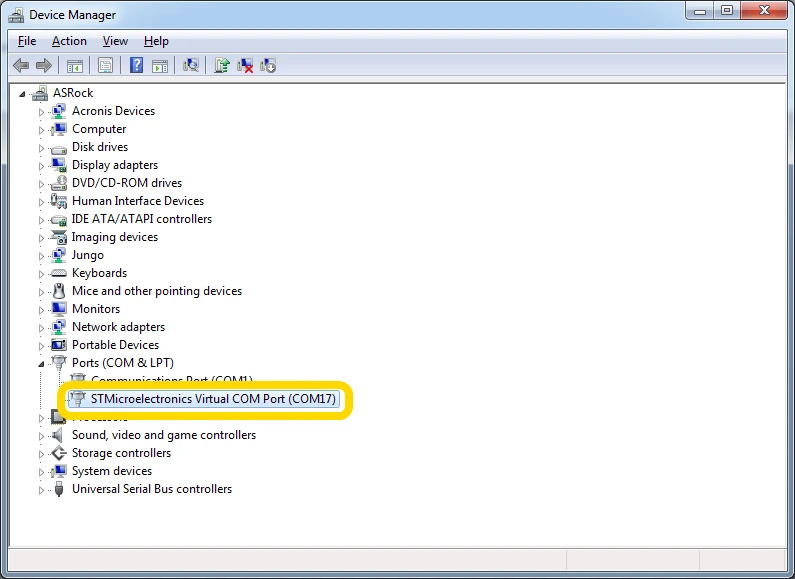
I am using an STM32 in a project as a Virtual Com Port, everything is working really well, however i would like the Virtual Com Port to appear with a custom Device Description in Windows device manager. Would anyone know how to do this, at the moment it appears as ''STMicroelectronics Virtual COM Port'' (see below)

I have tried editing the strings in usb_desc.c but this only seems to affect the device name that appears when the device is being installed.

0690X00000604oFQAQ.png
    This topic has been closed for replies.

    2 replies

    tsuneo
    Associate II
    Nov 17, 2013 4:19 PM UTC
    Posted on November 17, 2013 at 17:19

    1) On the registry

    The device name comes from this registry entry, HKEY_LOCAL_MACHINE\SYSTEM\CurrentControlSet\Enum\USB\Vid_0483&Pid_5740\<Serial_Number>\FriendlyName 2) On the INF file Above registry entry is made just when the device is plugged in to the PC. The string comes from the INF file.

    C:\Program Files\STMicroelectronics\Software\Virtual COM Port Driver\stmcdc.inf
    ;------------------------------------------------------------------------------
    ; String Definitions
    ;------------------------------------------------------------------------------
    [Strings]
    PRVDR = ''STMicroelectronics''
    MFGNAME = ''STMicroelectronics.''
    DESCRIPTION = ''STMicroelectronics Virtual COM Port'' ;;; <----

    a) After device installation, you may change the registry value using SetupDiSetDeviceRegistryProperty( SPDRP_FRIENDLYNAME ) by your PC application (in admin previlage). b) For new device installation, you may change the string on the INF file. Please note, modification of the INF file breaks MS certification (stmcdc.cat) It brings up warning on installation, or it disturbs installation on Windows 8. Tsuneo
    justinwoolich
    Associate III
    Nov 17, 2013 11:44 PM UTC
    Posted on November 18, 2013 at 00:44

    Good info thanks!