

Associate
July 22, 2026
Solved

Can STM32C552RE be used on a NUCLEO-C562RE board ?

  • July 22, 2026
  • 3 replies
  • 40 views

Hello,


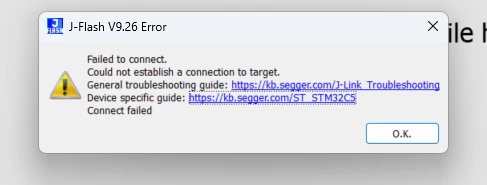
I have been using the NUCLEO-C562RE for my evaluation and due to a mistake I fried the MCU that came with the board, I replaced the MCU with an MCU from the same series. The dev board came with C562RE and I replaced it with C552RE, but after that I am not able to use JLink to connect to the MCU.

am I right in assuming that since the pinout of the two MCU’s are same, the MCU’s can be swapped and used ?
 

Best answer by Srikar

Thanks for the reply ​@Stassen.C & ​@Ozone, it works now. The NRST pins was not soldered properly, fixed that it works.

this proves that this can be done.

3 replies

Ozone
Principal
July 22, 2026

> am I right in assuming that since the pinout of the two MCU’s are same, the MCU’s can be swapped and used ?

Presumably yes, but check the datasheets to make sure.
Many MCUs in the same package share a very similiar or even identical pinout, even across MCU families. At least for smaller packages.

The error message “Failed to connect” sounds supsiciously like a hardware issue.
Perhaps some cold or shorted solderings, or other parts of the board were damaged when the MCU was “fried”.
I would recommend to check the current consumption, and the voltage on the MCU power supply pins (VDD, VDDA).
For the current consumption, I would recommend a comparison with a second, working board (if possible). 

For Nucleos and other stuff, an USB volt/amp meter like this would be ok.
Not a recommendation as such, but a device of that type is quite handy for quick checks.

Stassen.C
ST Employee
July 22, 2026

Hello Srikar,

The STM32C552RE and STM32C562RE in the same LQFP64 package are pin-compatible, so replacing the device is electrically possible. However, pin compatibility alone does not make the modified board an officially supported NUCLEO-C552RE configuration. Software projects, board definitions, clock configuration, option bytes, and debug tools must be configured for the STM32C552RE.

A blank STM32C552RE should nevertheless be accessible through SWD. If J-Link cannot connect, please check the following:

  1. Update the J-Link software and probe firmware to a version that supports STM32C552 devices.
  2. Select STM32C552RE explicitly as the target device. If it is not listed, update J-Link before proceeding.
  3. Try Connect under Reset at a low SWD frequency, for example 100 kHz.
  4. Check that J-Link detects the target voltage and verify:
    • VDD and VDDA supplies
    • All VSS connections
    • NRST level and continuity
    • SWDIO and SWCLK continuity
    • No solder bridges or lifted pins around the replaced MCU
  5. Make sure the onboard ST-LINK and the external J-Link are not driving the SWD interface simultaneously. Disconnect the relevant ST-LINK/SWD jumpers when using an external probe.
  6. If SWD communication is established but access is restricted, perform a full chip erase using STM32CubeProgrammer, provided the device is not permanently protected.

As the replacement device is new, no application firmware is required for the initial debug connection. Therefore, if neither J-Link nor STM32CubeProgrammer can read the device ID while the target voltage is present, the most likely causes are tool support, soldering, power/reset integrity, or SWD connectivity, rather than the difference between STM32C552RE and STM32C562RE.

You should also create the application for the STM32C552RE MCU, rather than using the NUCLEO-C562RE board selector unchanged, and review any peripheral or memory differences between the two devices.


Regards,
Stassen

To give better visibility on the answered topics, please click on Accept as Solution on the reply which solved your issue or answered your question.
SrikarAuthorBest answer
Associate
July 22, 2026

Thanks for the reply ​@Stassen.C & ​@Ozone, it works now. The NRST pins was not soldered properly, fixed that it works.

this proves that this can be done.