

yuan
Associate
October 19, 2014
Question

Button problem with custom card (STemWin)

  • October 19, 2014
  • 4 replies
  • 988 views
Posted on October 19, 2014 at 19:05

Hello ,

I have a problem with button function on my card. I can use emWin library to display text, but I cannot display button. In place of button, there is a black block. As shown in the picture.
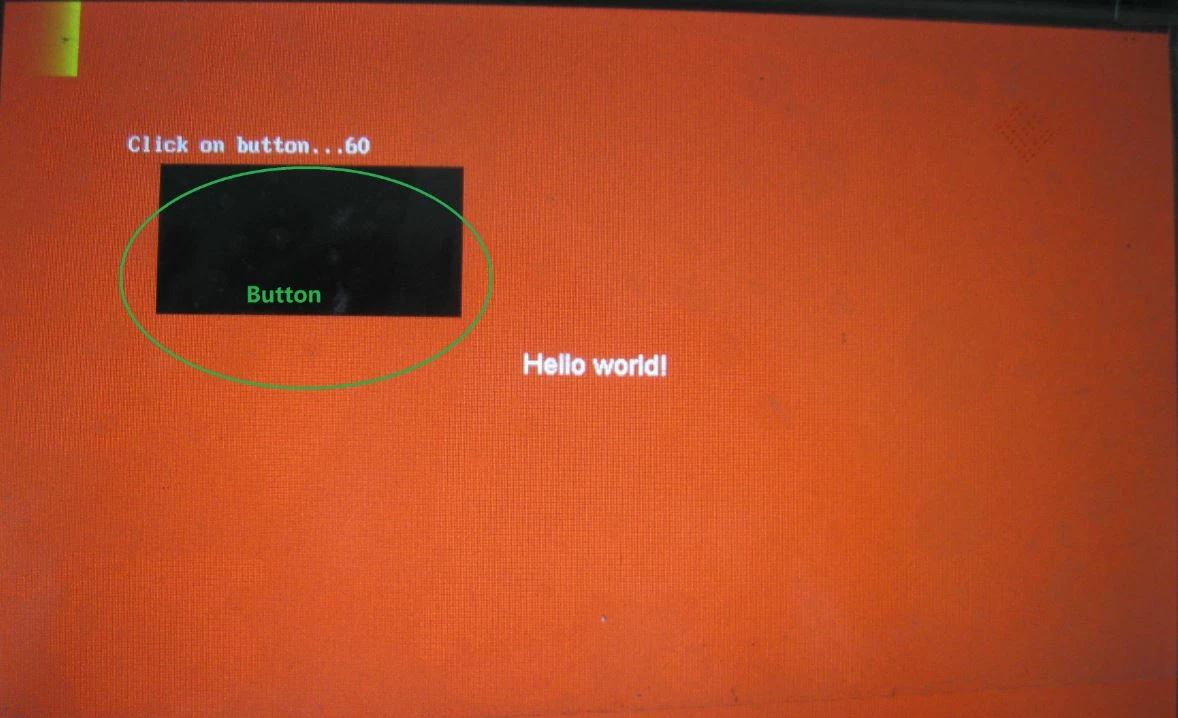
0690X00000602vEQAQ.jpg

Code:

                hButton = BUTTON_Create(110, 110, 200,100, GUI_ID_OK, WM_CF_SHOW);

Important: I have made my PCB using stm32f429ii as the LCD controller, a LCD 7�� screen with  800*480pixels and a 256Mbits SDRAM for memory.

With the same code and same LCD screen in the Discovery kit STM32F42x9I-Eval it works, but not with my card. In my card the button doesn�t appear. Meanwhile, I can display text, images. But I can�t display all the widgets.

The only difference between the Discovery kit and my electronic board is the memory SDRAM. But it seems to work well because I can write/read this SDRAM, and performed memory test.

What may be the reason? How can I do?

Thank you!

#emwin #sdram

    This topic has been closed for replies.

    4 replies

    Tesla DeLorean
    Guru
    October 19, 2014
    Posted on October 19, 2014 at 19:58

    Well the DISCOVERY and EVAL boards are different things, each uses a different SDRAM Bank

    So how the ''same'' is the code if you've accounted for the difference in the memory? Do things work better if you use the internal SRAM?
    Tips, Buy me a coffee, or three.. PayPal Venmo (See Profile) Up vote any posts that you find helpful, it shows what's working..
    yuan
    yuanAuthor
    Associate
    October 20, 2014
    Posted on October 20, 2014 at 09:35

    You are right. The code isn't the same for hard configuration, for example SDRAM and microcontroller.

    If I am configuring incorrectly SDRAM, nothing will appear. But I can't envisage other problem than SDRAM.

    What other reasons that the button cannot display normally?

    The internal SRAM is too small. The resolution of my screen is 800*480 pixels.

    It must have a big memory for storing data. 

    Montassar BEN ROMDHANE_O
    Visitor II
    October 20, 2014
    Posted on October 20, 2014 at 11:56

    Hi,

    The STM32F429I-Discovery board has a screen resolution 320*240 pixels, but you are working with 800*480 pixels screen. It seems logical to allocate more memory for you screen when using STemWin widgets. You can refer to the GUIConf.c file, where you can allocate more number of bytes available for the GUI, and asign more memory for the GUI.

    Regards,

    Heisenberg.

    yuan
    yuanAuthor
    Associate
    October 24, 2014
    Posted on October 24, 2014 at 16:05

    Hi,

    I have resolved the problem:  I misconfigured the RAM!


    Thanks.