

fronders
Associate III
March 24, 2023
Question

[BUG] Install of STM32CubeCLT has wiped my system PATH on Windows 10

  • March 24, 2023
  • 3 replies
  • 5009 views

This is absolutely ridiculous and unacceptable.

After I installed STM32CubeCLT v1.12.0 my system PATH variable has been wiped and now contains ONLY CubeCLT related paths, while all the rest are gone. This has made a bunch of installed software unusable and I don't have an old enough backup to restore the values from.
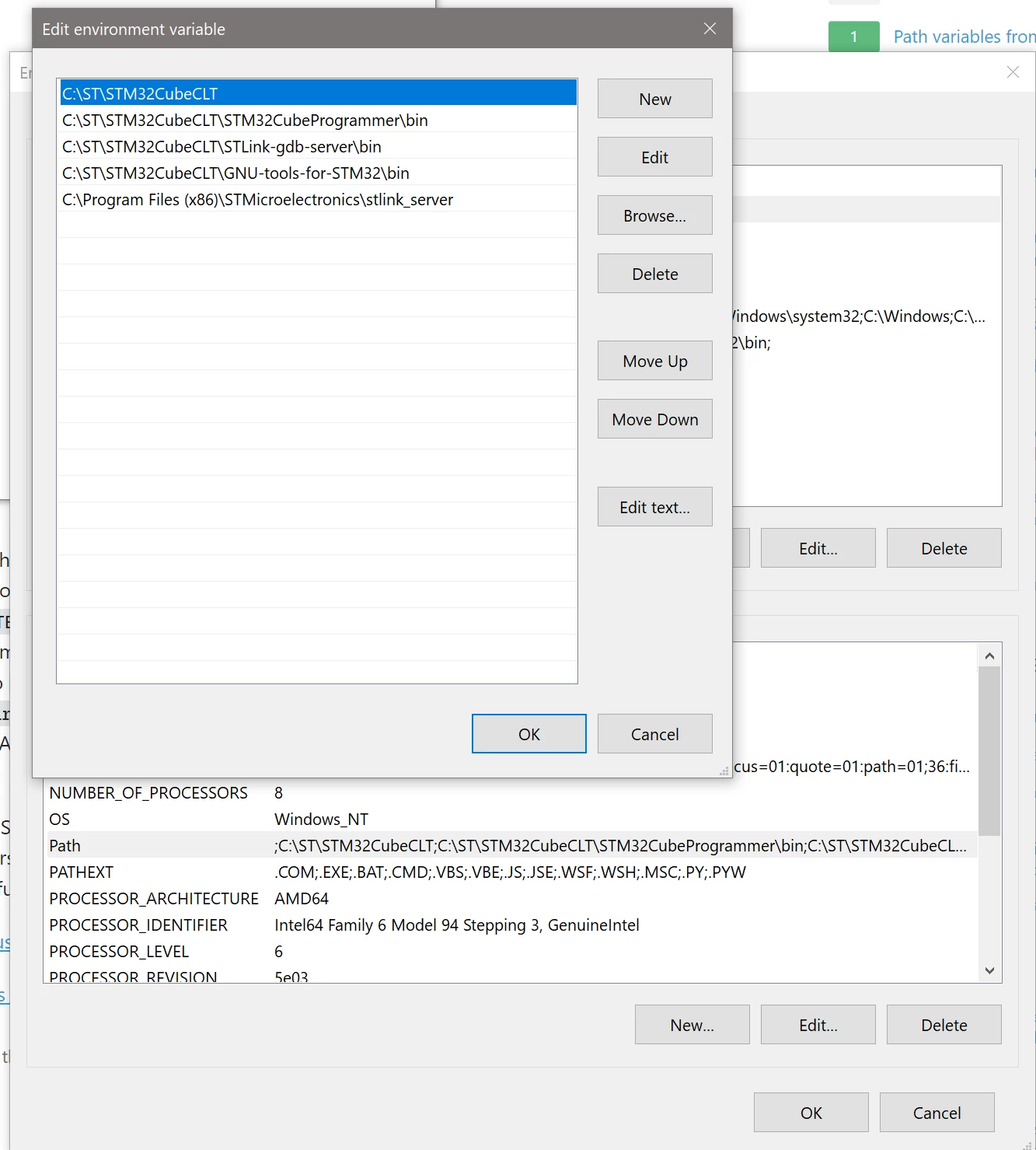

0693W00000aJfhcQAC.png

This topic has been closed for replies.

3 replies

Pavel A.
Super User
March 25, 2023

Fortunately Windows could get you covered. Use the System Restore. Find the most recent restore points before installing the CLT.

fronders
frondersAuthor
Associate III
March 25, 2023

Yeah, tried that already, unfortunately don't have any prior to install (noticed the corruption somewhat 2 weeks after the install). And MS dropped the RegBack as well couple of years ago. ShadowExplorer also didn't help. Ended up copying values from my laptop which has roughly same set of software installed, but we'll see in the future what I'm still missing

fronders
frondersAuthor
Associate III
July 7, 2023

Wow it has been 4 months, and ST hasn't fixed this issue with the latest STM32CubeCLT v1.12.1

I just tested the latest CLT install - same result - it wiped my system PATH (although this time it was anticipated so I backed it up).

fronders_0-1688728160173.png


Who at ST do I need to tag so it gets passed accordingly? @Nawres GHARBI @Ghofrane GSOURI could you please help? This is a very serious issue

Piranha
Principal III
July 12, 2023

It's ST - the software geniuses! They notice less than 10% of the reported issues and, when they do, it takes them a year or more to fix the issue. In addition 80% of the fixes either doesn't fix the issue or introduce other issues. Of course, fixing those requires another year...

Sara BEN HADJ YAHYA
Technical Moderator
July 13, 2023

Hello @fronders ,

Thanks for your feedback,

From my end, I have not been able to reproduce the issue. Could you please provide more details and a detailed scenario so that I can reproduce it and identify the root cause?

Sara.

In order to give better visibility on the answered topics, please click on 'Best answer' on the reply which solved your issue or answered your question.
fronders
frondersAuthor
Associate III
July 27, 2023

Sorry, missed the message.

I have a Windows 10 Pro 22H2 x64 machine running build 19045.3208 when I install CubeCLT it erases the PATH variable after a successful install, so after it only CLT entries are present. This happened to me twice so far (as you can see from the posts above) for v1.12.0 and 1.12.1 on the same computer. I'm installing under C:\ST\STM32CubeCLT

fronders_0-1690456258044.png

If needed I can provide access via remote desktop or capture some logs - you tell me :)