


Vietvinh Nguyen
Associate II
April 19, 2017
Solved

Bitmap on STM32F746G-DISCO discovery board

Posted on April 19, 2017 at 09:29
Hi all

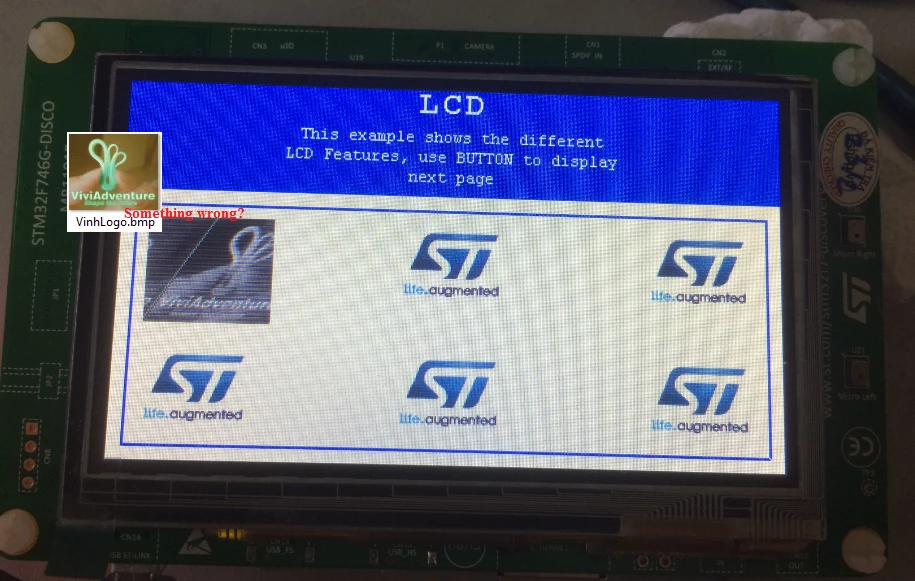
Recently, I created a Win32 application to convert a bitmap (.bmp) file into a header file (.h) in order to display it in mySTM32F746G-DISCO discovery board. Everything works fine but the bitmap (24 bit depth) displays differently (see attached photo) compared to the original bitmap.

0690X00000606oBQAQ.png

Does everyone experience the same? The displayed bitmap seems to be skewed and de-colored. I have done again with a 16-bit-depth bitmap but no further advance.

(I reused the BSP example in STM32CubeF7Packets for the test)

Note: this post was migrated and contained many threaded conversations, some content may be missing.
    This topic has been closed for replies.
    Vietvinh Nguyen
    Vietvinh NguyenBest answer
    Associate II
    April 21, 2017
    Posted on April 21, 2017 at 09:31

    Yeah! Finally I have resolved the problem:

    0690X00000606pnQAA.png

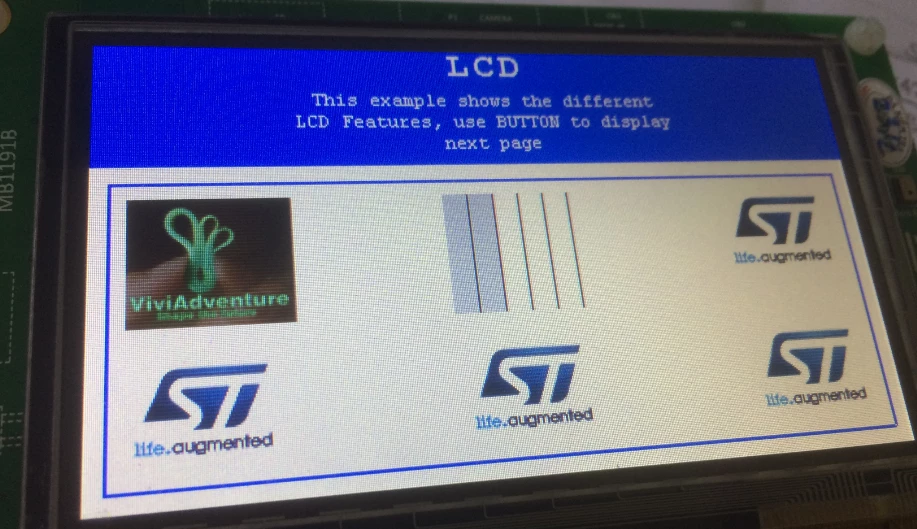
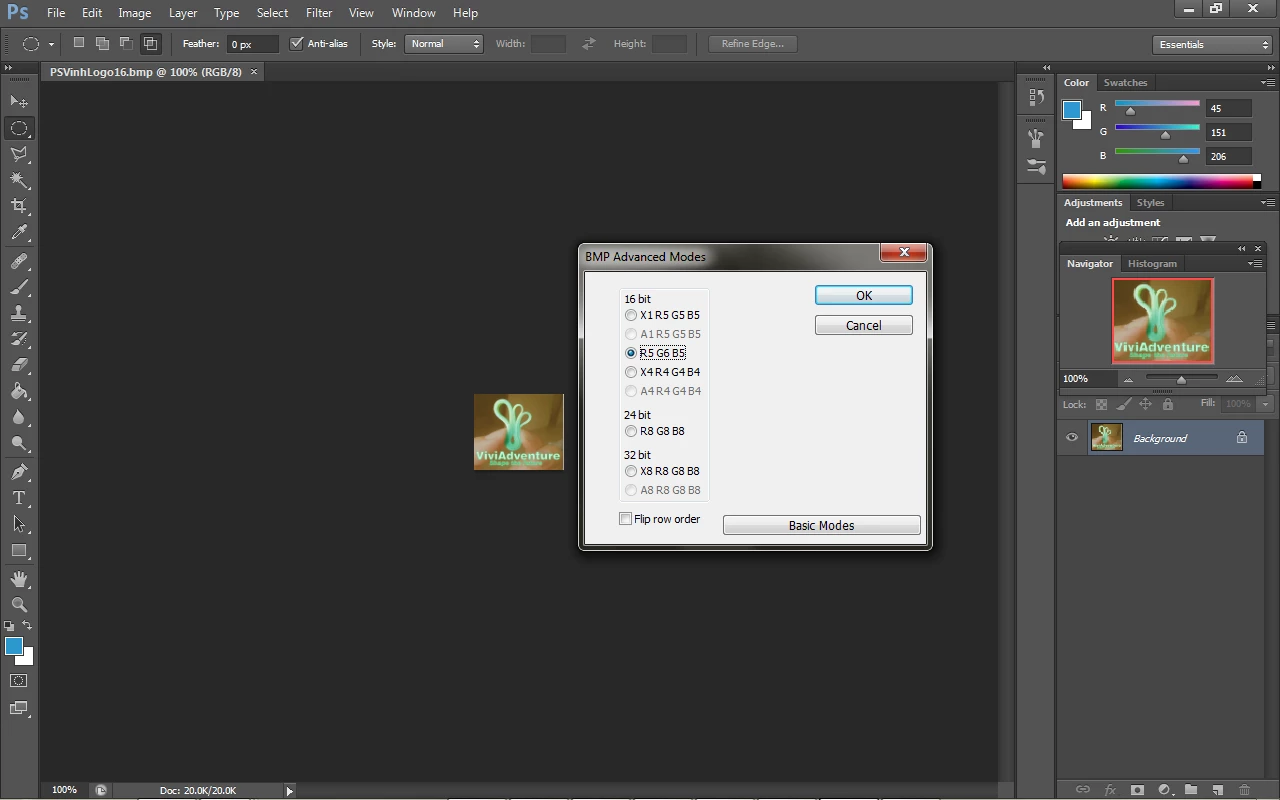
    The problem is that there are many formats for a .bmp file. The original bitmap is of 24 bit depth so the LCD driver handled it poor. I changed it to 16 bit, it displayed well (no skew anymore) but with just a few color. I used Photoshop to change it to RGB565 and it is OK.

    0690X00000606psQAA.png

    Thank you all for kindly help and suggestion.

    25 replies

    AvaTar
    Senior III
    April 19, 2017
    Posted on April 19, 2017 at 09:47

    I don't have a F746-Discover board, but you might want to check that the colour bits from your BMP/ source file end up in the right bits of the display buffer.

    Display drivers tend to support different colour depth modes, so some bit masking and shift will be involved.

    Recently, I created a Win32 application to convert a bitmap (.bmp) file into a header file (.h) ...

    GIMP (the Gnu Image Manipulation Program), available for Windows as well, supports export of images to

    *.h

    files.

    No need to re-invent the wheel ...

    Vietvinh Nguyen
    Associate II
    April 19, 2017
    Posted on April 19, 2017 at 09:58

    Thanks for your reply.

    I converted the entire .bmp file where the header contains all information about the index, width, height and bit-depth. I also found that the LCD driver has mechanism to check it. Something likes below:

    /**   * @brief  Draws a bitmap picture loaded in the internal Flash in ARGB888 format (32 bits per pixel).   * @param  Xpos: Bmp X position in the LCD   * @param  Ypos: Bmp Y position in the LCD   * @param  pbmp: Pointer to Bmp picture address in the internal Flash   * @retval None   */ void BSP_LCD_DrawBitmap(uint32_t Xpos, uint32_t Ypos, uint8_t *pbmp) {   uint32_t index = 0, width = 0, height = 0, bit_pixel = 0;   uint32_t address;   uint32_t input_color_mode = 0;      /* Get bitmap data address offset */   index = *(__IO uint16_t *) (pbmp + 10);   index |= (*(__IO uint16_t *) (pbmp + 12)) << 16;      /* Read bitmap width */   width = *(uint16_t *) (pbmp + 18);   width |= (*(uint16_t *) (pbmp + 20)) << 16;      /* Read bitmap height */   height = *(uint16_t *) (pbmp + 22);   height |= (*(uint16_t *) (pbmp + 24)) << 16;       /* Read bit/pixel */   bit_pixel = *(uint16_t *) (pbmp + 28);         /* Set the address */   //address = hLtdcHandler.LayerCfg[ActiveLayer].FBStartAdress + (((BSP_LCD_GetXSize()*Ypos) + Xpos)*(4));   address = hLtdcHandler.LayerCfg[ActiveLayer].FBStartAdress + (((BSP_LCD_GetXSize()*Ypos) + Xpos)*(4));      /* Get the layer pixel format */       if ((bit_pixel/8) == 4)   {     input_color_mode = CM_ARGB8888;   }   else if ((bit_pixel/8) == 2)   {     input_color_mode = CM_RGB565;      }   else    {     input_color_mode = CM_RGB888;   }      /* Bypass the bitmap header */   pbmp += (index + (width * (height - 1) * (bit_pixel/8)));        /* Convert picture to ARGB8888 pixel format */   for(index=0; index < height; index++)   {     /* Pixel format conversion */     LL_ConvertLineToARGB8888((uint32_t *)pbmp, (uint32_t *)address, width, input_color_mode);          /* Increment the source and destination buffers */     address+=  (BSP_LCD_GetXSize()*4);     pbmp -= width*(bit_pixel/8);   }  }

    AvaTar
    Senior III
    April 19, 2017
    Posted on April 19, 2017 at 10:40

    As said, I neither have a F746 disco, nor do I use Cube code. I draw from experiences with other boards/LCD drivers and SPL library code.

    I also found that the LCD driver has mechanism to check it. Something likes below: ...

    Is this function aware of the current colour mode of the LCD driver ?

    This mode is usually set during initalization in some config register.

    LCD driver ICs I dealt with also supported BW, 8-bit, 16-bit and 18-bit modes.

    The image seen on your initial post seems to have bits end up in the wrong colour.

    Io D
    Associate
    April 20, 2017
    Posted on April 20, 2017 at 11:27

    Could you please provide the Layer Settings of the LCD from CubeMX project?

    Probably, you have to re-configure the Pixel Format of the Foreground(Layer 0). I suggest to use RGB888 or ARGB888 format.

    In any case you may have to confirm that the pixels of the bitmap are 'aligned' in the peripheral's memory.

    For example, if you use 

    RGB888 format (3 bytes per pixel) and the address of the Layer Buffer begins at 0xC0000000, your first pixel should occupy the memory addresses 0xC0000000,0xC0000001,0xC0000002, [R-G-B] the second 0xC0000003, 0xC0000004, 0xC0000005... etc. 

    Vietvinh Nguyen
    Associate II
    April 20, 2017
    Posted on April 20, 2017 at 11:48

    Here is the layer setting:

    void BSP_LCD_LayerDefaultInit(uint16_t LayerIndex, uint32_t FB_Address)

    {

    LCD_LayerCfgTypeDef layer_cfg;

    /* Layer Init */

    layer_cfg.WindowX0 = 0;

    layer_cfg.WindowX1 = BSP_LCD_GetXSize();

    layer_cfg.WindowY0 = 0;

    layer_cfg.WindowY1 = BSP_LCD_GetYSize();

    layer_cfg.PixelFormat = LTDC_PIXEL_FORMAT_ARGB8888;

    layer_cfg.FBStartAdress = FB_Address;

    layer_cfg.Alpha = 255;

    layer_cfg.Alpha0 = 0;

    layer_cfg.Backcolor.Blue = 0;

    layer_cfg.Backcolor.Green = 0;

    layer_cfg.Backcolor.Red = 0;

    layer_cfg.BlendingFactor1 = LTDC_BLENDING_FACTOR1_PAxCA;

    layer_cfg.BlendingFactor2 = LTDC_BLENDING_FACTOR2_PAxCA;

    layer_cfg.ImageWidth = BSP_LCD_GetXSize();

    layer_cfg.ImageHeight = BSP_LCD_GetYSize();

    HAL_LTDC_ConfigLayer(&hLtdcHandler, &layer_cfg, LayerIndex);

    DrawProp[LayerIndex].BackColor = LCD_COLOR_WHITE;

    DrawProp[LayerIndex].pFont = &Font24;

    DrawProp[LayerIndex].TextColor = LCD_COLOR_BLACK;

    }

    You can find the whole example project in the Cube downloaded from st website.

    By the way, the bitmap used is 90x76 in size. It means that the bmp file must be of 90*76*4+54=27414 bytes. However its real size is 20726 bytes. The bitmap was edited in Paint.exe in Win7. I don't know why it loss a thousand of bytes. Could anyone explain it more detail?

    Io D
    Associate
    April 20, 2017
    Posted on April 20, 2017 at 11:58

    Please try to change  

    LTDC_PIXEL_FORMAT_ARGB8888 to 

    LTDC_PIXEL_FORMAT_RGB888

    S.Ma
    Principal
    April 21, 2017
    Posted on April 21, 2017 at 05:50

    Haven't played with stm32 gfx hw, however, could it be that for sram frame buffer size saving, the way to render picture is like windows 256 indexed color lookup table (256x8888) 256 colors, 32bit each? One pixel is 8 bit index which will generateb a 32 bit color formatted output?

    If this is the case, define the color palette for what wilk show onto the screen and use a pc color tool to use it to convert bitmaps in 8 bit format.

    Vietvinh Nguyen
    Vietvinh NguyenAuthorBest answer
    Associate II
    April 21, 2017
    Posted on April 21, 2017 at 09:31

    Yeah! Finally I have resolved the problem:

    0690X00000606pnQAA.png

    The problem is that there are many formats for a .bmp file. The original bitmap is of 24 bit depth so the LCD driver handled it poor. I changed it to 16 bit, it displayed well (no skew anymore) but with just a few color. I used Photoshop to change it to RGB565 and it is OK.

    0690X00000606psQAA.png

    Thank you all for kindly help and suggestion.

    PLa F.1
    Visitor II
    December 28, 2022

    Thank you so much for sharing this result. I had the exact same problem and could not find the solution anywhere.

    For anyone who may encounter the problem on the STM32L562E-DK (which mounts a st7789h2 240x240 TFT LCD):

    I solved by saving the BMP in the same format as showed in this post (R5 B6 G5) by using GIMP, loading it to a HEX converter (I've used HxD) and exporting it as a C file, which I've used as header in my project.

    sebastien Dumoulin
    Visitor II
    November 17, 2017
    Posted on November 17, 2017 at 10:27

    Hello, i made an open source software to convert any picture (jpg, bmp, png) to a header file (.h) in one clic.

    you can download it here :

    http://www.electro-info.ovh/bitmap2headerfile

    The software is in french but it is not difficult to use it.

    0690X0000060PFNQA2.png