


Giovanni Cambareri
Associate II
November 13, 2020
Solved

Adding button functionalities to costum keyboard TOUCHGFX

  • November 13, 2020
  • 5 replies
  • 2836 views

Hi, I've created a custom keyboard and so far all works good. I've just a problem: I want to use an OK button on the keyboard to copy the text edited to a text area in an other screen. I'm able to go to the other screen but when i do the second part of my goal, I've got errors. I think the problem is in the function getBuffer.

-This is the part in customkeyboard.cpp

void CustomKeyboard::okPressedHandler()

{

getBuffer(); // function to save the actual entered text

application().gotoScreen01ScreenNoTransition(); // if i use only this line the code work to change screeen

}

-Part in customkeyboard.hpp

virtual void getBuffer()

{

// implemented in screen02_00View.cpp

}

-Part in the screen where the keyboard is defined

extern Unicode::UnicodeChar keyboardBuffer[10];

void Screen02_00View::getBuffer() // added to manage the entered text from temperature keyboard

{

Unicode::UnicodeChar* buff = keyboard.getBuffer();

Unicode::strncpy(keyboardBuffer, buff, Unicode::strlen(buff) + 1);

} 

-Part in screen.hpp

virtual void getBuffer(); //added to manage the keyboard entered text

-Part in the screen where I want to go when i pressed ok button and where i want to save the text edited

Unicode::UnicodeChar keyboardBuffer[10]; // at the beginning of the code

void Screen01View::updateScreen() // I've defined updateScreen from touchGFX

{

if(Unicode::strlen(keyboardBuffer) > 0)

{

memset(&BakeText3Buffer, 0, BAKETEXT3_SIZE);

Unicode::strncpy(BakeText3Buffer, keyboardBuffer, BAKETEXT3_SIZE - 1);

BakeText3Buffer[BAKETEXT3_SIZE-1] = '\0'; // make sure last index is null

BakeText3.invalidate();

}

}

Part in the screen01.hpp

virtual void updateScreen();

Could you please help me?

Thank you

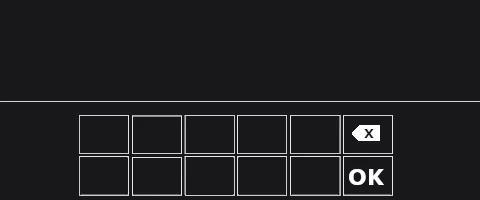
This is my keyboard:0693W000005BHAKQA4.png
    This topic has been closed for replies.
    Best answer by Alexandre RENOUX

    As the error mentions, CustomKeyboard::getBuffer() is undefined. It is because CustomKeyboard does not have the getBuffer() function. It's the Keyboard class that has it, not CustomKeyboard ;) CustomKeyboard does not inherit from the Keyboard class but only has a Keyboard object as an attribute.

    So you need to define a getBuffer() function in your CustomKeyboard class to be able to call it from your ScreenView.

    Something like :

    Unicode::UnicodeChar* CustomKeyboard::getBuffer()
    {
     return keyboard.getBuffer();
    }

    Don't forget to declare it in the .hpp file as well.

    The fact that both your CustomKeyboard and Keyboard variable have the same name is misleading. I suggest you to change your CustomKeyboard variable name to customKeyboard to avoid mixing them.

    When your question is answered, please close this topic by choosing Select as Best.

    /Alexandre

    5 replies

    MM..1
    Super User
    November 13, 2020

    I see more as one bad idea in your code.

    Unicode::UnicodeChar* buff = keyboard.getBuffer(); this try return pointer from void function and too empty function ???

    void CustomKeyboard::okPressedHandler()

    {

    getBuffer(); this call member empty not screen func

    Alexandre RENOUX
    Visitor II
    November 16, 2020

    Hello GCamb2,

    Could you provide the errors you got ? This would be helpful to assess the issue.

    In the future, I believe it is good practice to include the errors to your post in order for the community to be able to support you the best we can.

    /Alexandre

    Giovanni Cambareri
    Associate II
    November 16, 2020

    Yes sure, these are the first time I use the community so any advice can be useful.

    The error is the following:

    TouchGFX/build/STM32F746-DISCO/TouchGFX/gui/src/screen02_00_screen/Screen02_00View.o: In function `Screen02_00View::getBuffer()':

       /TouchGFX/gui/src/screen02_00_screen/Screen02_00View.cpp:28: undefined reference to `CustomKeyboard::getBuffer()'

        collect2.exe: error: ld returned 1 exit status

        make[2]: *** [TouchGFX/build/bin/target.elf] Error 1

        gcc/Makefile:289: recipe for target 'TouchGFX/build/bin/target.elf' failed

        gcc/Makefile:285: recipe for target 'generate_assets' failed

        make[1]: *** [generate_assets] Error 2

        ../gcc/Makefile:47: recipe for target 'all' failed

        make: *** [all] Error 2

        Failed

      Failed

    Thanks

    Alexandre RENOUX
    Alexandre RENOUXBest answer
    Visitor II
    November 17, 2020

    As the error mentions, CustomKeyboard::getBuffer() is undefined. It is because CustomKeyboard does not have the getBuffer() function. It's the Keyboard class that has it, not CustomKeyboard ;) CustomKeyboard does not inherit from the Keyboard class but only has a Keyboard object as an attribute.

    So you need to define a getBuffer() function in your CustomKeyboard class to be able to call it from your ScreenView.

    Something like :

    Unicode::UnicodeChar* CustomKeyboard::getBuffer()
    {
     return keyboard.getBuffer();
    }

    Don't forget to declare it in the .hpp file as well.

    The fact that both your CustomKeyboard and Keyboard variable have the same name is misleading. I suggest you to change your CustomKeyboard variable name to customKeyboard to avoid mixing them.

    When your question is answered, please close this topic by choosing Select as Best.

    /Alexandre

    MM..1
    Super User
    November 17, 2020

    Or maybe you can on invoke keyboard assign directly BakeText3Buffer to keyboard. Then only need in ok click use if empty and invalíidate text...

    Noone of getBuffer chaos.
