


Son, Dong-Seong
Associate III
July 4, 2023
Solved

About CAN communicaton with STM32F042

  • July 4, 2023
  • 1 reply
  • 4306 views

Hi!

I am testing CAN communication using STM32F042.

The settings for CAN communication on the same two boards are also set the same.

One board transmits data through CAN communication once per second, and the other board receives data.

If I check the CAN_RX pin (pin no. 21) of the receiving board's stm32F042 with an oscilloscope, I can see the received signal.

But However, the program does not receive it.

Below is the setting and the code for receiving.

    Here is parameter setting.
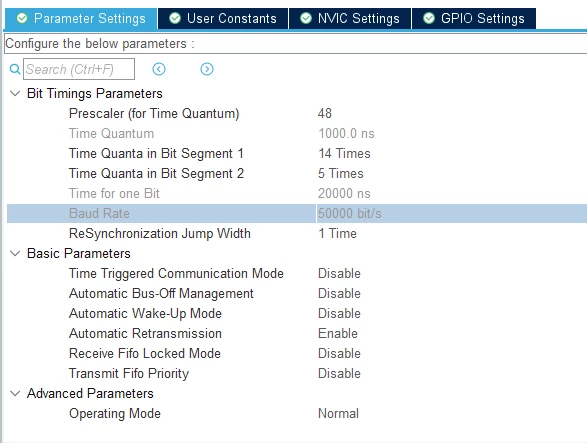
       SonDongSeong_0-1688470052406.png

    Here is NVIC setting.

    SonDongSeong_1-1688470106790.png


HAL_CAN_Start(&hcan);  // in main function.
 

        Here is callback function

void HAL_CAN_RxCpltCallback(CAN_HandleTypeDef *phcan)
{
if(HAL_CAN_GetRxMessage(phcan, CAN_RX_FIFO0, &canRxHeader, &canRx0Data[0]) != HAL_OK) {
}
else {
printf("RX : %c%c%c%c%c%c%c%c\r\n", canRx0Data[0], canRx0Data[1], canRx0Data[2], canRx0Data[3], canRx0Data[4], canRx0Data[5], canRx0Data[6], canRx0Data[7]);
}
}
If I look at the oscilloscope, the data is clearly received, but the callback function above is not called.
How should I set up to receive CAN data and which callback function should I use?
Please, help me.
Thank you.
 
This topic has been closed for replies.
Best answer by mƎALLEm

Hello,

You have to configure correctly the filters otherwise you can't receive any message.

You can inspire from any CAN example provided in CubeF0 firmware. Example: Projects\STM32072B_EVAL\Examples\CAN\CAN_Networking\

1 reply

mƎALLEm
mƎALLEmBest answer
Technical Moderator
July 5, 2023

Hello,

You have to configure correctly the filters otherwise you can't receive any message.

You can inspire from any CAN example provided in CubeF0 firmware. Example: Projects\STM32072B_EVAL\Examples\CAN\CAN_Networking\

To give better visibility on the answered topics, please click "Best answer" on the reply which solved your issue or answered your question.
Son, Dong-Seong
Associate III
July 7, 2023

Hi.

Thank you. I resolve it.

mƎALLEm
Technical Moderator
July 7, 2023

Hello,

Thank you for the confirmation. Please close this thread.

To give better visibility on the answered topics, please click "Best answer" on the reply which solved your issue or answered your question.
