

PPati.1
Associate
January 17, 2020
Solved

Where can I download MC SDK V4.3?

  • January 17, 2020
  • 2 replies
  • 2094 views

I am having the P-Nucleo IHM001. I am trying to generate code using ST Motor Control Workbench, but after building and dumping the code in the controller, the motor is not spinning and two faults are showing up:

  1. FOC fault
  2. Software error

I want to try older SDK (MC SDK V 4.3). Please help.
This topic has been closed for replies.
Best answer by AntoineC

Hello PPati,

This error :

"The Monitor gives the following faults:

1) FOC duration.

2) Software error."

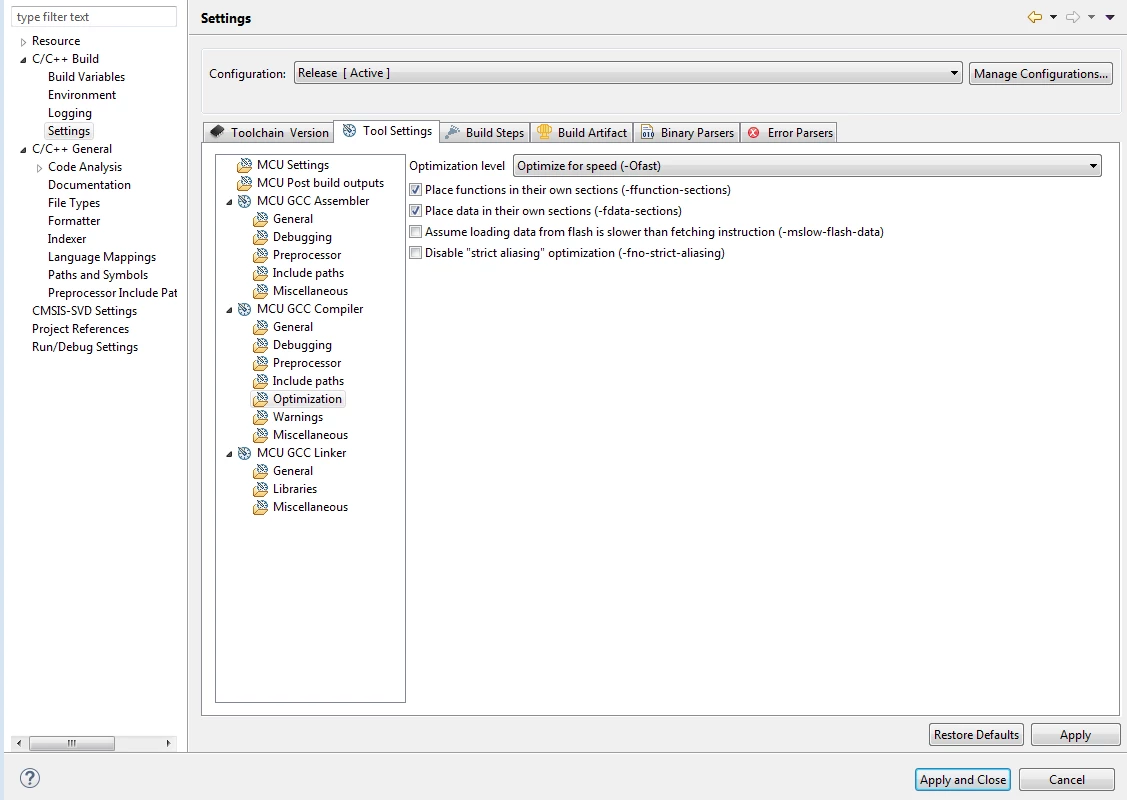
It seems to be an Optimization issue.

Please be sure to compile your program in release mode and run your project in this mode.

In Release Mode you are in "Optimize for speed".

To have a look on this setting :

1) Right Click on your on project in STM32 Cube IDE Project Explorer

2) Properties

0690X00000DA31TQAT.png

Let me know if it was your problem.

Thanks,

Antoine

2 replies

Claire O.
ST Employee
January 17, 2020

dear PPAti.1,

I am sorry this version is not available anymore .

Could you please anyway explain with more details your problem? (which MCSDK version you use, motor used, use case and descriprion of your problem)

We will try to solve it.

Thanks a lot by advance,

Claire

PPati.1
PPati.1Author
Associate
January 18, 2020
Thank you for your attention,
I am new to BLDC motor and trying to learn P-Nucleo IHM001 motor control Kit for FOC applications. The kit consists of :
1) Controller Board: Nucleo-F302R8
2) Driver Board: X-Nucleo IHM07M1
3) Motor: Bull Running BR2801-1700Kv-1
The Software I am using are:
1) ST Motor Profiler 5.4.3
2) Motor Control Workbench 5.4.3
3) CubeIDE 1.0.2
I followed steps:
1) Profile the motor using Motor Profiler 5.4.3
2) Select the boards, motor profile and Generate the code by using the Motor Control Workbench
3) Code is compiled and loaded in the target(Nucleo F302R8) by using STM32 CubeIDE
4) Monitor the motor using Motor Control Workbench
After opening Monitor in MC Workbench and connecting and clicking on Start Motor, the motor does not spin.
The Monitor gives the following faults:
1) FOC duration.
2) Software error.
I tried reducing PWM frequency then I got following fault:
1. Over current fault
(Screenshot Attached for both the cases)
But the Motor Seems to run fine when binary file in software in link given below.(X-CUBE-SPN7 Three-phase brushless DC motor driver software expansion for STM32Cube) is dumped directly
I need to run the motor using timers in the controller or with motion sensors using the IDE
Link to Software: https://my.st.com/content/my_st_com/en/products/embedded-software/mcu-mpu-embedded-software/stm32-embedded-software/stm32cube-expansion-packages/x-cube-spn7.html#tools-software
PS: I followed ST video tutorial on: https://www.youtube.com/watch?v=MF7-tHG_qiQ&list=PLnMKNibPkDnHbh24gShTBR32xGifYDBLI&index=3
Claire O.
ST Employee
January 23, 2020

Thanks, PPati.1,

we will have a look to your problem

AntoineC
AntoineCBest answer
ST Employee
February 13, 2020

Hello PPati,

This error :

"The Monitor gives the following faults:

1) FOC duration.

2) Software error."

It seems to be an Optimization issue.

Please be sure to compile your program in release mode and run your project in this mode.

In Release Mode you are in "Optimize for speed".

To have a look on this setting :

1) Right Click on your on project in STM32 Cube IDE Project Explorer

2) Properties

0690X00000DA31TQAT.png

Let me know if it was your problem.

Thanks,

Antoine
