Associate II
Solved

Motor Control using P-NUCLEO-IHM03

Ні,

I possess the following items:

1. Development Board : P-NUCLEO-IHM03

2. Controller Board : NUCLEO-G431RB

3. Inverter Board : X-NUCLEO-IHM16M1

4. DC power supply 12 V dc


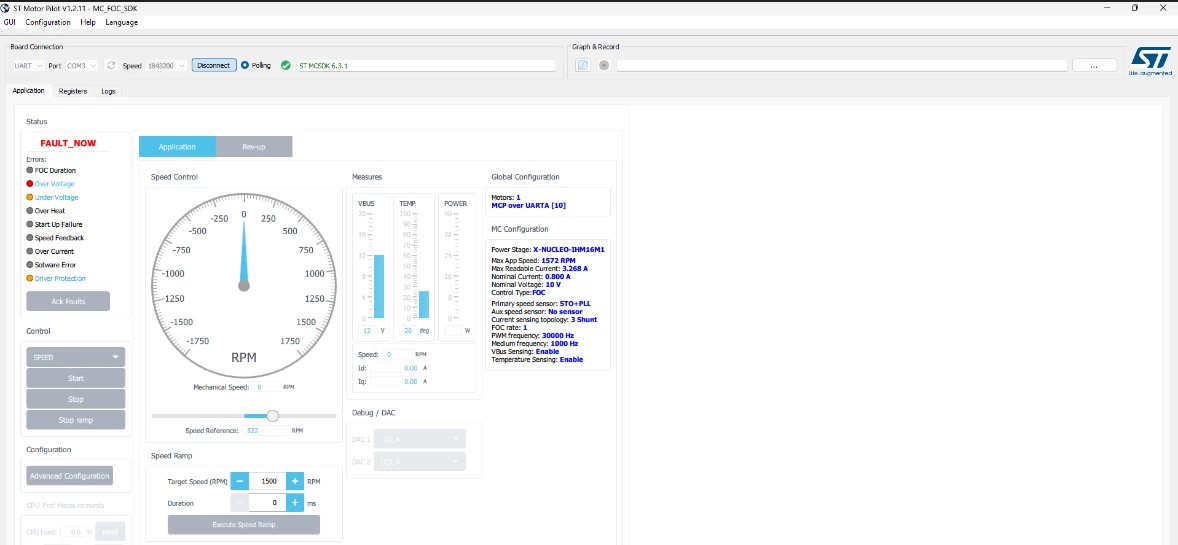
I downloaded the STM32 MCSDK 6.3.1 SDK as part of the environment setup, which is included with STM32CubelDE Version 1.16.1 and Motor Pilot_6.3.1 for monitoring purposes. Following the documentation's suggestion, I successfully generated the code for the specified hardware combination. After successfully building the generated code, I was able to flash it onto the controller. Upon powering up the development board, the motor pilot tool displayed the following status.
Prasanth91_0-1728631397024.png


The status is triggered with FAULT_NOW with highlighting the following: Over Voltage, Under Voltage and Driver Protection.

Thanks and regards,

Prasanth

    This topic has been closed for replies.
    GMA
    GMABest answer
    ST Technical Moderator

    Hello @Prasanth91,

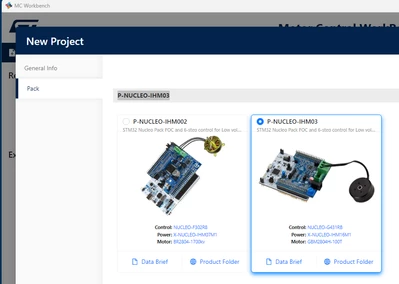
    Using P-NUCLEO-IHM03 from WB 6.3.1

    GMA_0-1729008631977.png

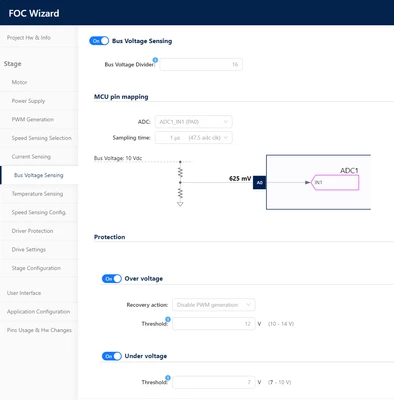
    I have generated the code, and in Bus Voltage Sensing tab, you can increase the Over Voltage value to 14V (by default set 12V). 

    GMA_1-1729008842987.png


    If you agree with the answer, please accept it by clicking on 'Best answer'.Best regards.GMA

    2 replies

    GMA
    GMABest answer
    ST Technical Moderator

    Hello @Prasanth91,

    Using P-NUCLEO-IHM03 from WB 6.3.1

    GMA_0-1729008631977.png

    I have generated the code, and in Bus Voltage Sensing tab, you can increase the Over Voltage value to 14V (by default set 12V). 

    GMA_1-1729008842987.png


    If you agree with the answer, please accept it by clicking on 'Best answer'.Best regards.GMA
    Associate II

    The proposed solution effectively resolved my issue. Thanks for the support.