

Visitor
July 16, 2026
Solved

Using 2 SAI as master / slave to reduce latency on Nucleo F756ZG

  • July 16, 2026
  • 7 replies
  • 100 views

Hello everyone,

I am currently working on a project on Nucleo F756ZG where I need to :

  • Use SAI1A and SAI2B to send audio data at the same time using TDM with 8 slots each
  • SAI parameters are 128 bits data frames (so 16 bits per slot)
  • Audio frequency 96k
  • Master mode
  • Use of HAL_SAI_Transmit_DMA to send the data

I managed to configure the SAIs, send and monitor the output data and it is working well but I noticed (an obvious I guess) latency between the payloads of the signals, between the 2 calls of the HAL_SAI_Transmit_DMA function, as you can see on the screenshot (12 us approximately).


I would like to reduce this latency under 1 microsecond if possible. During my experimentations I noticed it was possible to set one SAI as master and the other one as its slave and only call HAL_SAI_Transmit_DMA once, but haven’t managed to make it work for now. Is it really possible ? I am looking for a code example to be sure to setup the SAIs properly.


I can share more details of my code if necessary.


Thanks!
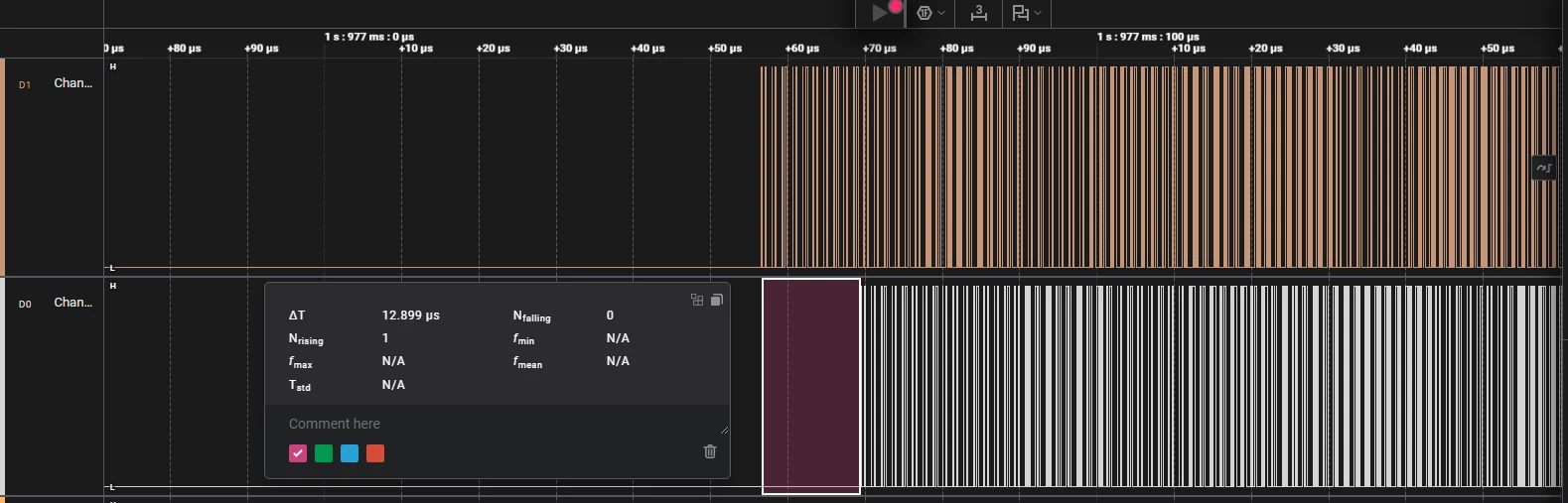
SD pin monitored for SAI1A and SAI2B

Best answer by AScha.3

Hi,

the “trick” is quite simple :

  • set in Cube the master SAI , to be master transmit - ok.
  • set all other to slave transmit, sync to this master -ok.
  • set to each an DMA channel in circular mode, for continuous data stream, callbacks enabled; generate...
  • then in main set all DMA channels (circular !) : HAL_DMA_Init(&hdma_sai1...);
  • then start all the slave SAI -only slaves !  :  HAL_SAI_Transmit_DMA(&hsai_Block...);
  • then start the master SAI !  :  HAL_SAI_Transmit_DMA(&hsai_BlockA1….);
  • Now all SAI sending sync to master from the first bit … :)

7 replies

AScha.3
Super User
July 16, 2026

Hi,

i use also the SAI to drive my dacs, 6 ch (only, compared to your 16 ch), but basically same, sending on 3 SAI to 3 DACs. (for active crossover, so no delays to have here.)

No problem here, so you doing it not the correct way, if getting some delay/gap.

just - what you wanna do ? get continuous output on all dacs or ...what ?

"If you feel a post has answered your question, please click ""Accept as Solution""."
pti_juAuthor
Visitor
July 16, 2026

Hi,

Thanks for your answer. 

After some testing I managed to send data with SAI1A as master and SAI1B as slave so the slave is synchronized with the master. The slave waits for the master signal to send the data so the delay disappears.


However, I would like to do the same with 2 different SAI (SAI1A and SAI2B), not 2 from the same block. I used the exact same config and set the sync input to synchronous with sai1 but I do not see any data when monitoring SD pin.

I am trying to send the output on all dacs at the exact same time, timing is really important because of phase-shift on the data.

Are your SAIs configured as Masters ? And if so, how can you have no delay between the different HAL_SAI_Transmit_DMA calls if the SAIs are not synchronized together ?

You can see attached the SAI1A and SAI2B configs.


AScha.3
AScha.3Best answer
Super User
July 16, 2026

Hi,

the “trick” is quite simple :

  • set in Cube the master SAI , to be master transmit - ok.
  • set all other to slave transmit, sync to this master -ok.
  • set to each an DMA channel in circular mode, for continuous data stream, callbacks enabled; generate...
  • then in main set all DMA channels (circular !) : HAL_DMA_Init(&hdma_sai1...);
  • then start all the slave SAI -only slaves !  :  HAL_SAI_Transmit_DMA(&hsai_Block...);
  • then start the master SAI !  :  HAL_SAI_Transmit_DMA(&hsai_BlockA1….);
  • Now all SAI sending sync to master from the first bit … :)
"If you feel a post has answered your question, please click ""Accept as Solution""."
pti_juAuthor
Visitor
July 16, 2026

Hi, 

Thanks for the precisions.


That’s what I did and it is working well if I use SAI1A and SAI1B but if I use SAI1A and SAI2B it doesn’t work…

I use the exact same config for SAI1B and SAI2B in my tests so I do not understand what I am doing wrong. Maybe a clock issue because the SAIs are not from the same block ?

My pin config is correct because I can see the data output on SAI2B if I set it as master.


To sum up, following your guide:

  • SAI1A Master + SAI1B Slave = OK
  • SAI1A Master + SAI2B Slave = Not OK (no data output)
  • SAI1A Master + SAI2B Master = OK but with 15 microseconds delay between both data


AScha.3
Super User
July 16, 2026

No, only one is master !!!

All other slave , sync to this one.

And you have to use the clk+frame from master for all slave dacs, as slave they send just data !

And select the correct sync source , the from the one as master you set.

And maybe try using the fifo:  (i have I2S format, for audio dacs, but not much different)


"If you feel a post has answered your question, please click ""Accept as Solution""."
pti_juAuthor
Visitor
July 16, 2026

In your example I see the synchronization is with other block of the same SAI. This one is working fine indeed, the issue is when the sync is with another SAI not from the same block. (SAI1A with SAI2B)

AScha.3
Super User
July 16, 2026

right, here the “other”: SAI 2


"If you feel a post has answered your question, please click ""Accept as Solution""."
AScha.3
Super User
July 16, 2026

But here i see : data size 8 bit, master is 16b. Is this what you want ? Because how it fits to the 16b frame from master ?

(I have I2S format, there is no problem having 32b and 16b frames, as i use for my dacs.)

And i use IDE v 1.18.1 , or 1.19 . and you ?

"If you feel a post has answered your question, please click ""Accept as Solution""."
pti_juAuthor
Visitor
July 17, 2026

No that is not what I want, I would like both master and slave to be Data Size = 16 bits, but here I somehow cannot change the frame length of the slave if it is set as synchronous. 

So I cannot change the data size either because it cannot be bigger than the Frame Size.

I am using CubeIDE version 2.1.1

pti_juAuthor
Visitor
July 17, 2026

Ok I forced the Frame length and data size values to what I wanted despite CubeMx not letting me to, and found the answer to my problem. 

I forgot to tick the external synchro output on SAI1A and now it’s working for SAI1A master and SAI2B slave.

Thanks for your time and explainations :)