

Associate
July 6, 2026
Solved

USBX HS Not Working on stm32u595RJT6Q

  • July 6, 2026
  • 3 replies
  • 64 views
  • custom board, The USB D+ and D− lines are connected directly from the MCU to the USB Type-B connector, with no intermediate components.
  • There is no pull-up resistor on the D+ line, as I understand that the MCU provides the pull-up internally
  • As far as I know, the stm32u595 supports USB High-Speed using its internal PHY.

CubeMX Version: 6.18.0

Reference project:
https://github.com/STMicroelectronics/STM32CubeU5/tree/main/Projects/STM32U5G9J-DK2/Applications/USBX/Ux_Device_CDC_ACM

I configured my .ioc file to match the reference project as closely as possible. UART is not used.

Issue:

I implemented a simple CDC ACM echo function to verify USB communication.

  • In Full-Speed (FS) mode, the echo function works correctly. The PC recognizes the device, and both transmit and receive operate normally.
  • In High-Speed (HS) mode, however, the PC does not recognize the USB device at all (it reports an unknown or unrecognized USB device), so communication cannot be established.

What could I be missing, or what configuration should I check?
Best answer by EdwardSon


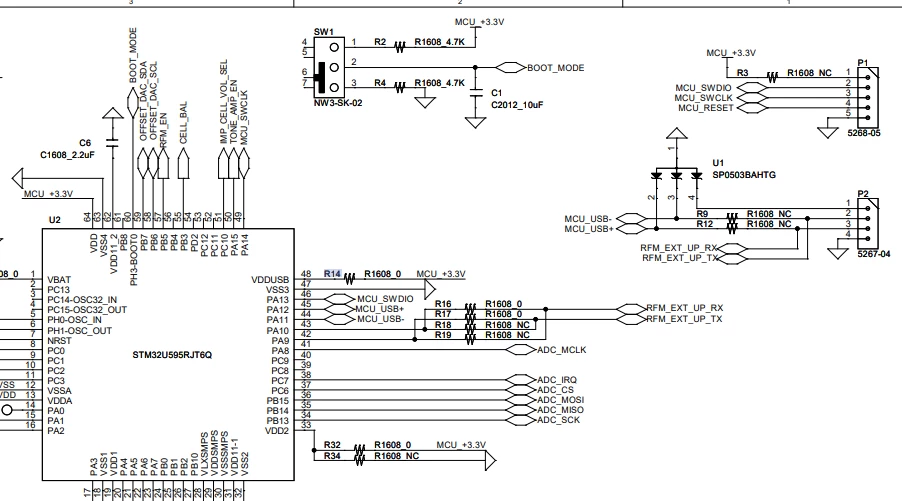
While preparing the schematic to attach, I noticed an issue with the circuit. The USB signals were connected to pins 2 and 3 of connector P2, but the connected diode had not been removed.

Once I removed the diode, the PC recognized the USB properly, and the communication was carried out smoothly. It was my mistake, and I truly appreciate your support and attention to this matter


3 replies

ST Technical Moderator
July 6, 2026

Hello ​@EdwardSon 
can you share your .ioc file or some schematics
BR
Gyessine

In order to give better visibility on the answered topics, please click on 'Best answer' on the reply which solved your issue or answered your question.
EdwardSonAuthorBest answer
Associate
July 7, 2026


While preparing the schematic to attach, I noticed an issue with the circuit. The USB signals were connected to pins 2 and 3 of connector P2, but the connected diode had not been removed.

Once I removed the diode, the PC recognized the USB properly, and the communication was carried out smoothly. It was my mistake, and I truly appreciate your support and attention to this matter


ST Technical Moderator
July 9, 2026

Hello ​@EdwardSon 
thanks for providing feedback and how you managed to resolve the issue
BR
Gyessine

In order to give better visibility on the answered topics, please click on 'Best answer' on the reply which solved your issue or answered your question.