Associate
December 20, 2024
Solved

STM32H743 with AZRTOS NetX doesn't work

  • December 20, 2024
  • 4 replies
  • 2088 views

Hi,

I am trying to set up a basic project on a Nucleo H743ZI2 using AZRTOS ans NetX, but I can't get it to work. I am relying on this guide: 

https://community.st.com/t5/stm32-mcus/creating-a-dual-ipv6-amp-ipv4-netxduo-udp-application-for/ta-p/570521

The only change I made was turning off IPv6 and deleting the code that manages it. However, I can't even ping the board. I also tried with the program linked in the guide, but it didn't work either. I don't think it is a problem with a board, because I tried the same thing with FreeRTOS + LWiP and it worked just fine. I am new to AzureRTOS and NetX, so I don't really know what to look for.

I'd appreciate any help.

This topic has been closed for replies.
Best answer by matt-crc

Hello,

Ok, I finally figured it out and got it to work.  The settings in the ETH configurations were wrong and I updated them as follows:

Under ETH configuration, the memory locations have to be updated to:


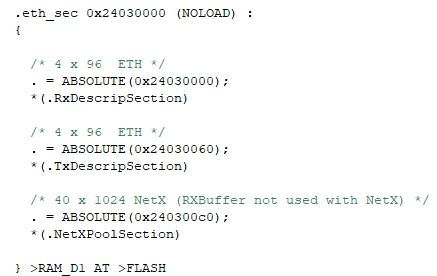
Note:  When using NETX, the "Rx Buffers Address" parameter is not used anywhere in the project, and can be ignored.  This was replaced with NetX  (.NetXPoolSection)

Finally, in the dot.FlashID file, these lines need to be added:

mattcrc_1-1739202733354.png

Everything started to work after making these changes 


4 replies

ST Technical Moderator
December 20, 2024

Hello @Kubagrs 

Please refer to this example which is generated using the same steps described in the article. 

Saket_Om_0-1734705705241.png


In order to give better visibility on the answered topics, please click on 'Best answer' on the reply which solved your issue or answered your question. Saket_Om
matt-crc
Senior III
February 9, 2025

Hi Omar,

I'm having the same issue... I downloaded your demo from https://github.com/stm32-hotspot/NUCLEO_H743_NetXDuo_UDP_IPv4_IPv6, and the demo doesn't seem to work.  I tried it on 2 nucleo boards, with no success.  One thing I noticed in the project is the ethernet memory map.  When I click on the Connectivity->ETH, It generates a warning:

mattcrc_0-1739071644327.png


Are you sure the memory is setup properly in the demo?  Also, its not clear how a user can see the memory map after compiling in the STM32CubeIDE.  Where is the map that shows where the Rx_Descriptors/Tx_Descriptors are allocated.

Finally, under the AzureRTOS Application tab, the demo originally had a NetXDuo memory pool size of 12288.   This value make the netxduo_init routing fail... when i increase it to 30*1024, at least it gets past the initialization routine.  Where can I find documentation as to what the proper sizes should be and where are these pool allocated.

Has anyone from STM actually tested the code?

thanks

Matthew

matt-crc
matt-crcBest answer
Senior III
February 10, 2025

Hello,

Ok, I finally figured it out and got it to work.  The settings in the ETH configurations were wrong and I updated them as follows:

Under ETH configuration, the memory locations have to be updated to:


Note:  When using NETX, the "Rx Buffers Address" parameter is not used anywhere in the project, and can be ignored.  This was replaced with NetX  (.NetXPoolSection)

Finally, in the dot.FlashID file, these lines need to be added:

mattcrc_1-1739202733354.png

Everything started to work after making these changes 


matt-crc
Senior III
February 16, 2025

Ok, I went through the NetxDuo code, and finally figured out what they were doing.  Everything associated with the NetxDuo, runs out of the .NetXPoolSection which includes the thread stack.  Anyway, now that I have a better understanding of the NetXPools, i was able to get it to work reliably.

Thanks for the responses and help.

Matthew