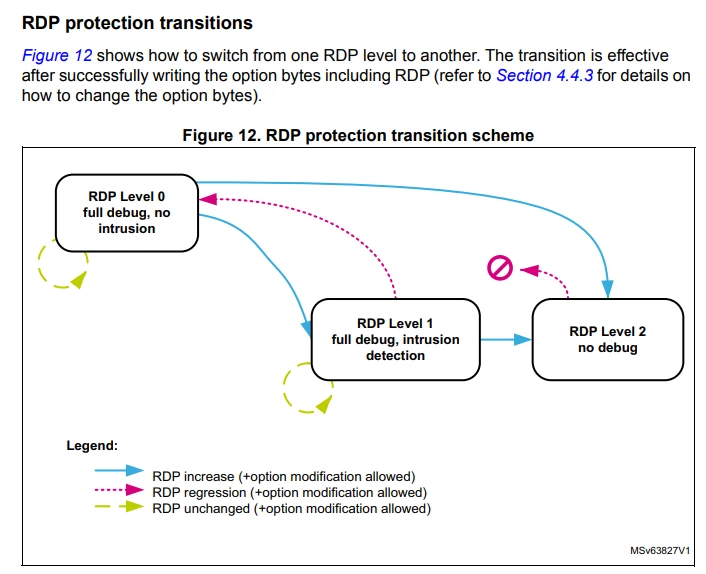
On an STM32H725, changing RDP from Level 0 to Level 1 causes the firmware to stop running. In my device, the LED and FDCAN stop responding, even without a debugger connected. During debug session, this occurs in “HAL_FLASH_OB_Launch()”, more specifically after “SET_BIT(FLASH->OPTCR, FLASH_OPTCR_OPTSTART);”.
After a manual power cycle, the firmware runs normally and RDP Level 1 is successfully applied.
Is this expected behavior? Is a reset required after changing RDP from Level 0 to Level 1,
For STM32H724xx, the RDP L0 → L1 transition is allowed, with no mass erase and no mandatory debugger disconnect.
However, after programming the option-byte, HAL_FLASH_OB_Launch() triggers the option-byte reload so the new RDP level takes effect. During this reload, the device goes through an internal reset/restart sequence, so execution is not expected to continue normally after this call.
So, the behavior you observe is consistent with that mechanism:
HAL_FLASH_OB_Launch() is reached
the application appears to stop responding
after reset/power cycle, the MCU boots normally with RDP L1 applied
For the debugger case, even if L0 → L1 is not defined as a debugger-disconnect transition, transient fault/reset indications such as HardFault/VECTTBL can still be seen while the option-bytes are being reloaded.
For your code, the recommended sequence is:
Unlock Flash option-bytes
Program OPTIONBYTE_RDP
Call HAL_FLASH_OB_Launch()
Do not expect code after this point to continue normally
Let the device reset
If needed, perform a power cycle for the cleanest restart
To be more precise, this is the code to set RDP to level 1:
FLASH_OBProgramInitTypeDef OBInit;
OPENBL_FLASH_OB_Unlock();
HAL_FLASHEx_OBGetConfig(&OBInit);
OBInit.OptionType = OPTIONBYTE_RDP;
OBInit.RDPLevel = RDPLevel;
if (HAL_FLASHEx_OBProgram(&OBInit) != HAL_OK)
{
OPENBL_FLASH_OB_Lock();
return ERROR;
}
// OPENBL_FLASH_OB_Lock();
if (HAL_FLASH_OB_Launch() != HAL_OK)
{
Error_Handler(); // This is not the cause of problem
return ERROR;
}
With debugger, when the execution reaches “ HAL_FLASH_OB_Launch()”, the hardfault VECTTBL happened:
To rule out debugger causing an illegal flash access when rdp = 1, I repeated this execution after removing the debugger physically. After commanding the application to activate rdp = 1, it appears to stop responding. After power off and on, rdp = 1 is successfully set and the device works normally.
According to the reference manual, a reset is not required. Therefore I would like to confirm if this behavior is expected or not.
> During debug session, this occurs in “HAL_FLASH_OB_Launch()”,
Raising RDP level under debugger is controversial operation, because RDP conflicts with debugger access to the protected resources. So this behavior isn’t surprising. Hope others with more experience with use of RDP can advice about best practices of activating it.
For STM32H724xx, the RDP L0 → L1 transition is allowed, with no mass erase and no mandatory debugger disconnect.
However, after programming the option-byte, HAL_FLASH_OB_Launch() triggers the option-byte reload so the new RDP level takes effect. During this reload, the device goes through an internal reset/restart sequence, so execution is not expected to continue normally after this call.
So, the behavior you observe is consistent with that mechanism:
HAL_FLASH_OB_Launch() is reached
the application appears to stop responding
after reset/power cycle, the MCU boots normally with RDP L1 applied
For the debugger case, even if L0 → L1 is not defined as a debugger-disconnect transition, transient fault/reset indications such as HardFault/VECTTBL can still be seen while the option-bytes are being reloaded.
For your code, the recommended sequence is:
Unlock Flash option-bytes
Program OPTIONBYTE_RDP
Call HAL_FLASH_OB_Launch()
Do not expect code after this point to continue normally
Let the device reset
If needed, perform a power cycle for the cleanest restart
Thank you very much for your reply, that was very helpful.
I also tried programming the write protection bits in the same way, but it executes normally and does not need power cycling or reset.
Does that suggest option bytes programming does not necessarily trigger a unexpected behavior? If so, is it recommended to always reset or perfom power cycling after programming an option byte? I would like to ask it because the reference mannual does not specify the behavior after option byte changes.
According to RM0468, after a successful option-byte modification, the Flash interface automatically reloads all option bytes in order to update the current option-byte registers. Therefore, the reload mechanism is part of the normal behavior of a successful option-byte programming operation.
That said, the visible impact on execution may differ depending on the option-byte being modified.
In practice, some option-byte changes such as write protection may appear to complete with no obvious disruption to the running app, while security-related changes, such as RDP, may produce a more visible interruption of execution or debug connectivity.
So your observation is valid:
WRP programming may appear to execute normally
RDP programming may appear to stop execution or require a clean restart
Also, you are right that the current STM32H7 RM does not explicitly distinguish between:
option-byte changes that may require or strongly recommend a system reset/device restart
and other option-byte changes that may not require a reset from the app point of view
This clarification is not explicitly stated in the STM32H7 option-byte section, and this can make the behavior less clear for users.
For comparison, the documentation has already been enhanced on some other products, such as the STM32H5 family (Click here), where it is explicitly stated that the option-byte programming step resets the device, and that this step is always recommended and becomes mandatory when certain option bytes are modified not all of them, for example: