

MMora.10
Associate
December 6, 2021
Solved

STM32G474 Crashes Laptop when unplugging USB

  • December 6, 2021
  • 11 replies
  • 2032 views

Currently when I unplug my Nucleo Board from my computer, my computer blue screens with a "SYSTEM_THREAD_EXCEPTION_NOT_HANDLED" error. Any ideas on what would cause this?

It happens every time I unplug the board, even if all I do is plug it in, then unplug it right away.

This topic has been closed for replies.
Best answer by MMora.10

Thanks to all that replied, I have found an answer.

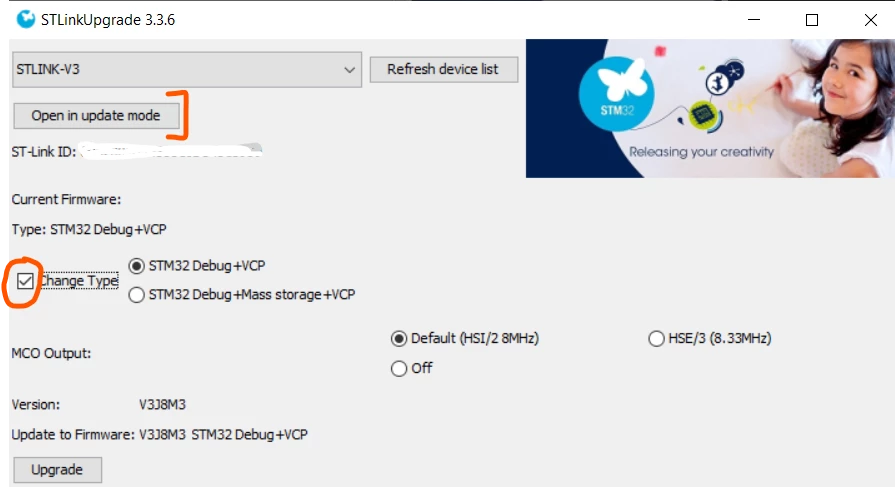
The issue was that company policy around USB devices would not agree with the nucleo board being mounted as a USB device. We do not use the USB storage on the nucleo board, so within the STM32Cube Programmer application, there is an option to do a firmware upgrade for the ST-LINK debugger. When doing the upgrade, you can change its type to remove the Mass Storage option.

0693W00000HnvlFQAR.pngThis fixed the issue!

11 replies

Uwe Bonnes
Chief
December 7, 2021

Try on another laptop. I suspect a problem on the laptop side.

MMora.10
MMora.10Author
Associate
December 7, 2021

Hi Uwe,

I am working with a small team, all of us on different computers. And all of them show this error. Any other thoughts?

We also have multiple different boards, and every board / laptop pair has this issue.

Uwe Bonnes
Chief
December 7, 2021

So tell what you OS you use and if updates are applied regulary. The crash happens in the Laptop, and a the OS should cope with not-so benevolent devices.

MMora.10
MMora.10Author
Associate
December 7, 2021

Hi Uwe,

I am working with a small team, all of us on different computers. And all of them show this error. Any other thoughts?

We also have multiple different boards, and every board / laptop pair has this issue.

Pavel A.
December 7, 2021

Do you all have installed same antivirus or something else by company IT? or maybe all of you play same game?

Can you share the crash dump (minidump) online?

-- pa

Pavel A.
December 7, 2021

>  Do you know of any ways to stop the device from appearing as a mass storage?

Yes. Begin from the simplest. While the device is plugged in, locate its mass storage function in Device Manager and disable it.

If Windows won't crash on spot, that's all. Else ...

MMora.10
MMora.10Author
Associate
December 8, 2021

Hi Pavel,

When I tried this, windows crashed on the spot, with the same error as I see when physically unplugging the hardware.

MMora.10
MMora.10AuthorBest answer
Associate
December 8, 2021

Thanks to all that replied, I have found an answer.

The issue was that company policy around USB devices would not agree with the nucleo board being mounted as a USB device. We do not use the USB storage on the nucleo board, so within the STM32Cube Programmer application, there is an option to do a firmware upgrade for the ST-LINK debugger. When doing the upgrade, you can change its type to remove the Mass Storage option.

0693W00000HnvlFQAR.pngThis fixed the issue!