


CSand
Senior
August 25, 2026
Solved

STM32F412 board used as HID apears in Windows Device Manager as "Unknown USB Device ( Device descriptor Request failed )"

  • August 25, 2026
  • 9 replies
  • 159 views

Hello dear ST Community,
I am not sure I can get help here as this topic is related to a WeAct Studio STM32F412 board and not a Nucleo or Discovery board from ST. If not that is fine , no problem.

So, back to my issue : 
For this particular type of project, in the past we used STM32F411 boards but this time we had to change to a board with more RAM's ...

The rest of the code in the MCU works as expected.
When we connect the USB cable to PC in the Device Manager we get this error :
"Unknown USB Device ( Device descriptor Request failed )"

We using CubeMX and STM32Cube in VSCode
In CubeMX I setup now just the basic USB_OTG_FS : Device only
Middleware : USB Device as Human Interface device class (HID)
** We can share code or ioc file if needed …

What I did :
- USB Clock is set 48MHz
- I tried HSI and HSE for the clock - there is said for the USB to work it requires HSE
- I changed the USB cable
- I revert to just basic HID and the default report ( but anyway Windows didn’t asked for it yet … )

Could you please help suggest what can be the cause of this ...

Best Regards,
Cristian
Best answer by CSand

Good morning,
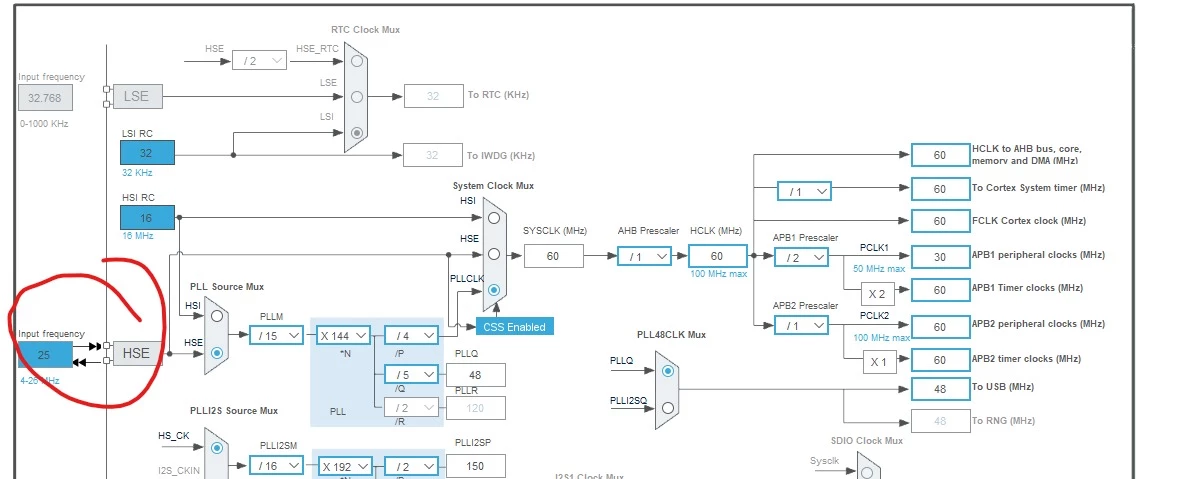
While preparing to check frequency with the oscilloscope I noticed the default input frequency in cubeMX is 25MHz while the board has a 8MHz crystal … so I changed it to 8MHz and now all is fine.

Thanks a lot for support!


9 replies

AScha.3
Super User
August 25, 2026

Hi,

Is it a board with USB connector soldered or you add it?

Because maybe d+ and d- lines are puzzled.

Check this.


And verify your CPU clock, using the MCO and check output with scope.

To be sure about the clock setting is doing what you expect.


And try other device settings, VCP .

Will it connect as com port....?


If you feel a post has answered your question, please click on " Best Answer ".
CSand
CSandAuthor
Senior
August 25, 2026

@AScha.3 
The board has the USB connector soldered. 
I will do the clock frequency check tomorrow

Thanks

Ozone
Principal
August 25, 2026

> For this particular type of project, in the past we used STM32F411 boards but this time we had to change to a board with more RAM's ..

I’m a bit confused, since I have a F411 board of this type.
But this board has just a SWD header, and no onboard ST-Link with USB access.
The only USB port is under control of the target MCU, a F412 in your case.
Am I right ?

In this case, this might just be a problem of USB vendor and product IDs Windows complains about.

Have you tried it to connect it to a Linux system (a VM works as well), and checked the “lsusb” output ?

CSand
CSandAuthor
Senior
August 25, 2026

@Ozone 

May be I wasn’t clear enough. We use a STM32F412 board . It has a USB connector on pins PA9 PA11.
We have a WeAct Studio mini debugger ST-Link device… in place of onboard ST-Link 

I do not think is a product ID issue.
I will try to connect on a Linux system tomorrow.
Thanks

CSand
CSandAuthor
Senior
August 26, 2026

… sorry pins PA11 and PA12 . The board comes with USB connector soldered.

CSand
CSandAuthorBest answer
Senior
August 26, 2026

Good morning,
While preparing to check frequency with the oscilloscope I noticed the default input frequency in cubeMX is 25MHz while the board has a 8MHz crystal … so I changed it to 8MHz and now all is fine.

Thanks a lot for support!


CSand
CSandAuthor
Senior
August 26, 2026

The reason we use these boards from WeAct Studio is that they are very compact and the other reason is … I am confident they use ST original chips not fakes... 

mini Debuger when first connect to STM32CubeIDE or recently to VSCode it requires an update of firmware which is done without any issues … I do not know about ST licenses or other details … but they work fine

Thanks for support and info

Ozone
Principal
August 26, 2026

> The reason we use these boards from WeAct Studio is that they are very compact and the other reason is … I am confident they use ST original chips not fakes... 

I have two F411 boards, and think they are ok.

> mini Debuger when first connect to STM32CubeIDE or recently to VSCode it requires an update of firmware which is done without any issues … I do not know about ST licenses or other details … but they work fine

Makes sense to me, this looks like they are shipped with CMSIS-DAP firmware flashed for exactly this license reasons.

You could check in the Windows device manager (alternatively on Linux via ‘lsusb’), or another toolchain with a ‘fresh’ device.
Most toolchains support CMSIS-DAP adapters directly - and several do not support ST-Link.

PS:
I’m not directly affiliated with ST, and thus cannot speak for ST in such legal matters.
This are mostly assumptions from my side.