sseveelavanan9
Associate II
January 30, 2017
Solved

STM32072B-EVAL + STM32Cube: unmodified USB VCP example not recognised properly

  • January 30, 2017
  • 17 replies
  • 4269 views
Posted on January 30, 2017 at 19:21

I'm using this example

STM32Cube_FW_F0_V1.7.0\Projects\STM32072B_EVAL\Applications\USB_Device\CDC_Standalone

Which should simply present a VCP in Windows/Linux, after the drivers are installed (for Windows): 

http://www.st.com/en/development-tools/stsw-stm32102.html


For the setup, I do the following

- ''For power supply from USB (CN4) to STM32072B-EVAL only, JP19 is set..'' - from

http://www.st.com/content/ccc/resource/technical/document/user_manual/63/18/cb/de/57/a6/45/17/DM00104135.pdf/files/DM00104135.pdf/jcr:content/translations/en.DM00104135.pdf

- link TX / RX for loop-back using jumpers (but not important I just want the device to be recognised for now)

- connect a standard USB cable from CN4 USB port to my computer. The cable is fine, as I also use this one connected to CN13 for programming via ST-Link.

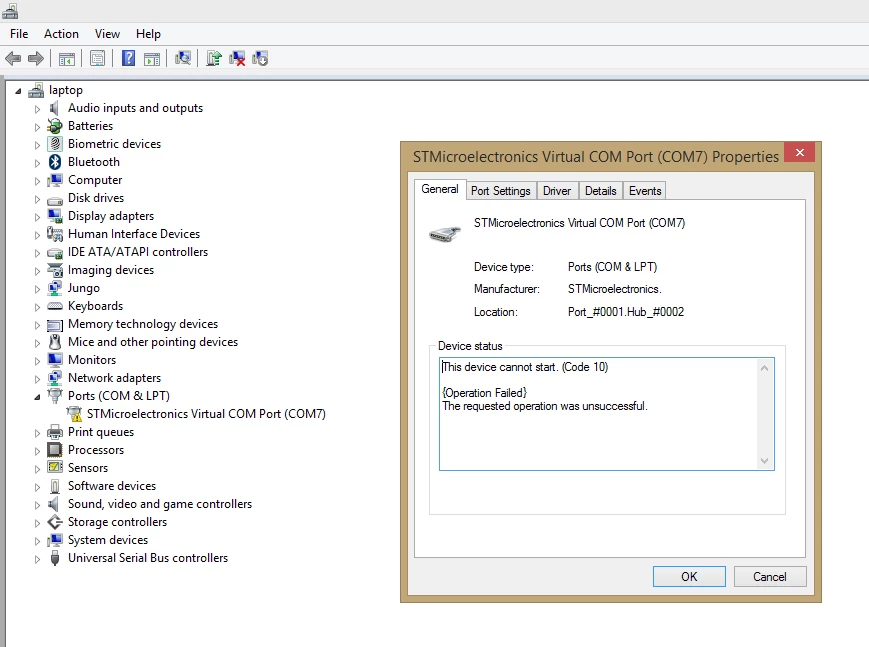
I get this unhappy message0690X00000606BxQAI.png

I checked to see if what recognised by Ubuntu / Linux. It is not

Am I missing something?

#cdc #stm32 #usb #vcp

This topic has been closed for replies.
Best answer by Mon2
Posted on February 01, 2017 at 17:33

Hey Chendy. Ok, downloaded a fresh copy of the same source code -> imported the CDC_EXAMPLE project -> compiled and tested on our same target board (STM32F072-EVAL). Also initially noted the yellow bang (screens are attached) and reviewed the following important steps:

1) be sure that the USB cable for the ST/LINK is connected - this powers the kit

2) then dock the cable for the USB interface to perform the CDC emulation. Also right-click the current yellow bang mark and select UNINSTALL AND check the box to delete the driver. This will force a fresh start for your device driver links.

3) Install the VCP driver using the installer package supplied with the 1.4.0 VCP driver package (yours appears to be the same but included in our download as well).

4) A compiled HEX file is also posted in this download for your testing.

Curious to hear about your results.

BTW - Any chance you a virus protection s/w running in the background that may be halting this installation ?? Known to happen and be sure you have admin rights.

https://axxonshare.s3.amazonaws.com/STM32F072-EVAL/STM32F072-EVAL_CDC_EXAMPLE.zip

Update:

1) We are on Win7 x64 - have not yet tested on Windows 8.x nor 10. According to the readme - should work fine on Windows 8.x

2) Tested with the power jumper for CN4 - works fine using a single cable to power the eval kit.

17 replies

Jennifer D
Associate II
January 30, 2017
Posted on January 30, 2017 at 21:26

Hi, did you find the soln to this problem? 

ST Technical Moderator
January 30, 2017
Posted on January 30, 2017 at 22:24

Hel

lo,

Maybe the problem is due to heap and stack memory sizes defined in startup file.

Try to increase the heap and stack size and p

lease keep me updated on the progress.

Regards

Imen

In order to give better visibility on the answered topics, please click on 'Best answer' on the reply which solved your issue or answered your question. Thanks
sseveelavanan9
Associate II
January 31, 2017
Posted on January 31, 2017 at 13:16

Hi,

So no luck for me...

I have increased the stack size 400 to 2500 (the max before non-compile), heap 200 to 2000. I cant increase the stack to 4000 (as per Jennifer D's tip) - it doesn't compile after this 2500.

Im using the free STM32 provide Keil offer. Could this somehow play a part? Is there a chance it is compilation size limited?

With these settings still same: not recognised. 

Also the 4 leds (ld1, ld2, ld3, ld4) are all flashing about about 2hz (incase that helps debug)

Any chance somebody at ST could get this working on the ST32F072-EVAL?

Thanks

sseveelavanan9
Associate II
January 31, 2017
Posted on January 31, 2017 at 15:53

I've also tried to do this:

The solution was the trick on p. 7 of the PDF referenced by Jennifer : edit usbd_conf.c and change

hpcd_USB_OTG_FS.Init.vbus_sensing_enable = ENABLE;

to :

hpcd_USB_OTG_FS.Init.vbus_sensing_enable = DISABLE;

but this line or similar doesn't seem present in the version of usbd_conf.c in my project folder. I also did a grep search for that string in the project folder - nothing found for 'vbus'.

(file from)

STM32Cube_FW_F0_V1.7.0\Projects\STM32072B_EVAL\Applications\USB_Device\CDC_Standalone\Src\usbd_conf.c

Jennifer D
Associate II
January 30, 2017
Posted on January 30, 2017 at 22:34

Back again.

Imen D is right. For those in IAR the heap and stack sizes are sorta hidden.

Project ->Options ->Linker and then edit the linker configuration.

Change 200->2000

400->4000

This worked for me! I am so excited I have been working on this for over a week.

-Jen

EDIT: I am attaching the PDF that helped me out

________________

Attachments :

Data exchange between STM32F411 and PC using USB.pdf : https://st--c.eu10.content.force.com/sfc/dist/version/download/?oid=00Db0000000YtG6&ids=0680X000006Hyxw&d=%2Fa%2F0X0000000bEU%2F7lvhMVuDIiZFx_j98IXzhFSfhsOYzVvbwy0rD0kHNLk&asPdf=false
ST Technical Moderator
January 30, 2017
Posted on January 30, 2017 at 23:27

Hi

flowersnlyrics

‌,

I'm happy to see

that my suggestion has been useful for you and

your problem is resolved

I want to thank youfor sharing your experience in the attached pdf, this will be helpful forusers forum.

Thanks

Imen

In order to give better visibility on the answered topics, please click on 'Best answer' on the reply which solved your issue or answered your question. Thanks
Mon2
Senior III
February 1, 2017
Posted on February 01, 2017 at 05:19

Hi Chendy. I think we recall your name from the XMOS forum:) We have the same STM32F072-EVAL board in the lab and did get the full CDC_EXAMPLE (supplied by ST) working.

See AN4735: STM32Cube firmware examples for STM32F0 Series -> page

The supplied code (not Cube generated) works fine - we have tested against a SiLabs USB bridge to confirm the assorted baud rates and they did sync fine with each other (CMOS to CMOS wiring).

Are you using the 256k license from ST ?

https://community.st.com/0D50X00009XkW4oSAF

sseveelavanan9
Associate II
February 1, 2017
Posted on February 01, 2017 at 12:02

hi yes its me from XMOS : )

completely unmodified example from STM32CubeF0?

So you did not have to change the heap and stack size? vbus stuff? 

0690X00000606BTQAY.png

Is this a suitable license? 

Mon2
Senior III
February 1, 2017
Posted on February 01, 2017 at 12:10

Hey Chendy. Let us review the same procedure upon reaching the office. Up a bit early here and will be in the office in about 4 hours from now. At the very least, we should be able to generate a compiled binary for you to test.

Any reason why you cannot use the CDC_EXAMPLE for the STM32F072-EVAL ? It is complete and will perform even better than the STMCube generated code. That is, if you wish to alter the baud rates or line settings of the virtual UART, the STMCube code will not allow for this and is left as an exercise for the reader.

I would think that the compiler you have is fine for this example but again will confirm details once reaching the office. In the meantime, just import the complete project created for your (rather expensive) STM32F072-EVAL board. We brought in this same tool just for the CDC_EXAMPLE code so we can study how it works. Very nice to be able to just import -> compile -> test (without issues).

sseveelavanan9
Associate II
February 1, 2017
Posted on February 01, 2017 at 12:20

Hi Bhatia, Great, thanks for your help... 

Any reason why you cannot use the CDC_EXAMPLE for the STM32F072-EVAL?

I thought I was?? I dont want to auto generate code. I want a basic working VCP, ideally from an unmodified ST provide example. see my OP:

I'm using this example

STM32Cube_FW_F0_V1.7.0\Projects\STM32072B_EVAL\Applications\USB_Device\CDC_Standalone

^ this is the examples referred to as STM32CubeF0 examples in AN4735, right?

Mon2
Senior III
February 1, 2017
Posted on February 01, 2017 at 12:29

My apologies. Correct - that is the same code we compiled with success. We do not recall any special tweaks to compile this supplied project but it was last week so may me missing some simple detail. Will confirm once at the office.

Your Device Manager tree looks busy with Jungo (good ole Jungo - great s/w) -> can you expand and review your USB tree to be sure that you do not have a stale STM device driver being mapped for this VCP device ? For us, we found that the Total Phase tools were stealing our links because they also use STM processors for DFU. Just be sure that you do not have another widget already installed with the STM drivers. What are the details of your STM device driver ?

Silly request but can you confirm your TARGET CPU matches the details for the STM32F072-EVAL board ? (ie. CPU number & package)

Jinhui Lin
Associate
February 18, 2017
Posted on February 18, 2017 at 15:10

It also works for me to expand stack & heap.

Change 0x200->0x500+

              0x400->0x500+

^_^!!!

Chip:STM32F746NGH

Version:[stm32cube_fw_f7_v160/stm32cubemx version 4.19.0/stm32cube v1.0]