

Nassimus Moualek
Associate
May 10, 2017
Solved

ST Link v2 Virtual Com Port Driver not working on Windows 10

Posted on May 10, 2017 at 23:40
The driver 

http://www.st.com/en/embedded-software/stsw-link009.html


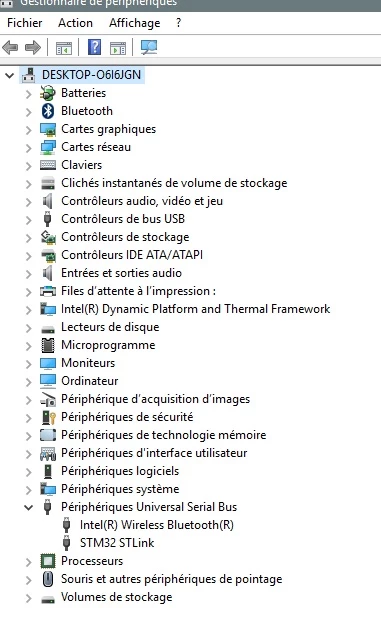
creates only the a USB serial port as shown here :

0690X00000603pkQAA.jpg

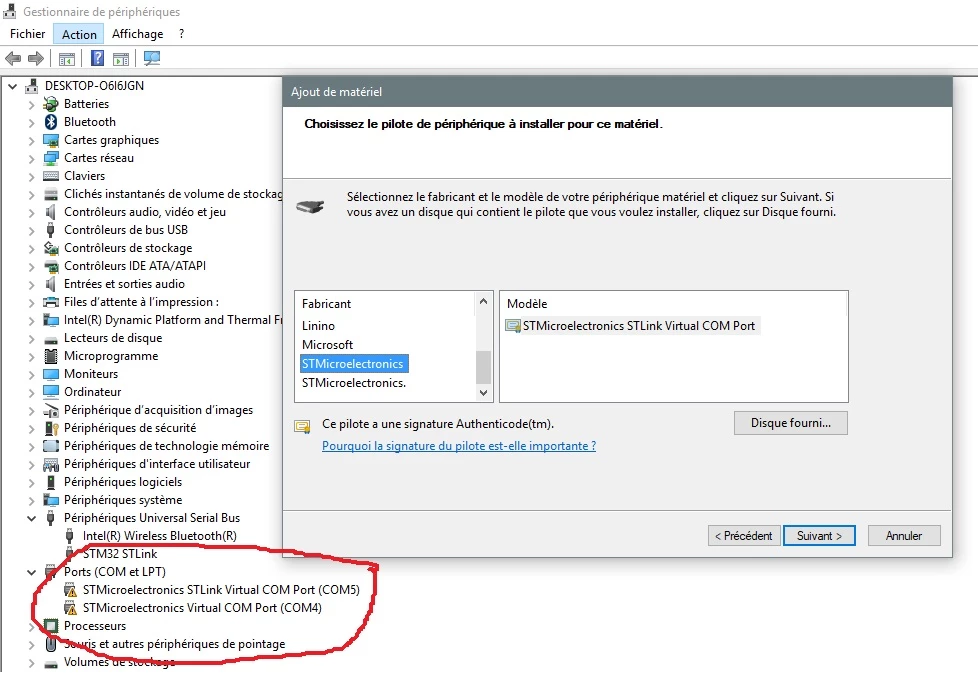
So i try to add the Virtual Port Com Manually with the action ''add an old generation device'' in the Device Manager

0690X00000603n1QAA.jpg

I try to install the STMicroelectronics\STM32 ST-LINK Utility\ST-LINK_USB_V2_1_Driver\stlink_VCP.inf

or the STMicroelectronics\Software\Virtual COM Port Driver

or the STMicroelectronics\Software\Virtual comport driver\Win8

Even after removing one by one, and reinstalling one at times, no one is working

I try all the possiblities listed in many chats or forums

I also attach the USBView devices listing

Is there a new update for the 1.4.1 VCP Driver for windows 10 ?

#virtual-comport-stm32 #windows10


This topic has been closed for replies.
Cedric LECOUTRE
Cedric LECOUTREBest answer
ST Employee
May 24, 2017

Posted on May 24, 2017 at 18:47

Hi

Moualek.Nassim

,

In Windows 10, USB driver has been reworked and there is no need for Virtual COM driver to be installed. It works natively when you plug-in a device. But according to Microsoft documentation, you need to set device USB class and subclass ID to 0x2 (see

https://msdn.microsoft.com/en-us/library/windows/hardware/dn707976(v=vs.85).aspx

).

This should be fixed in the HAL/CubeMX examples.

Best regards,

Cedric

8 replies

Cedric LECOUTRE
Cedric LECOUTREBest answer
ST Employee
May 24, 2017

Posted on May 24, 2017 at 18:47

Hi

Moualek.Nassim

,

In Windows 10, USB driver has been reworked and there is no need for Virtual COM driver to be installed. It works natively when you plug-in a device. But according to Microsoft documentation, you need to set device USB class and subclass ID to 0x2 (see

https://msdn.microsoft.com/en-us/library/windows/hardware/dn707976(v=vs.85).aspx

).

This should be fixed in the HAL/CubeMX examples.

Best regards,

Cedric

Nassimus Moualek
Associate
May 24, 2017

Posted on May 24, 2017 at 19:21

Hi, thank you to add me to this conversation, and thank you for your answer but i really nead a virtual com port to use :

1_ The Arduino IDE (screen shoot is attached) 2_ The Clean Flight OSD (screen shoot is attached) for filght contollers

And i cant modify your driver because it must be signed.

For now the stlink v2 is completely unuseful for me, i just can upload firmware to my micro-controller or debug it thats all.

Thanks in advance.