Associate II
Apr 25, 2025 1:38 PM UTC
Question

SDIO FATFS FR_NOT_READY - fails to mount SD card

Hello,

I have a NUCLEO-F767ZI I am trying to integrate an SD card with for data storage. The SD card is a Kingston CANVAS Select Plus 64GB in ExFAT format.

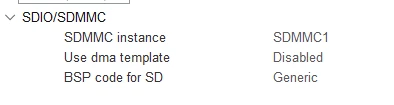
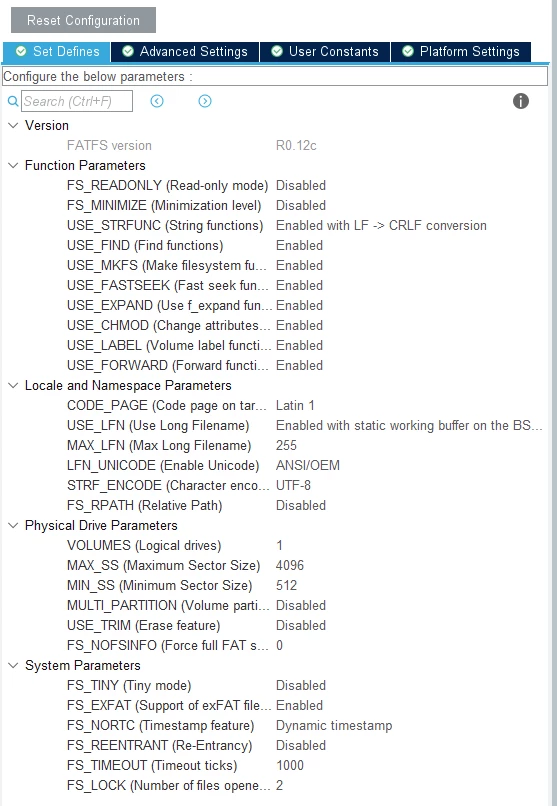
I am connecting it to the NUCLEO board through an Adafruit SD card module which has pullup resistors on all lines, including the detect pin, and I am using the internal GPIO pullup resistors too for D0, CMD and SD_DET to make sure the communication is uninterrupted. Below you can see the FATFS configuration fatfs_config1.pngfatfs_config2.png
 

printf("Mounting filesystem...\r\n\n");

FR_Status = f_mount(&FatFs, "", 1);

if (FR_Status != FR_OK)

{

printf("Error mounting SD card! Code: %d\r\n\n", FR_Status);

break;

}

printf("SD card mounted successfully\r\n\n");


FR_Status returns FR_NOT_READY (3 in console). 

The hardware configuration is correct as I can read the capacity and some other data from the SD card, but I cannot access the card itself.

Does anyone have any suggestions?


This topic has been closed for replies.

11 replies

Andrew Neil
Super User
Apr 25, 2025 1:46 PM UTC

Welcome to the forum.

For best results, please see How to write your question to maximize your chances to find a solution; in particular, How to insert source code.


Please give a link to the "Adafruit SD card module", and a schematic of how you have it connected.


@bog201 wrote:

FR_Status returns FR_NOT_READY (3 in console). 


So have you used the debugger to step into the code to find out why it does that?

A complex system that works is invariably found to have evolved from a simple system that worked.A complex system designed from scratch never works and cannot be patched up to make it work.
bog201Author
Associate II
Apr 28, 2025 2:13 PM UTC

Hi Andrew,

Thank you for reaching back fast and for the forum post tips. Here is the relevant piece of code. 

printf("Mounting filesystem...\r\n\n");
FR_Status = f_mount(&FatFs, "", 1);
if (FR_Status != FR_OK)
{
 printf("Error mounting SD card! Code: %d\r\n\n", FR_Status);
 break;
}
printf("SD card mounted successfully\r\n\n");

Here is the link to the Adafruit 4682 SD card module.


I unfortunately do not have a schematic for it, but here are the connections:

sdmmc1_pinout.png

NUCLEO board -> SD card module:

3V3 -> 3V

GND -> GND

PC12 -> CLK

PC8 -> D0

PD2 -> CMD

PG3 -> DET (Active high, internal resistors pulled up)


I've used the debugger but it is still unclear for now why I get FR_NOT_READY. Stepping into line 2 redirects me to ff.c (code excerpt shown below), where vol stays at 0 until I step into line 38. 

FRESULT f_mount (
	FATFS* fs,			/* Pointer to the file system object (NULL:unmount)*/
	const TCHAR* path,	/* Logical drive number to be mounted/unmounted */
	BYTE opt			/* Mode option 0:Do not mount (delayed mount), 1:Mount immediately */
)
{
	FATFS *cfs;
	int vol;
	FRESULT res;
	const TCHAR *rp = path;


	/* Get logical drive number */
	vol = get_ldnumber(&rp);
	if (vol < 0) return FR_INVALID_DRIVE;
	cfs = FatFs[vol];					/* Pointer to fs object */

	if (cfs) {
#if _FS_LOCK != 0
		clear_lock(cfs);
#endif
#if _FS_REENTRANT						/* Discard sync object of the current volume */
		if (!ff_del_syncobj(cfs->sobj)) return FR_INT_ERR;
#endif
		cfs->fs_type = 0;				/* Clear old fs object */
	}

	if (fs) {
		fs->fs_type = 0;				/* Clear new fs object */
#if _FS_REENTRANT						/* Create sync object for the new volume */
		if (!ff_cre_syncobj((BYTE)vol, &fs->sobj)) return FR_INT_ERR;
#endif
	}
	FatFs[vol] = fs;					/* Register new fs object */

	if (!fs || opt != 1) return FR_OK;	/* Do not mount now, it will be mounted later */

	res = find_volume(&path, &fs, 0);	/* Force mounted the volume */
	LEAVE_FF(fs, res);
}

Stepping into line 2 redirects me to ff.c (code excerpt shown above), where it fails the check, and goes to line 38, where I again step into it (code excerpt below). 

	/* Get logical drive number */
	*rfs = 0;
	vol = get_ldnumber(path);
	if (vol < 0) return FR_INVALID_DRIVE;

	/* Check if the file system object is valid or not */
	fs = FatFs[vol];					/* Get pointer to the file system object */
	if (!fs) return FR_NOT_ENABLED;		/* Is the file system object available? */

	ENTER_FF(fs);						/* Lock the volume */
	*rfs = fs;							/* Return pointer to the file system object */

	mode &= (BYTE)~FA_READ;				/* Desired access mode, write access or not */
	if (fs->fs_type) {					/* If the volume has been mounted */
		stat = disk_status(fs->drv);
		if (!(stat & STA_NOINIT)) {		/* and the physical drive is kept initialized */
			if (!_FS_READONLY && mode && (stat & STA_PROTECT)) {	/* Check write protection if needed */
				return FR_WRITE_PROTECTED;
			}
			return FR_OK;				/* The file system object is valid */
		}
	}

	/* The file system object is not valid. */
	/* Following code attempts to mount the volume. (analyze BPB and initialize the fs object) */

	fs->fs_type = 0;					/* Clear the file system object */
	fs->drv = LD2PD(vol);				/* Bind the logical drive and a physical drive */
	stat = disk_initialize(fs->drv);	/* Initialize the physical drive */
	if (stat & STA_NOINIT) { 			/* Check if the initialization succeeded */
		return FR_NOT_READY;			/* Failed to initialize due to no medium or hard error */
	}

This is where it gets to line 30 in the above code, returning FR_NOT_READY.

Do you have any suggestions? 


Andrew Neil
Super User
Apr 28, 2025 2:42 PM UTC

So the find_volume() call in f_mount() is returning an error.

What error code, exactly, does it return?

Try stepping into find_volume() to see where & why it returns that error code.


A complex system that works is invariably found to have evolved from a simple system that worked.A complex system designed from scratch never works and cannot be patched up to make it work.
ST Technical Moderator
May 8, 2025 11:00 AM UTC

Hello @bog201 

Did you attempt to follow the example below and find inspiration from it?

STM32CubeF7/Projects/STM32F769I_EVAL/Applications/FatFs/FatFs_uSD at master · STMicroelectronics/STM32CubeF7 · GitHub

In order to give better visibility on the answered topics, please click on 'Best answer' on the reply which solved your issue or answered your question. Saket_Om