

Associate
July 14, 2026
Question

Multichannel adc stm32f411ceu6
  • July 14, 2026
  • 8 replies
  • 125 views

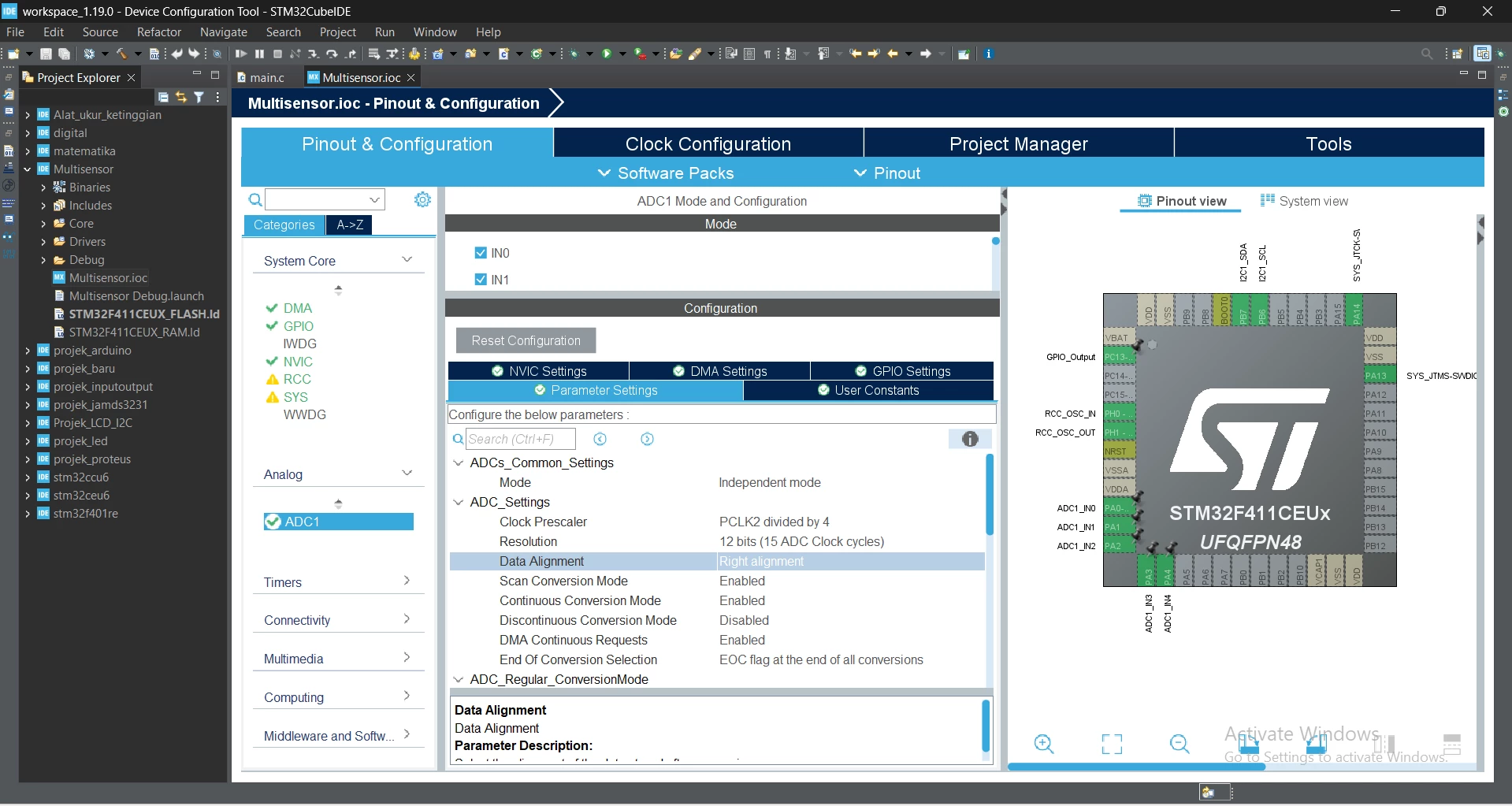
What is the correct way to implement multiple ADC channels? I have tried various tutorials on YouTube, but none of them work correctly. I am using two potentiometers. The ADC readings are random and cannot be controlled by the potentiometers. At one point, I managed to get it working, but only one potentiometer responded. The second potentiometer did not work, and the value of Channel 2 followed the value of Channel 1, even though Channel 2 should be controlled independently by the second potentiometer.

8 replies

MGogr.1
Senior
July 14, 2026

Can you try this ADC Tutorials? 

And see if this helps.

PutrasAuthor
Associate
July 16, 2026

Terima kasih, itu berhasil untuk STM32F103C8T6, tetapi tidak berfungsi pada STM32F411CEU6. Konfigurasi dan kodenya mungkin sedikit berbeda.

MGogr.1
Senior
July 16, 2026

You can try the same example on F411 and see if it works.

ST Technical Moderator
July 14, 2026

Hello ​@Putras 

Mybe this post can help you. 

In order to give better visibility on the answered topics, please click on 'Best answer' on the reply which solved your issue or answered your question. Saket_Om
PutrasAuthor
Associate
July 16, 2026

Thank you, that worked for the STM32F103C8T6, but it doesn't work on the STM32F411CEU6. The configuration and code may be slightly different.

MOBEJ
ST Employee
July 14, 2026

Hello ​@Putras 

A single ADC can convert only one channel at a time.
To read two potentiometers, enable Scan Conversion Mode and set Number of Conversions = 2.
Assign each potentiometer to a different ADC channel and give each one its own rank.
If you need continuous updates, enable Continuous Conversion Mode.

Please You can refer to ST’s ADC_MultiChannelSingleConversion example.
It shows how the ADC scans multiple channels in sequence.
Then adapt the same configuration to your STM32F411CEU6 board.

Br

To give better visibility on the answered topics, please click on Accept as Solution on the reply which solved your issue or answered your question.