

Associate II
Jan 3, 2024 10:18 AM UTC
Question

How to read a .csv file - STM32H745I-DISCO

Hi everyone,

I'm trying to open an image as a .csv or .bmp file in STM32CubeIDE. I've already tried different ways of reading the file but none of them would actually work. When I build the project the output gives no errors but when debugging, the file seems to be NULL. Should I add the .csv or .bmp file to the Src folder?

How should I import a .csv format file?

B.t.w, this is the code I wrote to open the file:
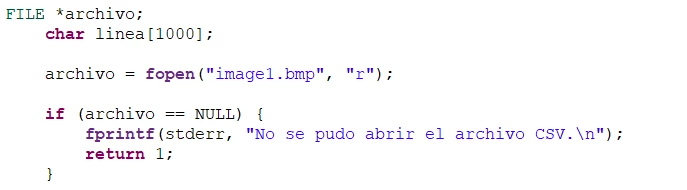
PreguntaSTM5.png

Thank you all in advance.

This topic has been closed for replies.

4 replies

Pavel A.
Jan 3, 2024 11:02 AM UTC

Use semihosting. Please see: https://community.st.com/t5/stm32-mcus/how-to-use-semihosting-with-stm32cubeide-and-stm32/ta-p/49742

Use absolute file paths because relative filenames with the semihosting are relative to the debugger directory, not to the project.

Associate II
Jan 3, 2024 1:18 PM UTC

Thanks @Pavel A. I will definitely try this out. Is there any other way to read a .csv file?

Pavel A.
Jan 3, 2024 9:18 PM UTC

@iker_arrizabalaga Yes definitely. I know one guy who writes parsers for csv and other text files in VHDL and programs this in FPGA. Your imagination is the limit.


Tesla DeLorean
Guru
Jan 3, 2024 9:40 PM UTC

The alternative is to have the file on the Target by way of a Micro SD Card, or USB Flash Drive, and driven by FATFS File System or Microsoft's equivalent.

Tips, Buy me a coffee, or three.. PayPal Venmo (See Profile) Up vote any posts that you find helpful, it shows what's working..