
Associate III
December 5, 2024
Solved

Framing error generated after RS485 plugging and unplugging

  • December 5, 2024
  • 4 replies
  • 4634 views

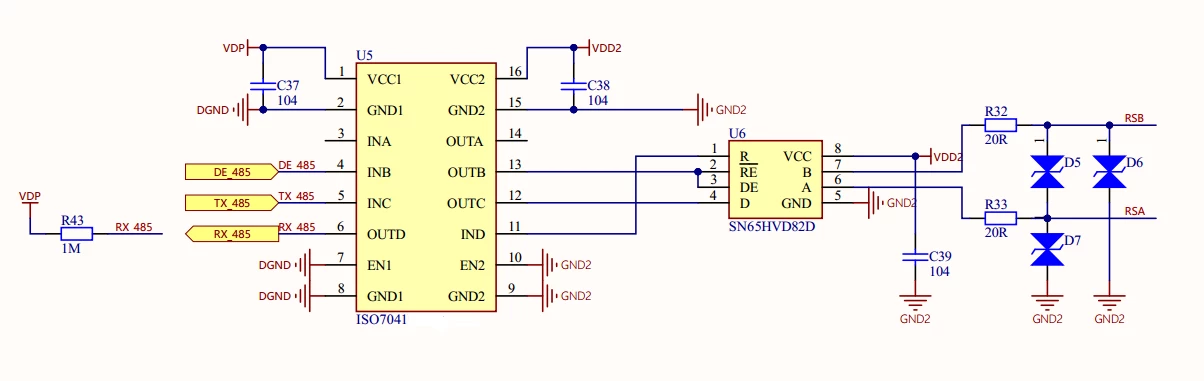
Hello everyone, I encountered a problem while using STM32L431 for RS485 development. I used the ISO7041 isolation chip, and in the initial state, the DE pin is low, while both TX and RX are high. The current issue is that when I turn on the power, reset, and plug in 485, both the transmission and reception of 485 are normal. However, when I unplugged and inserted 485 again, an FE error occurred. Why is this? Is it because the voltage level does not match after inserting 485?
微信图片_20241205083302.png

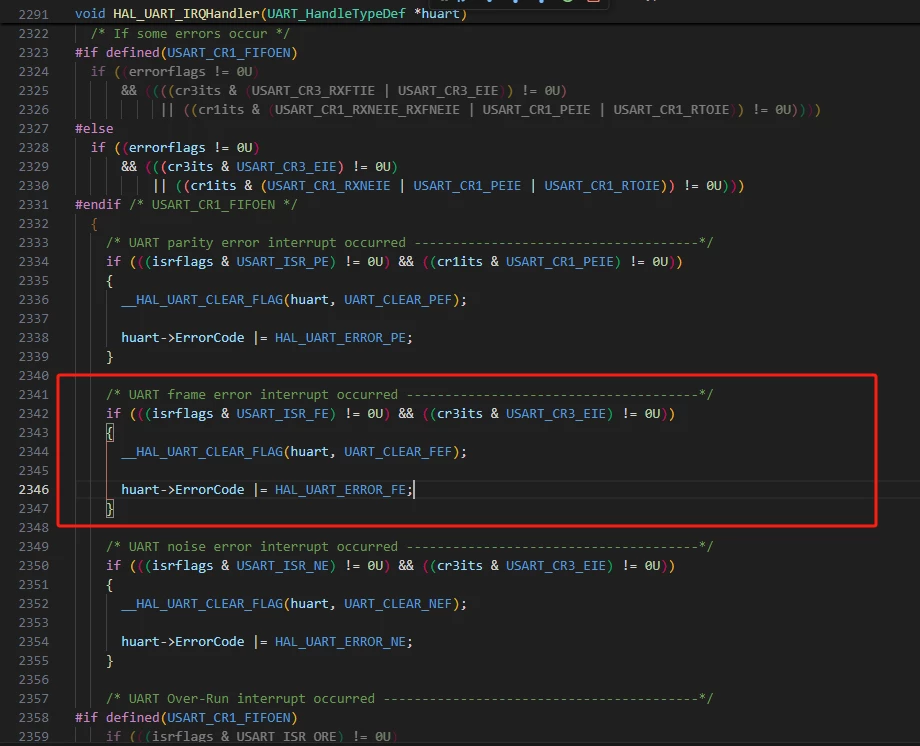
Debugging found errorsflags=2, which should be FE errors。

Here is some of my code:


int main()
{
	HAL_Init();
	SystemClock_Config();
	MX_GPIO_Init();
	MX_LPUART1_UART_Init();
	HAL_GPIO_WritePin(DE485_GPIO_Port, DE485_Pin, GPIO_PIN_RESET);
	initSqQueue(&uart[_LPCOM].Rx, lpuartRxBuff, sizeof(lpuartRxBuff));
	initSqQueue(&uart[_LPCOM].Tx, lpuartTxBuff, sizeof(lpuartTxBuff));
	__HAL_UART_ENABLE_IT(&hlpuart1, UART_IT_RXNE);
	__HAL_UART_ENABLE_IT(&hlpuart1, UART_IT_IDLE);
	while(1)
	{
		Process_Modbus_Receive(_LPCOM); // MODBUS
	}
}

void USER_LPUART1_IRQHandler(void)
{
 uint8_t lpuart1_data;
 if (__HAL_UART_GET_FLAG(&hlpuart1, UART_FLAG_RXNE) != RESET)
 {
 lpuart1_data = (uint8_t)hlpuart1.Instance->RDR & (uint8_t)0x00fff;
 wrEleQueue(&uart[_LPCOM].Rx, lpuart1_data);
 uart[_LPCOM].active = true;
 }
 if (__HAL_UART_GET_FLAG(&hlpuart1, UART_FLAG_IDLE) != RESET)
 {
 uart[_LPCOM].rxIdle = true;
 __HAL_UART_CLEAR_IDLEFLAG(&hlpuart1);
 }
 else
 {
 uart[_LPCOM].rxIdle = false;
 }
}

void LPUART1_IRQHandler(void)
{
 USER_LPUART1_IRQHandler();
 HAL_UART_IRQHandler(&hlpuart1);
}


My current solution is to modify the HAL library generated by CUBEMX, directly delete the judgment of CR3 EIE value and clear the flag bit. Is this correct? Will it affect the transmission and reception of other serial ports, or can this flag be detected elsewhere and cleared elsewhere.


 // if (((isrflags & USART_ISR_FE) != 0U) && ((cr3its & USART_CR3_EIE) != 0U))
 if (((isrflags & USART_ISR_FE) != 0U) )
 {
 __HAL_UART_CLEAR_FLAG(huart, UART_CLEAR_FEF);

 huart->ErrorCode |= HAL_UART_ERROR_FE;
 }

 

 微信图片_20241205084926.png

微信图片_20241205085038.png

Best answer by AlfRomeo

@Techn @Andrew Neil @jiangfan 

Hi, can I modify it like this?

void USER_LPUART1_IRQHandler(void)
{
 uint8_t lpuart1_data;
 if (__HAL_UART_GET_FLAG(&hlpuart1, UART_FLAG_RXNE) != RESET)
 {
 lpuart1_data = (uint8_t)hlpuart1.Instance->RDR & (uint8_t)0x00fff;
 wrEleQueue(&uart[_LPCOM].Rx, lpuart1_data);
 uart[_LPCOM].active = true;
 uart[_LPCOM].holdTmr = CONST_RS_485_HOLD_TMR;
 }
 if (__HAL_UART_GET_FLAG(&hlpuart1, UART_FLAG_FE))//Determine whether the FE flag is set
 {
 __HAL_UART_CLEAR_FLAG(&hlpuart1, UART_CLEAR_FEF);//Clear the FE flag
 openLpUart1();
 initSqQueue(&uart[_LPCOM].Rx, lpuartRxBuff, sizeof(lpuartRxBuff)); // Initialize the serial port receiving buffer
 memset(lpuartRxBuff, 0, sizeof(lpuartRxBuff));
 }
 if (__HAL_UART_GET_FLAG(&hlpuart1, UART_FLAG_IDLE) != RESET)
 {
 uart[_LPCOM].rxIdle = true;
 __HAL_UART_CLEAR_IDLEFLAG(&hlpuart1);
 }
 else
 {
 uart[_LPCOM].rxIdle = false;
 }
}
void LPUART1_IRQHandler(void)
{
 USER_LPUART1_IRQHandler();
 HAL_UART_IRQHandler(&hlpuart1);
}

4 replies

jiangfan
ST Employee
December 5, 2024

After a brief look, I suppose you may do:

detect unplug of RS485, reset/re-init RS485 interface, then RS485 can work as if it is the same as power on of the board.

AlfRomeoAuthor
Associate III
December 5, 2024

Hi, how can I check if RS485 is unplugged? There are no other pins except for DE, RX, TX

jiangfan
ST Employee
December 5, 2024

perhaps from low level, it is difficult to know if unplug state, you may define - from high level - protocol level that some traffic (heart break) exist timely (such as each second). so, unplug may be detected after unplug for ~1 second.

Andrew Neil
Super User
December 5, 2024

@AlfRomeo wrote:

when I unplugged and inserted 485 again, an FE error occurred. Why is this?


Because you get a glitch on the unplugging and/or re-plugging.

This is perfectly normal, and to be expected.


PS:

or the unplugging and/or re-plugging occurs during a frame

A complex system that works is invariably found to have evolved from a simple system that worked.A complex system designed from scratch never works and cannot be patched up to make it work.
Senior III
December 5, 2024

if you get frame error, reset the uart errors and start afresh, it should be ok. RS485 is not auto recovery , you have to have routines to detect errors and take action.

"If you feel a post has answered your question, please click ""Accept as Solution""."
AlfRomeoAuthorBest answer
Associate III
December 6, 2024

@Techn @Andrew Neil @jiangfan 

Hi, can I modify it like this?

void USER_LPUART1_IRQHandler(void)
{
 uint8_t lpuart1_data;
 if (__HAL_UART_GET_FLAG(&hlpuart1, UART_FLAG_RXNE) != RESET)
 {
 lpuart1_data = (uint8_t)hlpuart1.Instance->RDR & (uint8_t)0x00fff;
 wrEleQueue(&uart[_LPCOM].Rx, lpuart1_data);
 uart[_LPCOM].active = true;
 uart[_LPCOM].holdTmr = CONST_RS_485_HOLD_TMR;
 }
 if (__HAL_UART_GET_FLAG(&hlpuart1, UART_FLAG_FE))//Determine whether the FE flag is set
 {
 __HAL_UART_CLEAR_FLAG(&hlpuart1, UART_CLEAR_FEF);//Clear the FE flag
 openLpUart1();
 initSqQueue(&uart[_LPCOM].Rx, lpuartRxBuff, sizeof(lpuartRxBuff)); // Initialize the serial port receiving buffer
 memset(lpuartRxBuff, 0, sizeof(lpuartRxBuff));
 }
 if (__HAL_UART_GET_FLAG(&hlpuart1, UART_FLAG_IDLE) != RESET)
 {
 uart[_LPCOM].rxIdle = true;
 __HAL_UART_CLEAR_IDLEFLAG(&hlpuart1);
 }
 else
 {
 uart[_LPCOM].rxIdle = false;
 }
}
void LPUART1_IRQHandler(void)
{
 USER_LPUART1_IRQHandler();
 HAL_UART_IRQHandler(&hlpuart1);
}
Senior III
December 12, 2024

In addition to the above, probably you have to have some routine at higher level to detect the break and re-start the query/reception based on your state machine. Normally we implement one master multiple slaves, so it should be easy.

"If you feel a post has answered your question, please click ""Accept as Solution""."
