

External SDRAM as RAM memory clobber?
I’m trying to use the FMC and SDRAM (IS42S16400J) to expand the H7’s running memory. I have the FMC configured in SystemInit and the linker setup to put all readwrite into SDRAM. I’ve verified that I can create variables normally, they’re placed in SDRAM, and can be read and manipulated normally.
Now that I have minimal functionality, I’m starting to add more peripherals and functionality.
int main(void)
{

  /* USER CODE BEGIN 1 */

  /* USER CODE END 1 */

  /* MCU Configuration--------------------------------------------------------*/

  /* Reset of all peripherals, Initializes the Flash interface and the Systick. */
  HAL_Init();

  /* USER CODE BEGIN Init */

  /* USER CODE END Init */

  /* Configure the system clock */
  SystemClock_Config();

  /* USER CODE BEGIN SysInit */

  /* USER CODE END SysInit */

  /* Initialize all configured peripherals */
  MX_GPIO_Init();
  MX_SDMMC2_SD_Init();
  MX_USB_OTG_HS_PCD_Init();
  MX_FATFS_Init();
  /* USER CODE BEGIN 2 */
  MX_USB_DEVICE_Init();
  /* USER CODE END 2 */

  /* Infinite loop */
  /* USER CODE BEGIN WHILE */
  while (1)
  {
    /* USER CODE END WHILE */

    /* USER CODE BEGIN 3 */
  }
  /* USER CODE END 3 */
}
Above is my skeleton code. If I comment out MX_USB_DEVICE_Init(), the device starts up and runs fine. It doesn’t do anything, but I know that it’s hitting the main loop. If I don’t comment it out the program stalls during SystemClock_Config. Following that down I find it’s getting stuck here in HAL_InitTick
if((uint32_t)uwTickFreq == 0UL)
{
  return HAL_ERROR;
}
Looking at the memory view in the debugger shows this

When it should look like this
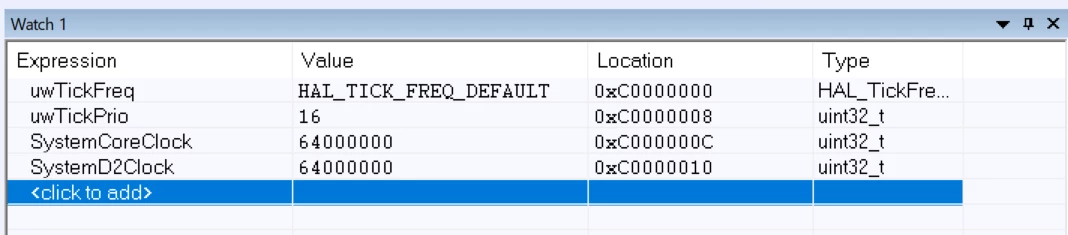
I don’t think this issue is specific to add USB functionality. I think that more things are being added to memory and it’s causing some sort of memory clobber.
My other thought is that the example I followed (here) is using external RAM with a 32-bit data bus where as mine is a 16-bit interface.
I’ve been banging my head against this for the past few days and am at a loss as to the issue. Looking for any insight.