


FSULE.1
Associate II
Mar 10, 2021 11:58 AM UTC
Solved

Error when including FatFs.h >> No such file or directory

Deer electronicians,

I was following the video "STM32 – Creating a File System on a SD card" from the ST Youtube channel.

I done stricty the same things as in the video but an error occurs.

../Core/Src/main.c:22:10: fatal error: fatfs.h: No such file or directory
 22 | #include "fatfs.h"
 | ^~~~~~~~~
compilation terminated.

I tried to enter manually the include path for all the files concened but many new errors are rising.

My config :

  • STM32F746-DISCO (the same as in the video)
  • STM32CubeIDE 1.6.0
  • Firmware F7 1.16.1
  • Windows 10 64 bits

I stay reachable for any questions or precisions.

Cordialement,

François
This topic has been closed for replies.
FSULE.1
FSULE.1Best answer
Associate II
Mar 10, 2021 12:46 PM UTC

Issue solved !!!!

I just changed some parameters :

1 - change the repository path (mine was a problem because i was having a "ç" in the name via the firmware updater

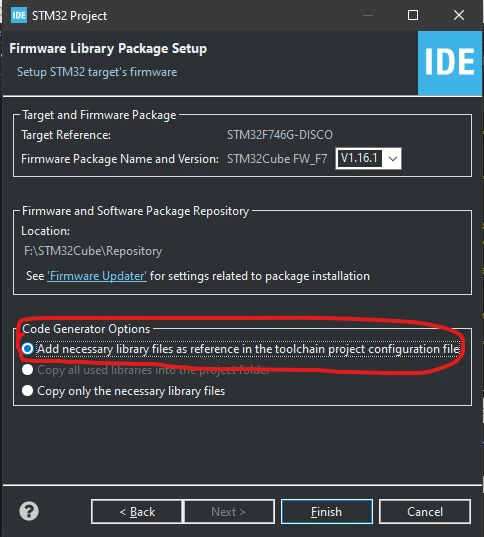
2 - when creating a project : select the first option : add necessary library ....

0693W000008wWPkQAM.png 

Tadam !!

5 replies

Tesla DeLorean
Guru
Mar 10, 2021 12:02 PM UTC

Should be able to add include paths to project for compiler to search on.

Show compiler command line, and configuration pane with paths.​

Tips, Buy me a coffee, or three.. PayPal Venmo (See Profile) Up vote any posts that you find helpful, it shows what's working..
FSULE.1
FSULE.1Author
Associate II
Mar 10, 2021 12:06 PM UTC

the text is too lon to be pasted here.

is it what yous asked ? or do you want something particular in the properties tab ?0693W000008wW8AQAU.png

FSULE.1
FSULE.1Author
Associate II
Mar 10, 2021 12:08 PM UTC
-mcpu=cortex-m7 -std=gnu11 -g3 -DDEBUG -DUSE_HAL_DRIVER -DSTM32F746xx -c -I../Core/Inc -I../Drivers/STM32F7xx_HAL_Driver/Inc -I../Drivers/STM32F7xx_HAL_Driver/Inc/Legacy -I../Drivers/CMSIS/Device/ST/STM32F7xx/Include -I../Drivers/CMSIS/Include -O0 -ffunction-sections -fdata-sections -Wall -fstack-usage --specs=nano.specs -mfpu=fpv5-sp-d16 -mfloat-abi=hard -mthumb

took on the project properties > C/C+ build > Settings

Tesla DeLorean
Guru
Mar 10, 2021 12:55 PM UTC

That doesn't look to have paths to the Middleware directories

Tips, Buy me a coffee, or three.. PayPal Venmo (See Profile) Up vote any posts that you find helpful, it shows what's working..
FSULE.1
FSULE.1AuthorBest answer
Associate II
Mar 10, 2021 12:46 PM UTC

Issue solved !!!!

I just changed some parameters :

1 - change the repository path (mine was a problem because i was having a "ç" in the name via the firmware updater

2 - when creating a project : select the first option : add necessary library ....

0693W000008wWPkQAM.png 

Tadam !!