
Associate II
June 22, 2024
Solved

Can not connect STM32G030 to CubeProgrammer

  • June 22, 2024
  • 2 replies
  • 7092 views

Hi,

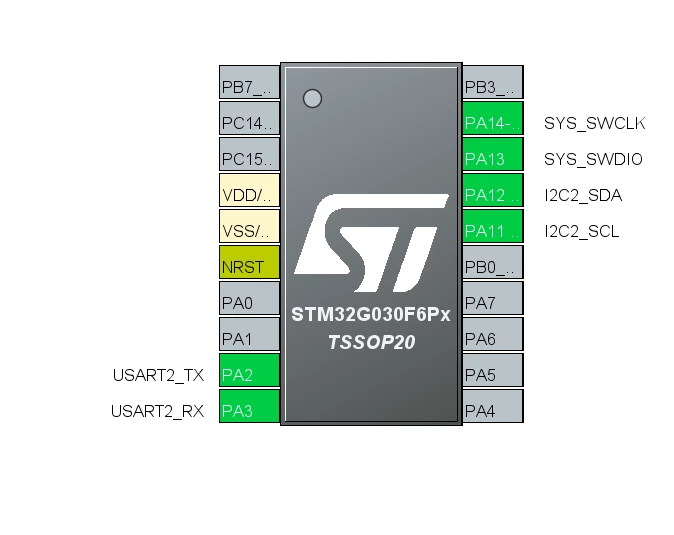
I recently created a custom board based on STM32G030 IC and programmed it via UART to run my application. Now, I want to make some changes to my firmware, but I can not connect to the CubeProgrammer. I have tried connecting it via UART and ST-LINK. Below are the errors i get when I try to connect the board via different methods

via UART- "Error: Activating device: KO. Please, verify the boot mode configuration and check the serial port configuration. Reset your device then try again... "

via ST-Link- "Error: No STM32 target found! If your product embeds Debug Authentication, please perform a discovery using Debug Authentication". The interesting thing here is that CubeProgrammer reads the board as a Nucleo-F303RE(I am using the ST-LINK from this board and have removed the necessary jumpers i.e on CN2)

I have tried to give 3.3V to pin 19(PA14) of the IC which is the Boot0 pin and restarting the board, but I am still not able to program the board. I can confirm that the IC is running the firmware which I uploaded as I can view it on one of my COM ports. How do I get the board back into programming mode? Even the SWD debugging is not working
Bhavil_0-1719049242418.png


Best answer by AScha.3

Ok. 

+

> I would like to reprogram the board using UART

Then you have to use the Boot pin , PA14/15 ; + pulldown (10k) ; + 100nF cap on NRST .

+ set nBOOT_SEL bit -> 0 (with swd connection -> option bytes )

Then (after reset, with boot pin PA14 : high ) you get bootloader access on Rx/Tx .

So you need : nrst, swd, swc, boot pin, and Rx, Tx ; 6 pins for this !

-----

If you just use st-link , swd, then : nrst, swd, swc ; 3 pins .

And you can even the swd+swc pins use for other function, if dont need debug any more;

still have access to swd with hard-reset/under reset , to flash/program/set option bytes .

2 replies

Peter BENSCH
Technical Moderator
June 22, 2024

Welcome @Bhavil, to the community!

What does your ST-LINK look like? Please upload a photo of it, preferably front and back.

Regards
/Peter

In order to give better visibility on the answered topics, please click on Accept as Solution on the reply which solved your issue or answered your question.
BhavilAuthor
Associate II
June 23, 2024

Hi Peter,


Unfortunately I do not have the photo right now, I will upload the photo tomorrow. But if it helps, I am using the ST-LINK present on one of my Nucleo-F303RE boards.

Peter BENSCH
Technical Moderator
June 24, 2024

@Bhavil I had overlooked the fact that you are using a NUCLEO, so a photo is no longer absolutely necessary.

In order to give better visibility on the answered topics, please click on Accept as Solution on the reply which solved your issue or answered your question.
AScha.3
Super User
June 22, 2024

Hi,

how you tried to connect ? (try: software reset )

+

show pic, what programmer shows ...


"If you feel a post has answered your question, please click ""Accept as Solution""."
BhavilAuthor
Associate II
June 23, 2024

Hey Ascha,

I have tried to connect with the SWD pins via Normal mode and the hotplug mode but to no avail. I have tried both Hardware Reset and Software reset. I do not have the picture today, but I'll attach the pictures from the programmer tomorrow.

AScha.3
Super User
June 23, 2024

Hi,

just , for hard reset: is the NRST connected to the G030 ? + check its working , with scope ?

+

What about the Boot pin , PA14/15 ? What you set in option bytes ?

-> Maybe only way to connect with st-link "under reset" , (hardware reset) .

"If you feel a post has answered your question, please click ""Accept as Solution""."
