


BKem.1
Associate II
August 3, 2021
Solved

Accessing GPIOA CRL and CRH registers using STM32 HAL libraries

  • August 3, 2021
  • 5 replies
  • 4638 views

Hey,

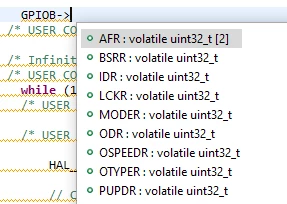
I was wondering how to interface GPIO port registers CRL and CRH with HAL libraries, as I don't see such an option and simple GPIOB->CRL line gives an error.

Here are the available selections:
0693W00000D1P1rQAF.png

This topic has been closed for replies.
Best answer by TDK
That library is for an STM32F103. It's not going to work for you without modification.
The STM32F4 doesn't have CRL/CRH registers in GPIO.

5 replies

TDK
August 3, 2021

CRL and CRH aren't GPIO registers on all chips. On chips that they are, you can access them just fine with GPIOx->CRL and GPIOx->CRH. What chip are you using?

https://github.com/STMicroelectronics/STM32CubeF1/blob/master/Drivers/CMSIS/Device/ST/STM32F1xx/Include/stm32f103xe.h#L483

"If you feel a post has answered your question, please click ""Accept as Solution""."
BKem.1
BKem.1Author
Associate II
August 3, 2021

I'm using a STM32F446VET6 chip.

Might be off topic, but I'm trying to interface a TFT Screen which sends commands through data pins on a GPIO port. And looking through some examples, a writing direction needs to be set, and all libraries use the CRL and CRH registers. Although I have another problem, that my Data pins of the screen are not on the same port..

BKem.1
BKem.1Author
Associate II
August 3, 2021

But as I understand, when selecting writing or reading direction from the screen, you set the pins to input or output mode, which I can do with HAL, right?

waclawek.jan
Super User
August 3, 2021

> when selecting writing or reading direction from the screen, you set the pins to input or output mode

It's simpler in 'F4 (and all other STM32 family) than in 'F1 - simply write 0b00 or 0b01 into the bitfield respective to given pin in GPIOx_MODER.

> which I can do with HAL, right?

Sure, you can even click it in CubeMX (or so I think, I don't use Cube/CubeMX).

JW
