Aatif Shaikh1
Associate III
July 27, 2021
Solved

Unable to program STM32G474RCT3 via JTAG

Hello,

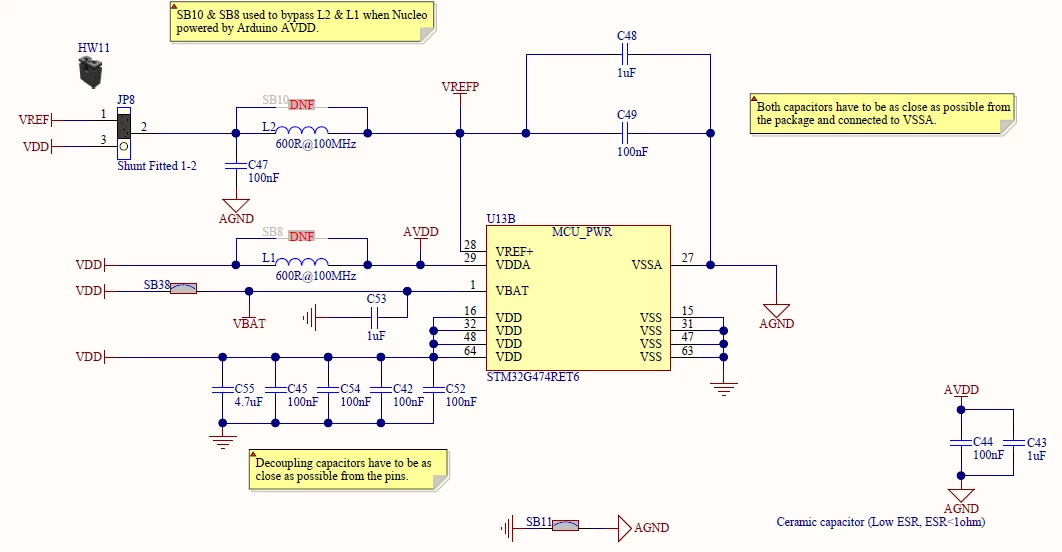
I'm working on a new project in which I'm using the new STMG series for development. At present, I'm trying to program the controller via JTAG. Unfortunately, the ST-Link is not able to connect to the controller. I'm attaching the screenshot of the error message below. Moreover, I'm also adding the schematic snippet for a better understanding. Could someone help me with some guidelines that I need to follow while designing any new custom made boards?

Part Number: STM32G474RCT3.
This topic has been closed for replies.
Aatif Shaikh1
Aatif Shaikh1Best answer
Associate III
July 30, 2021

Hello, Thank you all for your help.

I found the reason why my board was not able to connect it to ST-LINK. As I was not using the RTC in our project, I kept the VBAT pin in the open state. Due to this, the controller was not able to connect it to ST-LINK. So, later I followed the reference design (power section) of the NUCLEO-G474 and connected the VBAT to the VDD. 

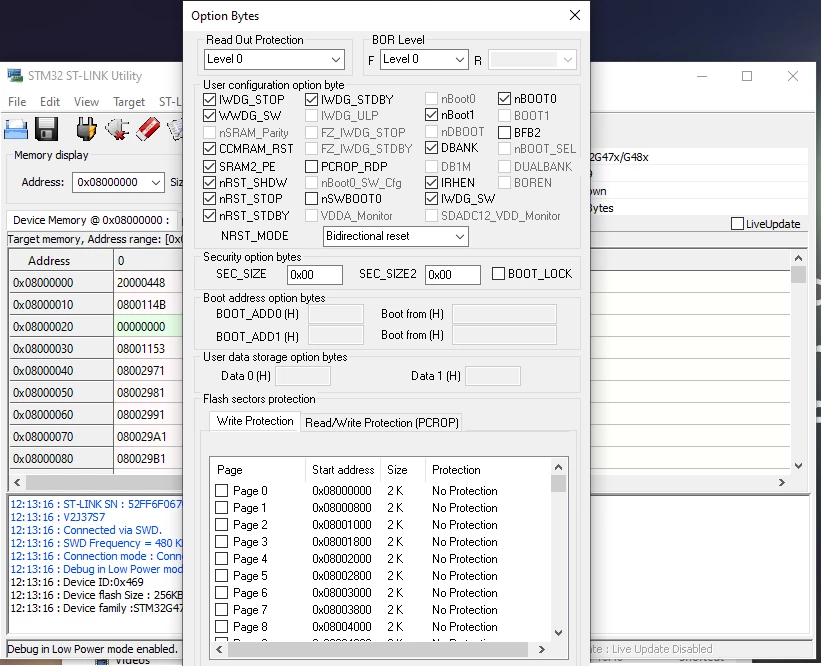
After that, I was able to connect it to ST-LINK and able to program it somehow. Unfortunately, I was still facing some difficulties while mass-erasing and re-programming (always verification failed at random address). Additionally, the code wasn't running appropriately. After checking lots of things, I found out that there were so many issues with option bytes. The default option byte is not correctly set. So, once again, I took the reference of NUCLEO-G474 and changed the option byte accordingly.

0693W00000D14AxQAJ.png0693W00000D14AiQAJ.png

3 replies

TDK
July 27, 2021

Try STM32CubeProgrammer. The pull resistors on the SWD lines are not necessary, but I don't think they will cause problems. Ensure the power rail is stable and VCAP is stable and ~1.2V.

"If you feel a post has answered your question, please click ""Accept as Solution""."
Mike_ST
ST Technical Moderator
July 27, 2021

Please try with the STM32CubeProgrammer software.

ST-Link-utility is officially not recommended anymore.

In order to give better visibility on the answered topics, please click on 'Best answer' on the reply which solved your issue or answered your question. 
Aatif Shaikh1
Aatif Shaikh1AuthorBest answer
Associate III
July 30, 2021

Hello, Thank you all for your help.

I found the reason why my board was not able to connect it to ST-LINK. As I was not using the RTC in our project, I kept the VBAT pin in the open state. Due to this, the controller was not able to connect it to ST-LINK. So, later I followed the reference design (power section) of the NUCLEO-G474 and connected the VBAT to the VDD. 

After that, I was able to connect it to ST-LINK and able to program it somehow. Unfortunately, I was still facing some difficulties while mass-erasing and re-programming (always verification failed at random address). Additionally, the code wasn't running appropriately. After checking lots of things, I found out that there were so many issues with option bytes. The default option byte is not correctly set. So, once again, I took the reference of NUCLEO-G474 and changed the option byte accordingly.

0693W00000D14AxQAJ.png0693W00000D14AiQAJ.png