Associate II
February 12, 2024
Solved

Technical document organization

  • February 12, 2024
  • 2 replies
  • 1401 views

I am trying to find schematic diagram for Nucleo board to know, where button is connected but there are many unnecessary files but where is Schematic? 

This is so annoying when press Ctrl+V and your text inserted in *** block in this form, how can I insert it as plane text? Thanks

Best answer by Andrew Neil

Schematics are usually included in the User Manual - this will be in the 'Documentation' tab of the Product Page; eg,

https://www.st.com/en/evaluation-tools/nucleo-l073rz.html#documentation

They will be available separately in the 'CAD Resources' tab; eg,

https://www.st.com/en/evaluation-tools/nucleo-l073rz.html#cad-resources


@OlegAjax wrote:

This is so annoying when press Ctrl+V and your text inserted in *** block in this form, how can I insert it as pain text? 


That's a general Windows complaint, not specific to this forum; eg, you get the same pasting into Word - it pastes the source format, rather than whatever format you have already in the document.

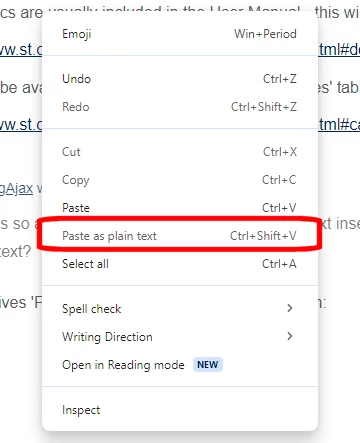
Chrome gives 'Paste as plain text' as a right-click option:
 AndrewNeil_0-1707758577386.png 

Failing that, paste to Notepad (or any other text-only app) first, then copy & paste to the target "rich text" application


EDIT


@OlegAjax wrote:

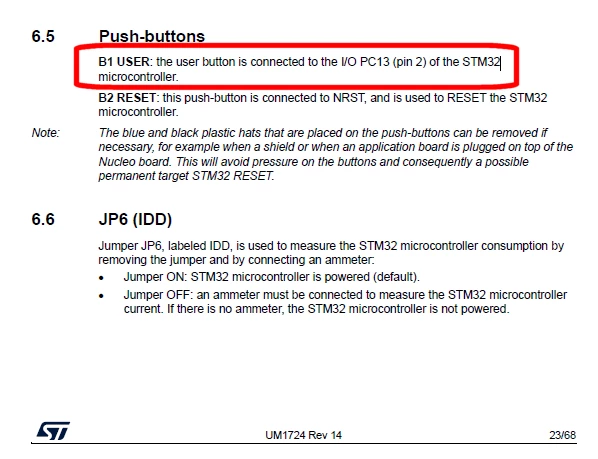
 to know, where button is connected 


That will also be described in the text of the User Manual:
AndrewNeil_1-1707759007775.png

Also:

AndrewNeil_0-1707759128090.png


2 replies

Andrew Neil
Andrew NeilBest answer
Super User
February 12, 2024

Schematics are usually included in the User Manual - this will be in the 'Documentation' tab of the Product Page; eg,

https://www.st.com/en/evaluation-tools/nucleo-l073rz.html#documentation

They will be available separately in the 'CAD Resources' tab; eg,

https://www.st.com/en/evaluation-tools/nucleo-l073rz.html#cad-resources


@OlegAjax wrote:

This is so annoying when press Ctrl+V and your text inserted in *** block in this form, how can I insert it as pain text? 


That's a general Windows complaint, not specific to this forum; eg, you get the same pasting into Word - it pastes the source format, rather than whatever format you have already in the document.

Chrome gives 'Paste as plain text' as a right-click option:

 AndrewNeil_0-1707758577386.png 

Failing that, paste to Notepad (or any other text-only app) first, then copy & paste to the target "rich text" application


EDIT


@OlegAjax wrote:

 to know, where button is connected 


That will also be described in the text of the User Manual:

AndrewNeil_1-1707759007775.png

Also:

AndrewNeil_0-1707759128090.png


A complex system that works is invariably found to have evolved from a simple system that worked.A complex system designed from scratch never works and cannot be patched up to make it work.
olezhandr
Associate III
February 12, 2024

Thank you so much

STTwo-32
Technical Moderator
February 12, 2024

Hello @OlegAjax and welcome to the ST Community :smiling_face_with_smiling_eyes:.

You can find all boards schematics on the CAD RESOURCES of each board for example here you can find the STM32H745I-DISCO schematics.

Best Regards.

STTwo-32 

To give better visibility on the answered topics, please click on Accept as Solution on the reply which solved your issue or answered your question.