Associate II
December 3, 2024
Solved

STWINBX1 loses RTC at poweroff?

Hi

I have found that the STWINBX1 loses RTC at poweroff (or does CubeMX write code to reset RTC at poweron? there is a ticket on that) so that I have to battery-power it on, connect usb, update RTC and then disconnect while still on in order to log without "2001-01-01 00:01". 

Its LiPo battery is connected and above 90%

Is there a remedy?

This topic has been closed for replies.
mƎALLEm
mƎALLEmBest answer
ST Technical Moderator
December 4, 2024

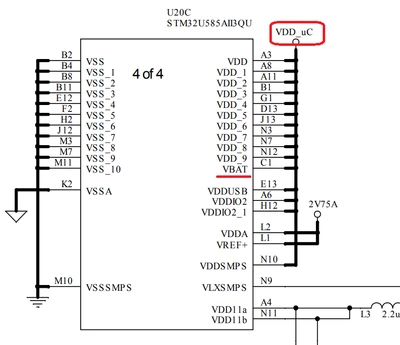
According to the schematics you attached, VBAT pin is hardwired to VDD_uC and not to a dedicated battery cell. So if you lose the power on VDD_uC you will lose the Time/date. So you need to keep VDD_uC powred on.

SofLit_0-1733326674670.png


To give better visibility on the answered topics, please click "Best answer" on the reply which solved your issue or answered your question.

9 replies

mƎALLEm
ST Technical Moderator
December 3, 2024

Hello, 


@Old_Geezer wrote:

or does CubeMX write code to reset RTC at poweron?


Check if you don't configure the the time and date at each power on. Check out this example:

https://github.com/STMicroelectronics/STM32CubeL4/tree/master/Projects/STM32L476G-EVAL/Examples/RTC/RTC_Calendar

You need to configure the Time/Date one and save that status in the Buck up register and at each power on you check this status, if the time/date was configured you escape the time/date settings:

RTC_CalendarConfig() implementation:


static void RTC_CalendarConfig(void)
{
 RTC_DateTypeDef sdatestructure;
 RTC_TimeTypeDef stimestructure;

 /*##-1- Configure the Date #################################################*/
 /* Set Date: Tuesday February 18th 2014 */
 sdatestructure.Year = 0x14;
 sdatestructure.Month = RTC_MONTH_FEBRUARY;
 sdatestructure.Date = 0x18;
 sdatestructure.WeekDay = RTC_WEEKDAY_TUESDAY;
 
 if(HAL_RTC_SetDate(&RtcHandle,&sdatestructure,RTC_FORMAT_BCD) != HAL_OK)
 {
 /* Initialization Error */
 Error_Handler(); 
 } 
 
 /*##-2- Configure the Time #################################################*/
 /* Set Time: 02:00:00 */
 stimestructure.Hours = 0x02;
 stimestructure.Minutes = 0x00;
 stimestructure.Seconds = 0x00;
 stimestructure.TimeFormat = RTC_HOURFORMAT12_AM;
 stimestructure.DayLightSaving = RTC_DAYLIGHTSAVING_NONE;
 stimestructure.StoreOperation = RTC_STOREOPERATION_RESET;
 
 if(HAL_RTC_SetTime(&RtcHandle,&stimestructure,RTC_FORMAT_BCD) != HAL_OK)
 {
 /* Initialization Error */
 Error_Handler(); 
 }
 
 /*##-3- Writes a data in a RTC Backup data Register0 #######################*/
 HAL_RTCEx_BKUPWrite(&RtcHandle,RTC_BKP_DR0,0x32F2); 
}


-> it sets the value 0x32F2 in the BKP registers after configuring the calendar.

That will be checked later on at power up.


 /*##-2- Check if Data stored in BackUp register1: No Need to reconfigure RTC#*/
 /* Read the Back Up Register 1 Data */
 if (HAL_RTCEx_BKUPRead(&RtcHandle, RTC_BKP_DR1) != 0x32F2)
 {
 /* Configure RTC Calendar */
 RTC_CalendarConfig();
 }
 else
 {


 Hope that answers your question.

To give better visibility on the answered topics, please click "Best answer" on the reply which solved your issue or answered your question.
Associate II
December 3, 2024

Hope it does, bc it's running your DATALOG2v2.2.0 demo, downloaded and flashed "as is" :)

mƎALLEm
ST Technical Moderator
December 3, 2024

Sorry I don't have idea about this demo even about this STWINBX1 board but the concept is the same as long as this box is based on a STM32 MCU ;)

To give better visibility on the answered topics, please click "Best answer" on the reply which solved your issue or answered your question.