


MLakc.1
Associate
March 16, 2023
Solved

STMF334R8 not found in debug

When I try too start debugging I get this message:
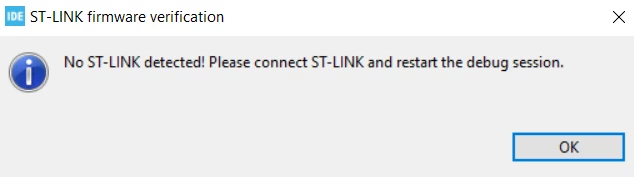
0693W00000aJ8ESQA0.pngI checked the drivers and the device is showing as a USB Composit Device and I have no alternative to change the driver.

I installed en.stsw-link009 and successfully installed some drivers but they are not available in device manager.

I uninstalled the device in device manager but still no change.

I even installed the newest STM32CubeIDE 1.12.0 but still no change.

Does anybody have another idea?

This topic has been closed for replies.
MLakc.1
MLakc.1Best answer
Associate
March 16, 2023

I tried with another cable it was still not working.

But, I changed PC to my desktop and it worked, it probably had something to do with my laptop not exactly sure what, I'm going to continue working from my desktop and hopefully it's going to work now.

​

The difference now is the power led is green.​

13 replies

Peter BENSCH
ST Technical Moderator
March 16, 2023

Welcome, @MLakc.1​, to the community!

What kind of ST-LINK are you using? Can you upload a photo of it?

Regards

/Peter

In order to give better visibility on the answered topics, please click on Accept as Solution on the reply which solved your issue or answered your question.
MLakc.1
MLakc.1Author
Associate
March 16, 2023

yes it's a NUCLEO-F334R8

now it's not connected so there is no light, when connected it has 2 red leds showing
_legacyfs_online_stmicro_images_0693W00000aJ8CwQAK.png

Peter BENSCH
ST Technical Moderator
March 16, 2023

OK, please try to upgrade the embedded ST-LINK/V2-1 using STM32CubeIDE and the command:

Help > ST-Link Upgrade

In order to give better visibility on the answered topics, please click on Accept as Solution on the reply which solved your issue or answered your question.
MLakc.1
MLakc.1Author
Associate
March 16, 2023

It doesn't recognise the ST-LINK/V2-1

0693W00000aJ8K6QAK.png

Peter BENSCH
ST Technical Moderator
March 16, 2023

The ST-LINK/V2-1 cannot be recognised because it does not receive any supply voltage.

Please set a jumper on JP1 (directly next to the MiniUSB socket).

Regards

/Peter

In order to give better visibility on the answered topics, please click on Accept as Solution on the reply which solved your issue or answered your question.
MLakc.1
MLakc.1Author
Associate
March 16, 2023

0693W00000aJ8RCQA0.jpgI don't have an extra one right now.

I recieved this device from somebody and it already has some jumpers:

  • 2 on the two gnd connections on the bottom
  • 1 in IDD
  • 2 in CN2 - it says st-link on the side
  • and 1 in PWR

can I remove any of these?

Peter BENSCH
ST Technical Moderator
March 16, 2023

The two GND jumpers at the bottom are spare ones, your can easily take any of them.

In order to give better visibility on the answered topics, please click on Accept as Solution on the reply which solved your issue or answered your question.
Peter BENSCH
ST Technical Moderator
March 16, 2023

Sorry, I made a mistake - the supply voltage does not route via JP1, but is connected directly to the STM32F103. So you can disconnect it again and set the jumper back to the bottom side.

The other jumpers were set correctly (PWR = U5V, IDD = set and 2 jumpers on ST-LINK).

If the USB port on your computer works otherwise, there are now only two possibilities: the USB cable is defective or the ST-LINK has been damaged.

Regards

/Peter

In order to give better visibility on the answered topics, please click on Accept as Solution on the reply which solved your issue or answered your question.
Tesla DeLorean
Guru
March 16, 2023

Bad cables, won't work with charging cables.

Try different cables, try different USB ports.

Avoid docking stations and hubs.

Got a multi-meter or scope, perhaps check board voltages.

Tips, Buy me a coffee, or three.. PayPal Venmo (See Profile) Up vote any posts that you find helpful, it shows what's working..
MLakc.1
MLakc.1Author
Associate
March 16, 2023

I'll get a new cable and come back to you, Thanks for the help!

MLakc.1
MLakc.1AuthorBest answer
Associate
March 16, 2023

I tried with another cable it was still not working.

But, I changed PC to my desktop and it worked, it probably had something to do with my laptop not exactly sure what, I'm going to continue working from my desktop and hopefully it's going to work now.

​

The difference now is the power led is green.​