STM32F429I-DISC1 SDRAM - one exact bit always comes back wrong when I read data back, no matter what I change
Board: STM32F429I-DISC1 (the official ST discovery board), using its onboard SDRAM chip (IS42S16400J-7TLI, 8MB)
Framework: Zephyr RTOS 3.7.0
What I'm trying to do:
This board has a small TFT LCD screen attached to it. I'm trying to display an image/text on that screen by drawing directly into the external SDRAM chip, which acts as the screen's picture buffer (framebuffer) - the display hardware (LTDC) continuously reads whatever's in that SDRAM and shows it on the screen. So the whole approach depends on being able to reliably write pixel data into SDRAM and have it come back out correctly.
The problem, in plain terms:
Whenever I write a value into the SDRAM and immediately read it back, one specific bit out of the 16 bits always comes back wrong - always the same one, every single time, no exceptions. For example:
I write: 0xABCD → I read back: 0xAB4D
I write: 0xBADC → I read back: 0xBA5C
I write: 0x89EF → I read back: 0x896F
Notice in every case, the value comes back almost identical to what I wrote, except one bit has flipped from 1 to 0. It's never a different bit, never random - same one every time. I also tested writing the same value and reading it back once immediately and once 200 milliseconds later, and both reads gave the exact same (wrong) answer - so it's not fading/decaying over time, it's wrong from the very first instant.
Because of this, the screen doesn't show what I actually drew - instead of my intended image/text, the screen shows solid wrong colors or garbled blocky patches.
What I've already tried changing, to see if any of it fixes the problem (none of them made any difference at all):
1. Double- and triple-checked that I'm actually writing to the correct memory address (confirmed three separate ways).
2. Recalculated and corrected the SDRAM's refresh timing settings from scratch using the official datasheet numbers.
3. Checked all the other SDRAM timing settings (how long the chip needs to wait between different operations) against the datasheet, then made them noticeably more generous than the minimum required - no change.
4. Changed a setting called "CAS latency" (how many clock cycles the chip takes to respond to a read command) - no change.
5. Copied the exact SDRAM startup settings from a different, already-proven-working example project that uses the same exact chip on the same exact board - no change.
6. Completely removed the screen/display code from my program, so absolutely nothing else was using the memory at the same time as my test - no change, exact same result.
7. Checked ST's own official list of known chip bugs for this exact processor family - none of the documented bugs match this symptom.
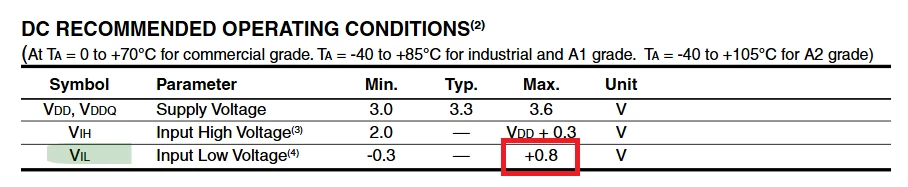
8. Reconfigured that exact same physical processor pin to just be a simple on/off output (nothing to do with memory at all) and measured it with a multimeter. It does switch on and off, but instead of cleanly reaching full voltage (around 3.3V) and full zero (0V), it only reaches about 2.9V and 0.8V - a weaker signal than it should be.
My question: Since changing every single software/timing setting I can find made absolutely no difference, and the problem is stuck to one exact physical pin on the chip (the one connected to this particular bit of the memory chip), does this sound like a physical/hardware fault on this specific board (like a bad solder connection) rather than something fixable in software? Or is there some other software explanation for one single, fixed bit always being wrong that I might be missing - since this doesn't match any of the timing-related bugs ST has documented?