


Johi
Senior II
December 10, 2023
Question

STM32F407VET6 ICB JLINK : No device found

  • December 10, 2023
  • 3 replies
  • 4529 views

Hello,

I have 3 of these (chinese origin) boards, 2 are failing communication, 1 is ok.
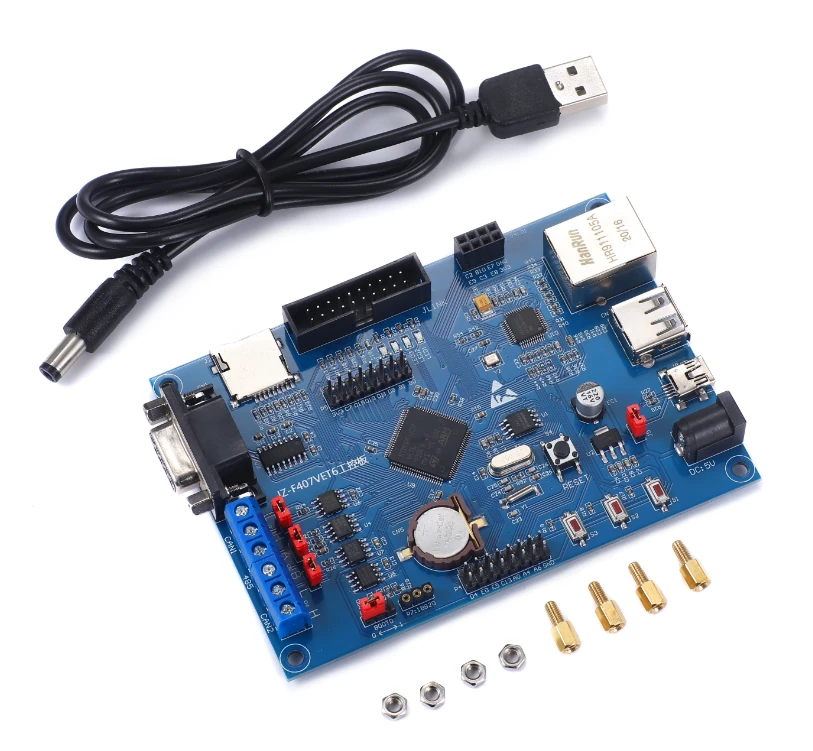
Johi_0-1702195538842.png

In essence my STLINK-V3SET fails to connect to the board but the led's on the brand new board are blinking. Therefore the MCU processor is running. I measured the 3.3V power supply pins on my STLINK and they are not powering the board (board is powered externally), so a 3.3 conflict does not seem to be the origin of the broken board, my question: are there any other steps that can be taken to repair the JLINK interface or at least find the origin of the problem? 


This topic has been closed for replies.

3 replies

Mike_ST
Technical Moderator
December 13, 2023

Hello,

we don't know this board, do you have the schematic ?

You're talking about JLINK and ST-LINK. Which one are you using ?

Maybe the board that is not working already has a firmware inside that when executing prevents to use the debug pins.

Solution would be to connect under reset or connect via bootloader with boot0 set to 1 and perform a mass erase.

In order to give better visibility on the answered topics, please click on 'Best answer' on the reply which solved your issue or answered your question. 
Johi
JohiAuthor
Senior II
December 15, 2023

Hello,

Schematic drawing see attachement.

As I see jlink with both SWD and JTAG capabilities via ST-LINK V3.

Both work correctly on twin board that is OK.

Tried the following:

Johi_0-1702669501323.pngJohi_1-1702669552959.png

Where pin 3 and 2 are connected on pin 8.

So I suppose all is ok.

What I do see is that the 3.3V on the bogus board is there but the ac voltage on the Y1 is much lower compared to the OK board. (140 mV ok & 14 mV nok). However one of the LED's on the board is blinking so the processor is running. I also replaced Y1 with a brand new one. However I do not believe Y1 is necessary for an operational board.

So thank you for the reply but no result yet.


Tesla DeLorean
Guru
December 15, 2023

Looks more like a Generic ARM 20-pin JTAG, not "J-LINK" specifically, although the Silk-Screen suggests that what they referred to it as

You could select "SWD" as the connection method, it uses a sub-set of the full JTAG pins.

ST Tools may reject connectivity if the parts is a counterfeit or clone device. Board and processor need to be properly powered for the SWD/JTAG interface to be viable.

Tips, Buy me a coffee, or three.. PayPal VenmoUp vote any posts that you find helpful, it shows what's working..
Johi
JohiAuthor
Senior II
December 16, 2023

Thank you for the info.

I have 3 boards, identical design (except for the color of the headers :).

The first board, the older one, SWD and JTAG operating fully no connection problems whatsoever.

The 2 recent boards, SWD, JTAG, even connect under reset with Boot 0 = 1, no connection.

Therefore, sorry to say and respect for what you do for the people on the forum, but your post did not hit the target this time.