Jutt
Associate II
September 6, 2019
Solved

ST-Link V3 is not working with Connect under Reset

  • September 6, 2019
  • 7 replies
  • 4771 views

Hello.

i am using stm32L0 family.i have ST-Link V3. its working fine with st link utility tool. i can connect using cli command with normal mode. so the issue is Connect under Reset. CLI command is not working if i connect in Connect under Reset mode.

ST-LINK_CLI.exe -c ID=0 SWD UR LPM

output

STM32 ST-LINK CLI v3.5.0.0

STM32 ST-LINK Command Line Interface

[UR]: Connect under Reset is available only on ST-LINK/V2!

st link utility tool can connect Under Reset mode but not cli exe.

This topic has been closed for replies.
Best answer by Nesrine.JLASSI

Hello @Jutt​ 

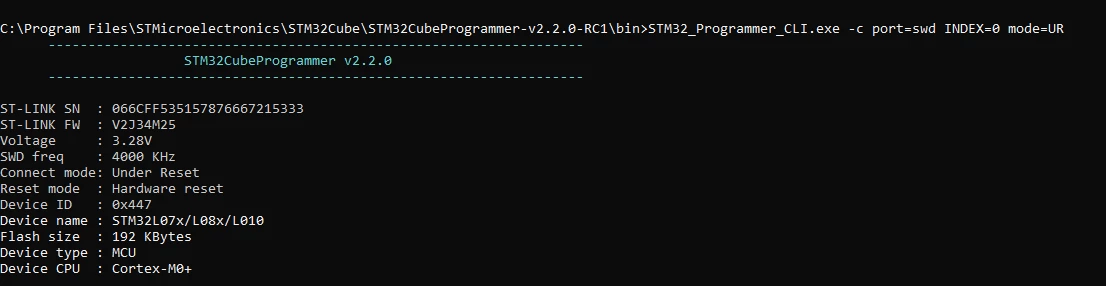
I just tested the same scenario with cubeprogrammer and stlink utility: stlink V3 does not work with stlink utility so Cubeprogrammer is the solution (it works correctly) .

stlink utility is no longer under support.

0690X00000ARJ72QAH.png

Best regards,

Nesrine

7 replies

Jutt
JuttAuthor
Associate II
September 16, 2019

No Answer from St, as usual.

Nesrine.JLASSI
Nesrine.JLASSIBest answer
Visitor II
September 17, 2019

Hello @Jutt​ 

I just tested the same scenario with cubeprogrammer and stlink utility: stlink V3 does not work with stlink utility so Cubeprogrammer is the solution (it works correctly) .

stlink utility is no longer under support.

0690X00000ARJ72QAH.png

Best regards,

Nesrine

Jutt
JuttAuthor
Associate II
September 17, 2019

thank you for reply. is there any command in cubeprogrammer  to erase the eeprom ? i check the manual but was not successful.

Nesrine.JLASSI
Visitor II
October 7, 2019

​Hi @Jutt​ 

There is no way to delete the eeprom manually, you must program an external flash memory.

Regards,

Nesrine

Jutt
JuttAuthor
Associate II
June 22, 2020

@Nesrine.JLASSI​ 

short feed back from side. stm32L07x family is working fine.

when i test with stm32L051.i have same issue.

St link V3

Cube programmer V2.4

connect under reset.

here is error msg from cubeprogrammer "Error: ST-LINK error (DEV_CONNECT_ERR)"

thank you

OE1
Associate II
September 4, 2020

Greetings,

I'm also experiencing the same problem with both stm32L051 and stm32L052 when using STLINK-V3.

No problem on stm32L452.

Here's my command line for it :

STM32_Programmer_CLI.exe --connect port=SWD mode=UR reset=hwRst --download "software.bin" 0x08000000 --verify -Rst

and what it shows :

0693W000003QojfQAC.png

Exact same command with same STM32_Programmer_CLI.exe works perfectly when using STLINK-V2.

Any possible fix?

Thanks forward

Uwe Bonnes
Chief
September 7, 2020

STLINKV3 rejects connection in many situations where V2 connects successfull!

simosilva
Senior
October 19, 2021

Hi,

I'm able to connect and program correctly with STLink V3 mini, with slightly different configuration but still effective.

Here my .bat:

STM32_Programmer_CLI.exe -c port=SWD sn=<insert_here_the_optional_serial_number> -w <Path/to/the/binary/Application.bin> 0x80000000
STM32_Programmer_CLI.exe -c port=SWD sn=<insert_here_the_optional_serial_number> -rst

This will program the binary end then reset the MCU so application automatically run after the script end.

I used serial number to program different targets with the same script.