

Associate
June 23, 2026
Solved

ST-Link/v2 can't connect to MCU

  • June 23, 2026
  • 6 replies
  • 111 views

Hi,

I’m using a NUCLEO-C031C6 64 board.

I successfully setup the tool chain and ran several test from STM32CubeMX templates, directly compile and programming through STM32CubeIDE.

Until this morning, everything was working fine.

But I have lost the connection to the MCU later on.


From STM32CudeIDE:

Target unknown error 19

Error in initializing ST-LINK device.

Reason: Unknown. Please check power and cabling to target.


Using of STM32CubeProgrammer:

  • Recognized as mass storage
  • On board ST-LINK/V2 is recognized, updated to version V2J47M34 successfully
  • Full chip erase and board recognition works fine on the NUCLEO-G031K8 board

But I have repetitively following messages while I try to connect ():
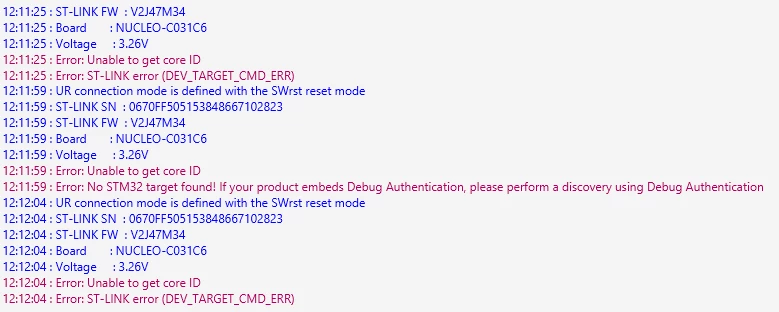
 

I have tried unsuccessfully:

  • under reset mode 
  • external SWD ST-LINK


How can I debug futher?

Did I miss something?

Thanks!


Best answer by Fabrizio32

Thanks all for your suggestion.


I tried several reset configuration, both on the board and with CubeProgrammer options.

Everything was normal on the scope from ST-Link side (SWD signal, NRST).

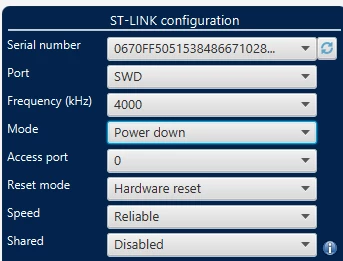
I finally get back access to the STM32 using the option “power down”:


I erased completely the MCU and I can now program it again with CubeProgrammer or directly after compilation with CubeIDE.


Thanks!

6 replies

Andrew Neil
Super User
June 23, 2026

Is your software using low-power modes, and/or reconfiguring the SWD pins ?

Have you enabled any security/protection ?


Try connecting from CubeProgrammer.


A complex system that works is invariably found to have evolved from a simple system that worked.A complex system designed from scratch never works and cannot be patched up to make it work.
Associate
June 23, 2026


The program is a basic CubeMX configuration template. I have no low-power mode or security settings.

I played with clock configuration and somehow disabled the “serial wire” debug in one of my tests. Beyond this point, I couldn’t recover the connection with the MCU 

Andrew Neil
Super User
June 24, 2026

Connecting under hardware reset should get you out of that.

Or use the System bootloader.

A complex system that works is invariably found to have evolved from a simple system that worked.A complex system designed from scratch never works and cannot be patched up to make it work.
Associate II
June 24, 2026

Until this morning, everything was working fine.

But I have lost the connection to the MCU later on.


between this period of time, is there any change on the board or your laptop? looks wired...

Fabrizio32AuthorBest answer
Associate
June 25, 2026

Thanks all for your suggestion.


I tried several reset configuration, both on the board and with CubeProgrammer options.

Everything was normal on the scope from ST-Link side (SWD signal, NRST).

I finally get back access to the STM32 using the option “power down”:


I erased completely the MCU and I can now program it again with CubeProgrammer or directly after compilation with CubeIDE.


Thanks!

Associate II
June 25, 2026

well done and congratulations~~