

MLemo.1
Associate III
June 26, 2020
Solved

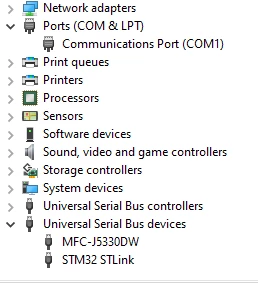
ST-link V2 appears as a USB device instead of a COM PORT

  • June 26, 2020
  • 2 replies
  • 9639 views

Hello,

Like the title says when I connect an ST-link to a computer to try to program an NRF52 through an arduino with it it won't show up on COM port but can be found in device manager under "USB devices" as can seen by this picture:
 0693W000001rcrIQAQ.png

How do you fix that problem and make the device appear as a COM port?

BTW I have a similar problem with the original ST link and J link as well.

This topic has been closed for replies.

2 replies

Pavel A.
Super User
June 27, 2020

Does your ST-Link V2 have a VCOM function? If not - this is normal, not a problem.

The usual white ST-Link v2 dongles do not have VCOM. Bring your own USB to TTL UART adapter.

-- pa

MLemo.1
MLemo.1Author
Associate III
June 27, 2020

It used to show up as a com port an year ago but didn't touch it since then and not realy sure what happened I also remembering fidling with it's drivers a bit

Pavel A.
Super User
June 28, 2020

Please select the "STM32 STlink" in dev. manager, then click View-> Devices by container. Post the picture.

-- pa

MLemo.1
MLemo.1AuthorBest answer
Associate III
June 28, 2020