


SSpad.1
Associate II
October 20, 2020
Question

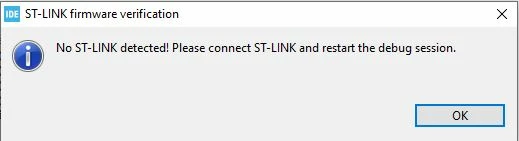
[Solved] Hi, I'm working with STM32F103C8T6. When I try to debug, it appers the window "No ST-LinkDetected! Please connect ST-Link and restart the debug session". I tried to modify debug configuration, but I can't debug my project. Can you help me?
0693W000004KRX3QAO.jpg

This topic has been closed for replies.

15 replies

Tesla DeLorean
Guru
October 20, 2020

Does the ST-LINK show up in Device Manager? Get the Windows Ding-**** sounds when inserted/removed?

Try different cables, different ports.

Avoid hubs and docking stations.

Don't use charging cables.

Tips, Buy me a coffee, or three.. PayPal Venmo (See Profile) Up vote any posts that you find helpful, it shows what's working..
SSpad.1
SSpad.1Author
Associate II
October 21, 2020

I don't use charging cables or hubs or docking stations: I've connected directly the device to the USB port of my PC. I've already tried to connect the device to different port, but the problem persists-

PatrickF
ST Employee
October 22, 2020
In order to give better visibility on the answered topics, please click on 'Best Answer' on the reply which solved your issue or answered your question.Tip of the day: Try Sidekick STM32 AI agent
LaurentL
ST Employee
October 26, 2020

You need to install the latest STM32CubeIde version with installer (v1.4.0).

It will install STLink usb driver but also STlink server.

Rgds,

Laurent

To give better visibility on the answered topics, please click on Accept as Solution on the reply which solved your issue or answered your question.
SSpad.1
SSpad.1Author
Associate II
December 3, 2020

Hi, I've tried to uninstall the old version and install STM32CubeIDE 1.5.0; I've installed all ST-LINK driver (I think!), and I've tried to update ST-LINK Firmware, but my problem persists. Have you got an idea?

Thank you for helping me.

Tesla DeLorean
Guru
December 3, 2020

Does the ST-LINK show up in Device Manager? I don't recall getting a yes/no answer on this.

Is this a laptop? DELL? Corporate?

Are there any policy settings preventing USB MSC being plugged in?

What ST-LINK do you have? Official one, boot-leg?

Tips, Buy me a coffee, or three.. PayPal Venmo (See Profile) Up vote any posts that you find helpful, it shows what's working..
LaurentL
ST Employee
December 4, 2020

Hello,

Try to install CubeIde 1.5.0 via installer (not upgrade).

With admin rights to install STLink Usb drivers and STlink server.

Then, check that you see the STLink in USB device in device manager.

Rgds,

Laurent

To give better visibility on the answered topics, please click on Accept as Solution on the reply which solved your issue or answered your question.
Vangelis Fortounas
Associate II
December 5, 2020

Hello,

this device does not contains STLink but communicates with USB-Serial portocol.

Debuging with USB_serial port is imposible.

It is posible to program MCU by using STM32CubeProgrammer in UART mode and pulling up BOOT0 pin (jumper).

SSpad.1
SSpad.1Author
Associate II
December 7, 2020

Thank you for your advice.

The software doesn't recognize the device, the connection is possible only in OTA mode, and I can't update the firmware.

I have a question: when I use STM32CubeProgrammer, to program the device I need another programmer, or it's enough to connect the device to USB port?

SSpad.1
SSpad.1Author
Associate II
December 10, 2020

Hello, I managed to solve my problem.

I've used a USB to Serial chip connected to MCU, BOOT0 connected to 3V3, and STM32CubeProgrammer in the UART mode; I've downloaded the .bin file of my project and I've programmed my device. Now it works correctly.

If there's a mistake in this solution, please tell me.

Thank you very much for helping me.