Visitor
Oct 27, 2026 1:10 PM UTC
Solved

NUCLEO-C5A3ZG (Nucleo-144) Display and CAN Expansion Boards

I am trying to find a compatible display for the C5A3ZG board.  The user manual suggests it is compatible with the X-NUCLEO-GFX01Mx series displays, but that data sheets for those boards do not list the C5AZG as compatible.  The C5AZG is a Nucleo-144 board which offers the X-NUCLEO-GFX02Z1 display for 144 boards but C5AZG is also not listed as compatible.

Is there a recommended expansion display board for the C5A3ZG?

Additionally, is there an expansion board that offers a CAN interface for the C5AZG?

mƎALLEm
mƎALLEmBest answer
ST Technical Moderator
Oct 27, 2026 2:44 PM UTC

Hello,

To me there is nothing preventing using NUCLEO-C5A3ZG with X-NUCLEO-GFX02Z. Need to confirm by checking the schematics.

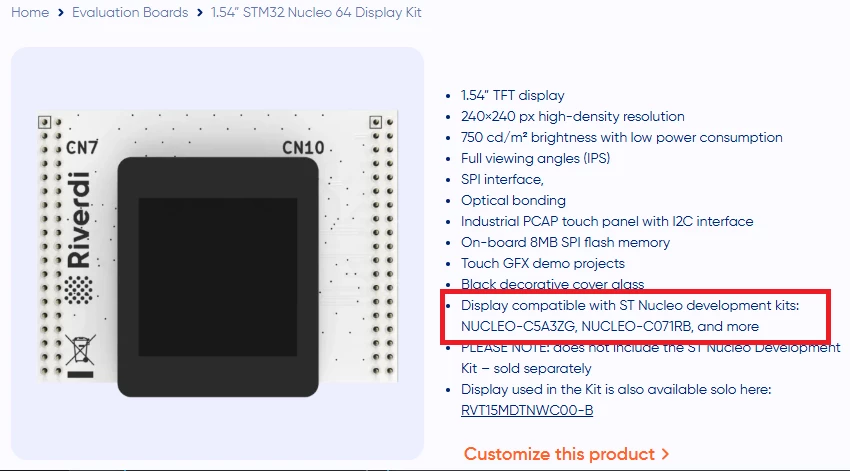
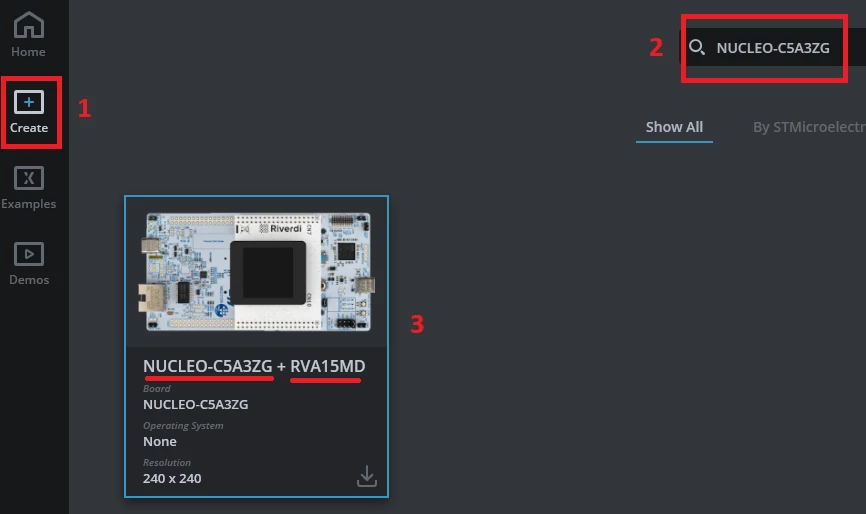
But what is sure is that RVA15MD display extension board (by Riverdi) is supported by NUCLEO-C5A3ZG:

Proof: with TouchGFX designer tool when you select NUCLEO-C5A3ZG as a target board, you see this:

Hope that answers your question.

To give better visibility on the answered topics, please click "Best answer" on the reply which solved your issue or answered your question.

7 replies

mƎALLEm
ST Technical Moderator
Oct 27, 2026 1:56 PM UTC

Hello ​@RobotDev and welcome to the ST community,

X-NUCLEO-GFX01Mx are only compatible with NUCLEO-64 boards while X-NUCLEO-GFX02Z are only compatible with NUCLEO-144.

For CAN, you need either to add an external CAN transceiver (to my knowledge no such expansion board offered by ST) or simply solder a CAN transceiver on the board. Not soldered by default:


To give better visibility on the answered topics, please click "Best answer" on the reply which solved your issue or answered your question.
RobotDevAuthor
Visitor
Oct 27, 2026 2:05 PM UTC

Thanks for the quick response ​@mƎALLEm.  So does this mean that the X-NUCLEO-GFX02Z will work with the C5A3ZG, which is a NUCLEO-144 board even though the data sheet for the GFX02Z does not list the C5A3ZG as compatible?

mƎALLEm
mƎALLEmBest answer
ST Technical Moderator
Oct 27, 2026 2:44 PM UTC

Hello,

To me there is nothing preventing using NUCLEO-C5A3ZG with X-NUCLEO-GFX02Z. Need to confirm by checking the schematics.

But what is sure is that RVA15MD display extension board (by Riverdi) is supported by NUCLEO-C5A3ZG:

Proof: with TouchGFX designer tool when you select NUCLEO-C5A3ZG as a target board, you see this:

Hope that answers your question.

To give better visibility on the answered topics, please click "Best answer" on the reply which solved your issue or answered your question.
RobotDevAuthor
Visitor
Oct 27, 2026 2:50 PM UTC

Oh wow… thank you!  I did not realize I could use the GFX tools to see what’s supported.  I don't have the development board yet, but I will install the software right away.  Again, thanks for the help.

mƎALLEm
ST Technical Moderator
Oct 27, 2026 2:55 PM UTC

OK if you find my previous post answerd your question, don’t hesitate to mark it as Best Answer.

Thank you.

To give better visibility on the answered topics, please click "Best answer" on the reply which solved your issue or answered your question.
Andrew Neil
Super User
Oct 27, 2026 3:08 PM UTC

The user manual suggests it is compatible with the X-NUCLEO-GFX01Mx series displays

It looks like those boards have SPI displays?

If that’s suitable for your requirements, it should be easy to connect any SPI display to the SPI pins available on any Nucleo (or other) board ?


A complex system that works is invariably found to have evolved from a simple system that worked.A complex system designed from scratch never works and cannot be patched up to make it work.
mƎALLEm
ST Technical Moderator
Oct 27, 2026 3:15 PM UTC

If that’s suitable for your requirements, it should be easy to connect any SPI display to the SPI pins available on any Nucleo (or other) board ?

yes if the extension board is not directly pluggable on the board in that case he needs to use wiring. But I think he’s looking for a directly pluggable extension board.

To give better visibility on the answered topics, please click "Best answer" on the reply which solved your issue or answered your question.