

M95512-D EEPROM with STM32F103RCT7 Communication is not working.
 Hi,
Hi,
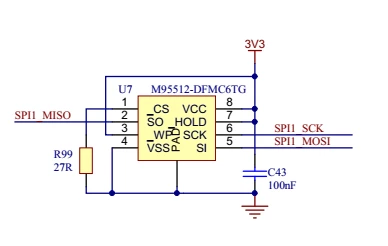
Im using M95512-D EEPROM with STM32F103RCT7. EEPROM is connected with SPI2.
My Initialization and Read Write Process are given below, Please help me to make it work,
-----------------------------------------------------------------------------------------------------------------
/* SPI2 parameter configuration*/
hspi2.Instance = SPI2;
hspi2.Init.Mode = SPI_MODE_MASTER;
hspi2.Init.Direction = SPI_DIRECTION_2LINES;
hspi2.Init.DataSize = SPI_DATASIZE_8BIT;
hspi2.Init.CLKPolarity = SPI_POLARITY_LOW;
hspi2.Init.CLKPhase = SPI_PHASE_1EDGE;
hspi2.Init.NSS = SPI_NSS_SOFT;
hspi2.Init.BaudRatePrescaler = SPI_BAUDRATEPRESCALER_8;
hspi2.Init.FirstBit = SPI_FIRSTBIT_MSB;
hspi2.Init.TIMode = SPI_TIMODE_DISABLE;
hspi2.Init.CRCCalculation = SPI_CRCCALCULATION_DISABLE;
hspi2.Init.CRCPolynomial = 10;
if (HAL_SPI_Init(&hspi2) != HAL_OK)
{
Error_Handler();
}
/* User Code*/
uint8_t sEEstatus[1] = { 0x00 };
uint8_t command[1] = { EEPROM_RDSR };// EEPROM_RDSR =0x05
// Send "Read Status Register" instruction
if (HAL_SPI_Transmit(&hspi2, (uint8_t*)command,1, 200) != HAL_OK) {
Error_Handler();
}
// Loop as long as the memory is busy with a write cycle
do {
while (HAL_SPI_Receive(&hspi2, (uint8_t*)sEEstatus, 1, 200) == HAL_BUSY) {
HAL_Delay(1);
};
HAL_Delay(1);
} while ((sEEstatus[0] & EEPROM_WIP_FLAG) == SET);
// Write in progress
------------------------------------------------------------------------------------------------------
Status is always 0xFF i.e. not reading the data from eeprom
Please correct me if my code is wrong.
schematic for reference:
thanks,
pratheep
