Associate III
December 22, 2023
Solved

LwIP debug log not displayed

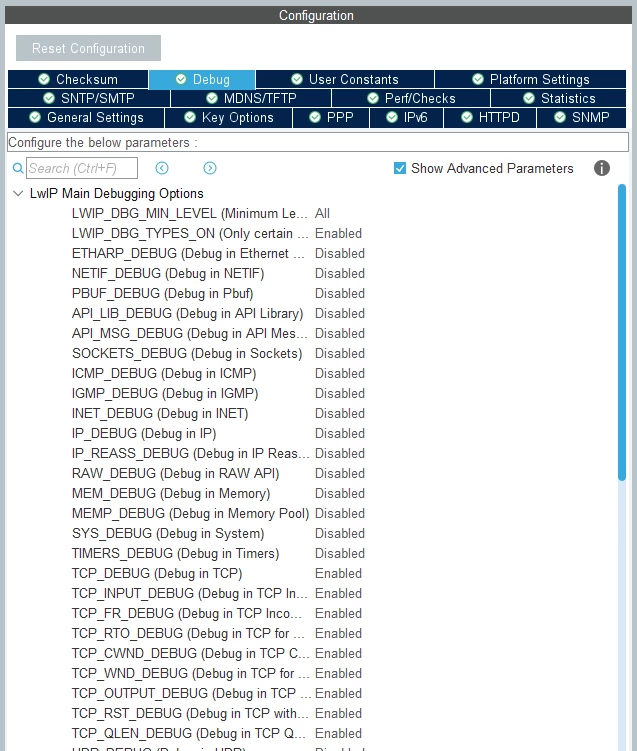
I'm trying to view the LwIP debug log to check Ethernet operation on the nucleo-f429zi board. I tested the operation after setting the code as shown below, but the LwIP debug log is not displayed. The code below is for printing debug logs.

Can you tell me the correct settings for LwIP debug log output?
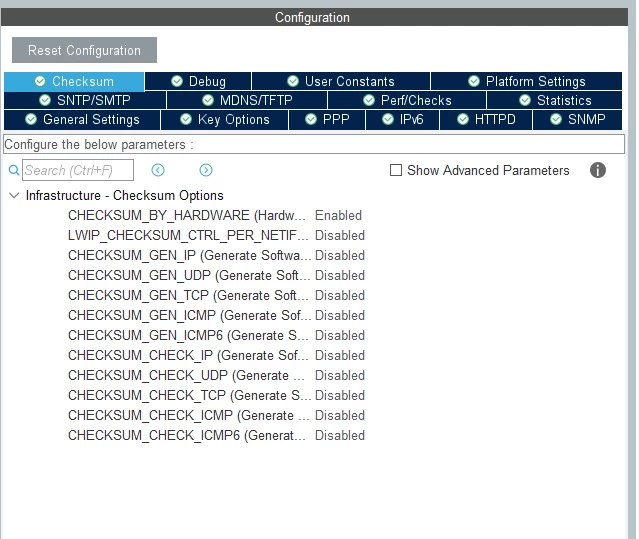
 

image1.pngimage2.png

/* Private define ------------------------------------------------------------*/
/* USER CODE BEGIN PD */
#ifdef __GNUC__
 /* With GCC, small printf (option LD Linker->Libraries->Small printf
 set to 'Yes') calls __io_putchar() */
 #define PUTCHAR_PROTOTYPE int __io_putchar(int ch)
#else
 #define PUTCHAR_PROTOTYPE int fputc(int ch, FILE *f)
#endif /* __GNUC__ */
PUTCHAR_PROTOTYPE
{
 /* Place your implementation of fputc here */
 /* e.g. write a character to the EVAL_COM1 and Loop until the end of transmission */
 HAL_UART_Transmit(&huart3, (uint8_t *)&ch, 1, 0xFFFF);

 return ch;
}
/* USER CODE END PD */


This topic has been closed for replies.
joseph05Best answer
Associate III
December 26, 2023
 

The main file I used was C++, so I changed the log output method as shown below and it worked well.


/* Private define ------------------------------------------------------------*/
/* USER CODE BEGIN PD */
#ifdef __cplusplus
extern "C" int _write(int32_t file, uint8_t *ptr, int32_t len) {
#else
int _write(int32_t file, uint8_t *ptr, int32_t len) {
#endif
 for(int32_t i = 0; i < len; ++i) { ITM_SendChar(*ptr++); }
 return len;
}

/* USER CODE END PD */


4 replies

Pavel A.
December 24, 2023

> The code below is for printing debug logs.

Nope, this code is a helper to implement printf and its friends.

If you call printf or puts in main()  - will it work? Is LwIP in your project configured to use printf for its debug prints?

Johi
Senior II
December 25, 2023

If you trace into the source code of LWIP you can see what the problem is by evaluating the source code, one example:

Johi_0-1703536586546.png

In my case:

Johi_1-1703536616902.png

so UDP_DEBUG was on, that seems ok.

But if I check LWIP_DEBUGF i see:

Johi_2-1703536700725.png

The grayed code is not active, analysis of the code learns that LWIP_DEBUG is not defined.

In most cases I define it in LWIOPTS.H:

Johi_4-1703536835042.png

And then I get in my SWV ITM console window:

Johi_5-1703536854809.png

But in my main.c I need to add:

Johi_6-1703536885174.png

As you are using USART3, this code will need an alternative.


joseph05Author
Associate III
December 26, 2023

Johi, thank you for your explanation. By adding some modifications, the output of LwIP's debug log was successful.


image1.png

joseph05AuthorBest answer
Associate III
December 26, 2023
 

The main file I used was C++, so I changed the log output method as shown below and it worked well.


/* Private define ------------------------------------------------------------*/
/* USER CODE BEGIN PD */
#ifdef __cplusplus
extern "C" int _write(int32_t file, uint8_t *ptr, int32_t len) {
#else
int _write(int32_t file, uint8_t *ptr, int32_t len) {
#endif
 for(int32_t i = 0; i < len; ++i) { ITM_SendChar(*ptr++); }
 return len;
}

/* USER CODE END PD */