Associate
March 14, 2024
Solved

I don't know what I can do after full chip erase

  • March 14, 2024
  • 4 replies
  • 3597 views

Hi, I have a STM32F407 Discovery Board and I'have made full cihp erase. But I have no idea what I can do after doing this. In the communtiy I have read that I have to install the original firmware. How can I do that? Can you help me? Thanks from now.

Best answer by mƎALLEm

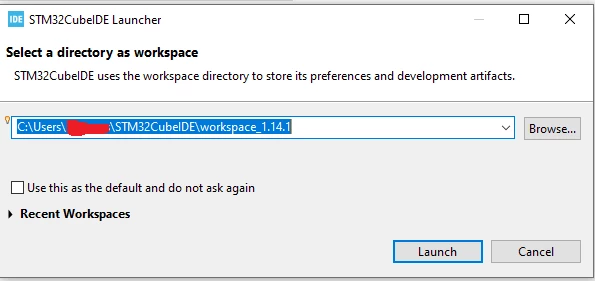
Go to STM32CubeIDE folder and double click on .project file.

This window will be shown, click "Launch" button:
SofLit_0-1710425062256.png

and wait until the project workspace is loaded. You have to get this view:
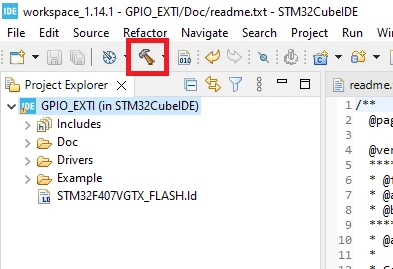
SofLit_1-1710425221784.pngHope

Then click on the "Hummer" button to build the project. When it was completed,

Click on the arrow button shown in red and go to the menu shown below:
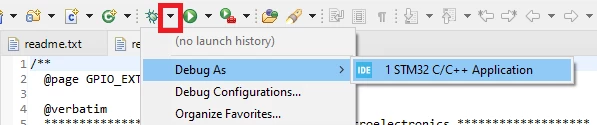
SofLit_2-1710425348701.png

If this window is shown, click OK button to load the program to your MCU target and launch the debug session:
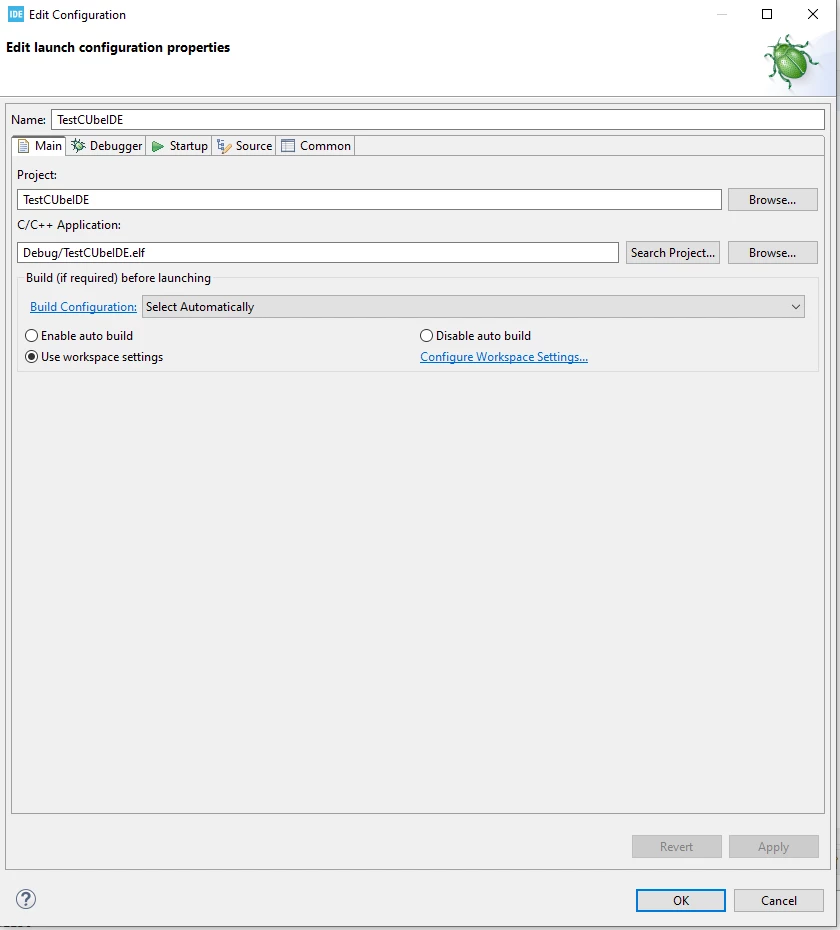
SofLit_3-1710425617569.png

To run the program click on this button:
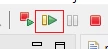
SofLit_5-1710425818375.png

To stop the debug session click on this button:

SofLit_6-1710425854075.png

Hope it helps.


4 replies

mƎALLEm
Technical Moderator
March 14, 2024

Hello,

Not clear what do you want to do after doing a chip erase, programming a specific application? which one?

To give better visibility on the answered topics, please click "Best answer" on the reply which solved your issue or answered your question.

aorkAuthor
Associate
March 14, 2024

Actually I don't know what to do either. I just wiped the chip. I am a completely new user and I want to tackle very simple projects. After erasing the chip, I want to use it as I first purchased it. So basically, I don't know what would happen if completely erasing the chip. Do I need to do anything after erasing the chip? If so, how should I do it? Would you help me with this topic?

Uwe Bonnes
Chief
March 14, 2024

The picture looks good. Have you excluded all possible errors on your side? E.g.

- 5V on non tolarant pins?

- Dangerous external voltage applied before or after proper MC voltages reached ?

Last errors have resulted in chips with high current consumption, partly still functional.

aorkAuthor
Associate
March 14, 2024

No, I just clicked on Full Chip Erase using STM32CubeProgrammer and that's it. Can I use the card afterwards? I don't know. I'm looking for help on this matter

mƎALLEm
Technical Moderator
March 14, 2024

Hello,

Download the firmware package of STM32F4 from here.

and go to the simplest example toggling a LED by user button: https://github.com/STMicroelectronics/STM32CubeF4/tree/master/Projects/STM32F4-Discovery/Examples/GPIO/GPIO_EXTI

Use STM32CubeIDE to compile the project and load the program to your board.

As you are a newbie with STM32, I recommend you to read this wiki.

To give better visibility on the answered topics, please click "Best answer" on the reply which solved your issue or answered your question.

aorkAuthor
Associate
March 14, 2024

Do I need to install or install these files that I downloaded? What path will I follow?

mƎALLEm
Technical Moderator
March 14, 2024

What do you mean by "install these files"?

You need to:

- Dwnload the package I provided previously.

- Download STM32CubeIDE toolchain and compile one of the examples.

- Program your board by the compiled example.

You need to read the wiki link.


To give better visibility on the answered topics, please click "Best answer" on the reply which solved your issue or answered your question.
mƎALLEm
Technical Moderator
March 15, 2024

Attached a complete project from which you can try the example.

Go to F4_Discovery_Example\Projects\STM32F4-Discovery\Examples\GPIO\GPIO_EXTI\STM32CubeIDE

If it doesn't compile, unzip the folder under your root drive C:


To give better visibility on the answered topics, please click "Best answer" on the reply which solved your issue or answered your question.
aorkAuthor
Associate
March 16, 2024

aork_0-1710556153302.png

First of all, thank you very much for your interest, but when I click on the Debug section, this appears and it seems like it is not normal. I did what you wrote step by step. What should I do? I'm so desperate

mƎALLEm
Technical Moderator
March 16, 2024

Click on switch button and go ahead.

To give better visibility on the answered topics, please click "Best answer" on the reply which solved your issue or answered your question.