Ivan Ivan
Associate III
August 15, 2017
Question

How to use UART1 in STM32F429-DISC1 board?

  • August 15, 2017
  • 3 replies
  • 2725 views
Posted on August 15, 2017 at 22:08

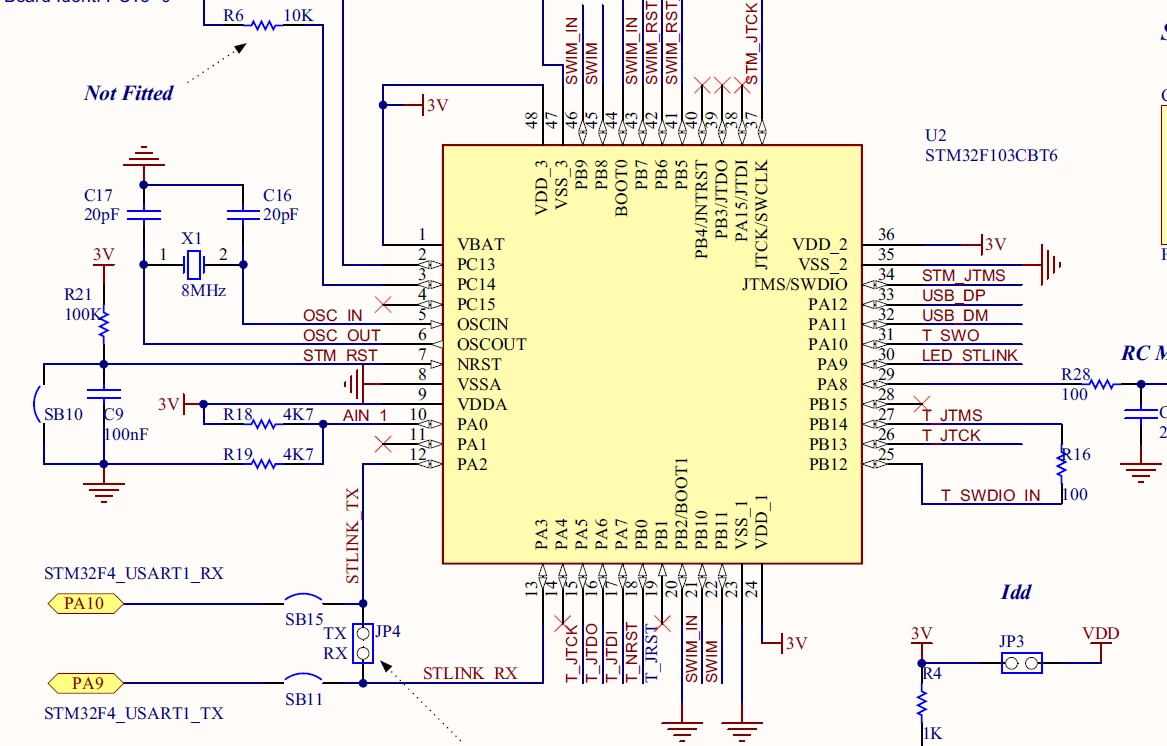
Hello, I'm developing some program using STM32F429-DISC1 board and I need to use UART1 there. I'm little confused, because UART1 sort of overlaps STLINK circuits.

0690X00000607tbQAA.png

To be more specific, PA9 and PA10 from STM32F429 go to STM32F103 supplementary controller (which manages debugging on board), as seen in Figure 10 of Board manual. What would happen if I define PA9 and PA10 of STM32F429 to use alternative function? I don't want to lose debugging functionality. Is it required to remove SB15 and SB11 to use UART1?

#stlink #stm32f429i-disc1 #electronics #uart
This topic has been closed for replies.

3 replies

waclawek.jan
Super User
August 15, 2017
Posted on August 15, 2017 at 22:14

Disconnect SB15 (and also SB11 if you want). There's a diagram in the manual to the Disco board showing where are the solder bridges located physially. It will be most probably a 0R resistor.

JW

Tesla DeLorean
Guru
August 15, 2017
Posted on August 15, 2017 at 22:23

Connects to the ST-LINK's VCP, you can disconnect it without interfering with the debugger, but you'd want to remove the solder bridge on the F4 USART1 RX side so you don't have multiple devices driving the pin

Tips, Buy me a coffee, or three.. PayPal VenmoUp vote any posts that you find helpful, it shows what's working..
Harsha Sandirigama
Visitor II
October 25, 2017
Posted on October 25, 2017 at 13:55

hey!

Enable and initialize USART1 as you would initialize any other USART interface. Afterwards, you can hook up the board to the computer via the ST-LINK port. Use a software such as Hercules or PUTTY to communicate with the board. Works like a charm with a baud rate of 9600!

cheers!