

Associate
May 8, 2024
Question

How to use STM discovery board as external Debugger

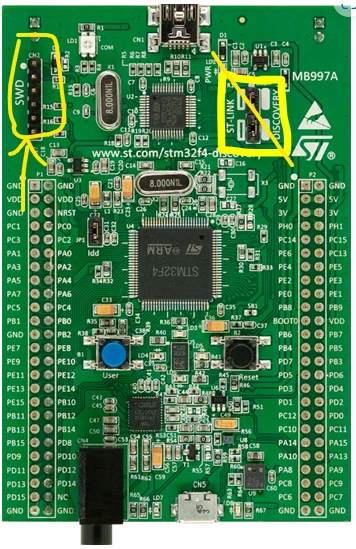
I have F407G Disc1 board where it has the SWD ports and I want use this board as a standalone external debugger and I went through the manual for the connections but got stuck
Also found a thread in stack exchange where the connections are given as below
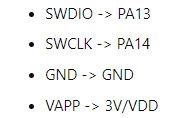
Screenshot 2024-05-08 150043.png

Akshay__0-1715161299835.png


Where are the pins PA13 and PA14 in SWD here?
It would be really helpful if the name of the respective pins be given here

This topic has been closed for replies.

5 replies

Pavel A.
May 8, 2024

Get ST-LINKv3, do yourself a favor.

Akshay_Author
Associate
May 8, 2024

I want to know it with V2 
Can you answer it if possible

AScha.3
Super User
May 8, 2024
If you feel a post has answered your question, please click on " Best Answer ".
Akshay_Author
Associate
May 8, 2024

Is port 1 PA13
We have 6 pins here, what does each pin signify here?

Uwe Bonnes
Chief
May 8, 2024

An easy test is when you have two similar board, best with different CPUs to see the difference. disconnect the jumper on one board and connect SWD pind 1-4  to the other board ST-Link connector. Keep the orientation. No one board should see the other cpu.