

Explorer
September 24, 2026
Question

How to debug an external board by using the ST-LINK debugger of STM32H5 Nucleo-144 board

In this case, I want to debug a new control board whose MCU is STM32H563. But I didn’t have a proper debugger, so I want to use the ST-LINK debugger of the STM32H5 Nucleo-144 board for the new board’s debugging.

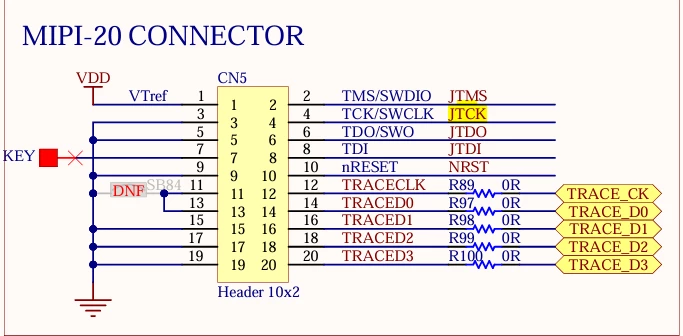
The debugger connector of the STM32H5 Nucleo-144 board : 
The debugger connector of my own board : 
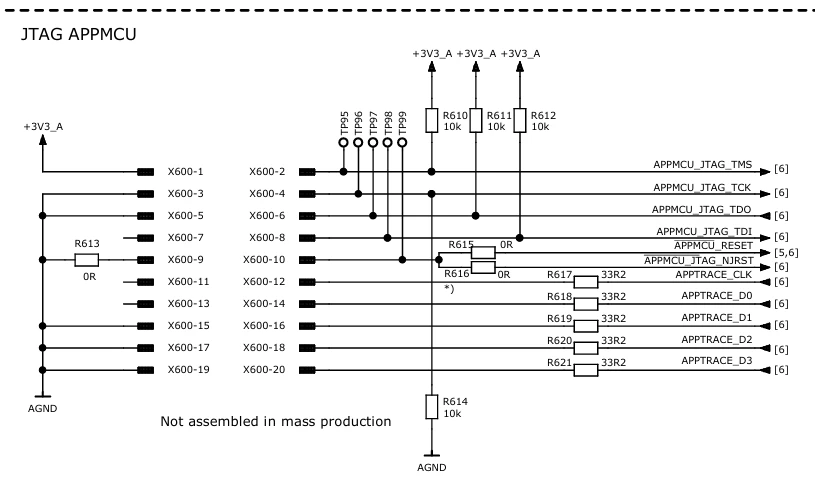
I want to connect the 2 connectors through a cable for the external board’s debugging.

So currently my issue is that the ST-LINK debugger can’t be used on the external board, I tried some methods for this, but it didn’t work, such as removing the jumper of JP5, connecting the jumper for JP1. 

My question is that : Can the ST-LINK debugger of STM32H5 Nucleo-144 board be used on an external board, if possible please show me the steps of the configurations on the Nucleo board.

1 reply

AScha.3
Super User
September 24, 2026

The debug probe on STM32H5 Nucleo-144 board is not connected for external use , to debug another target.

Better buy a cheap V3 miniE , or a V3 mods (if you anyway want use other connection/pinout than the STDC14 connector).

If you really want to try it , you have to cut some traces on the nucleo, with a certain risk of damaging the board.

See the circuit of the nucleo: for using the debug to external target, you have to keep the onboard H5 in reset state and then can use the trace connector to other target.

So you have to cut the nrst and SWD connection to the H5 and connect the H5 nrst to VDD , to keep it disabled and disconnected from SWD.

But i cannot promise, this will work 100% , as i never tried on my H563 nucleo. I just been thinking, what is to do, if i need it...

If you feel a post has answered your question, please click on " Best Answer ".