SK.22
Associate II
April 3, 2024
Solved

How to connect STLink in Nucleo-L496ZG Board

  • April 3, 2024
  • 5 replies
  • 4829 views

Hi Team,

I'm using Nucleo - L496ZG board in our project.

Whenever I connect the USB cable to the CN1 connector, the ST-Link isn't detected.

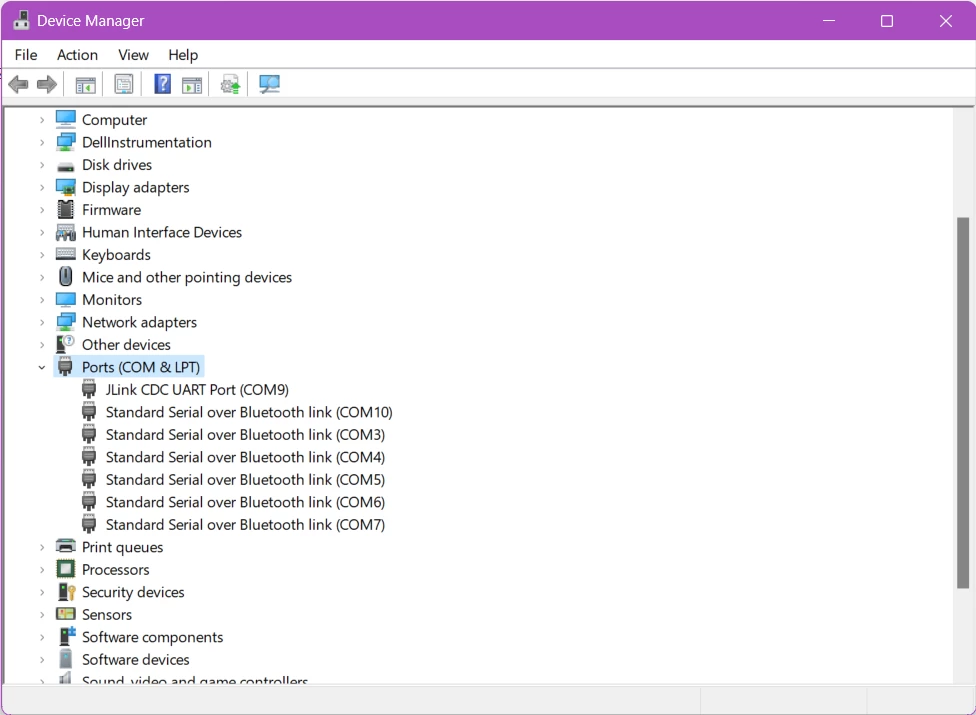
I have checked the ports on Device Manager and it shows Jlink instead of ST-Link.

I am attaching the image for your reference. Awaiting for your response!


SK22_0-1712138235200.png


Thanks & Regards, 

Sneha K

This topic has been closed for replies.
Best answer by Andrew Neil

@SK.22 wrote:

I have checked the ports on Device Manager and it shows Jlink instead of ST-Link.


Segger have a utility to convert an on-board ST-Link to an on-board J-Link - looks like this has been done to your board?

Obviously, after converting the ST-Link to a J-Link, it will no longer be detected as an ST-Link!

If you want to go back to using it as an ST-Link, the Segger utility can also be used to convert back


Addendum:

https://www.segger.com/products/debug-probes/j-link/models/other-j-links/st-link-on-board/


Or, as @Pavel A. said, just carry on and use it as a J-Link (subject to the Segger Ts & Cs - see the above link)

5 replies

mƎALLEm
Technical Moderator
April 3, 2024

Hello,

Check if you're using a data cable and not a charging cable

To give better visibility on the answered topics, please click "Best answer" on the reply which solved your issue or answered your question.
SK.22
SK.22Author
Associate II
April 4, 2024

It is data cable only.

mƎALLEm
Technical Moderator
April 4, 2024

I misunderstood your issue. I thought you have two devices connected to your PC: JLINK and STLINK and only JLINK is shown in the device list. Sorry for that.

To give better visibility on the answered topics, please click "Best answer" on the reply which solved your issue or answered your question.
Pavel A.
Super User
April 3, 2024

Can it be because someone has updated the ST-LINK firmware to J-LINK?

If so just tell the debugger that you have J-LINK and enjoy.


Andrew Neil
Andrew NeilBest answer
Super User
April 3, 2024

@SK.22 wrote:

I have checked the ports on Device Manager and it shows Jlink instead of ST-Link.


Segger have a utility to convert an on-board ST-Link to an on-board J-Link - looks like this has been done to your board?

Obviously, after converting the ST-Link to a J-Link, it will no longer be detected as an ST-Link!

If you want to go back to using it as an ST-Link, the Segger utility can also be used to convert back


Addendum:

https://www.segger.com/products/debug-probes/j-link/models/other-j-links/st-link-on-board/


Or, as @Pavel A. said, just carry on and use it as a J-Link (subject to the Segger Ts & Cs - see the above link)

A complex system that works is invariably found to have evolved from a simple system that worked.A complex system designed from scratch never works and cannot be patched up to make it work.

SK.22
SK.22Author
Associate II
April 4, 2024

Hi Andrew and Pavel,

Thanks for the solution.

Cheers! It works now, and it is now changed to ST-Link.


Thanks!

SK.22
SK.22Author
Associate II
April 4, 2024

Hi there,

I'm facing another issue,

After switching from ST-Link to J-Link, the SWV is disabled, as shown in the image below.

SK22_0-1712224061744.png


How to see the live data? Kindly share your ideas on this.

Thanks!


Andrew Neil
Super User
April 4, 2024

For a new issue, please start a new thread - so that the title matches the actual topic of the discussion.

A complex system that works is invariably found to have evolved from a simple system that worked.A complex system designed from scratch never works and cannot be patched up to make it work.

SK.22
SK.22Author
Associate II
April 4, 2024

Sure Andrew!