marciolafourcade
Associate
April 23, 2022
Solved

How can I configure my cubeide project to supply vcc from stlink v2

  • April 23, 2022
  • 5 replies
  • 1669 views

..

This topic has been closed for replies.
Best answer by Tesla DeLorean

Try reviewing the manual.

https://www.st.com/resource/en/user_manual/um1075-stlinkv2-incircuit-debuggerprogrammer-for-stm8-and-stm32-stmicroelectronics.pdf

 >>Is there some configuration in the cubeide...

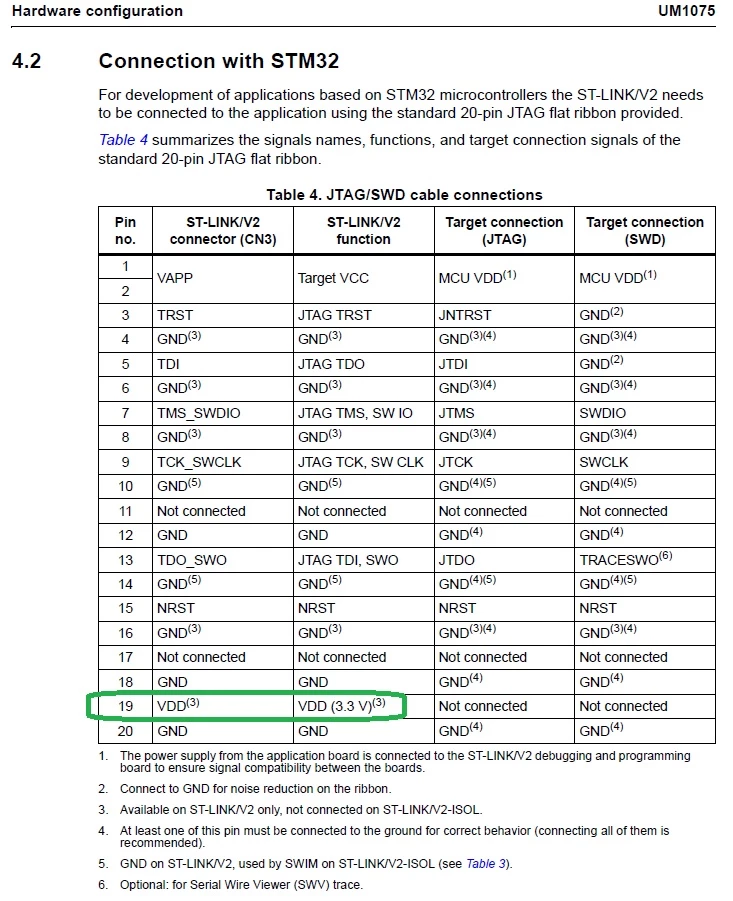
No, it's hardwired on the pin, and not gateable via the tools/drivers
0693W00000LyqL5QAJ.jpg

5 replies

KnarfB
Super User
April 23, 2022

You can't. Maybe your board has a jumper for that.

hth

KnarfB

Tesla DeLorean
Guru
April 23, 2022

An authentic ST-LINK/V2 ?

Should provide 3.3V on Pin 19

Tips, Buy me a coffee, or three.. PayPal Venmo (See Profile) Up vote any posts that you find helpful, it shows what's working..

marciolafourcade
Associate
April 23, 2022

Hi friends. Yes it is authentic. Is there some configuration in the cubeide, like the microchip's pickit3. Where can I provide vcc through the programmer. I never use. I've always used vcc onbord and programmed when it's on. But my friend told me it is possible..

Tesla DeLorean
Tesla DeLoreanBest answer
Guru
April 23, 2022

Try reviewing the manual.

https://www.st.com/resource/en/user_manual/um1075-stlinkv2-incircuit-debuggerprogrammer-for-stm8-and-stm32-stmicroelectronics.pdf

 >>Is there some configuration in the cubeide...

No, it's hardwired on the pin, and not gateable via the tools/drivers

0693W00000LyqL5QAJ.jpg

Tips, Buy me a coffee, or three.. PayPal Venmo (See Profile) Up vote any posts that you find helpful, it shows what's working..

marciolafourcade
Associate
April 23, 2022

great! thanks fot that.

