


Justin1
Associate III
August 29, 2018
Question

Help needed with external ST-LINK on Nucleo

I am trying to connect my ST-LINK/v2 to a Nucleo and having difficulties -

Apparatus

  • Board (STM32 Nucleo-446RE)
  • SW (STM32 ST-Link Utility, v3.9.0)
  • ICSP (ST-LINK/v2)

Here is my apparatus config, using Vdd=3.3V -
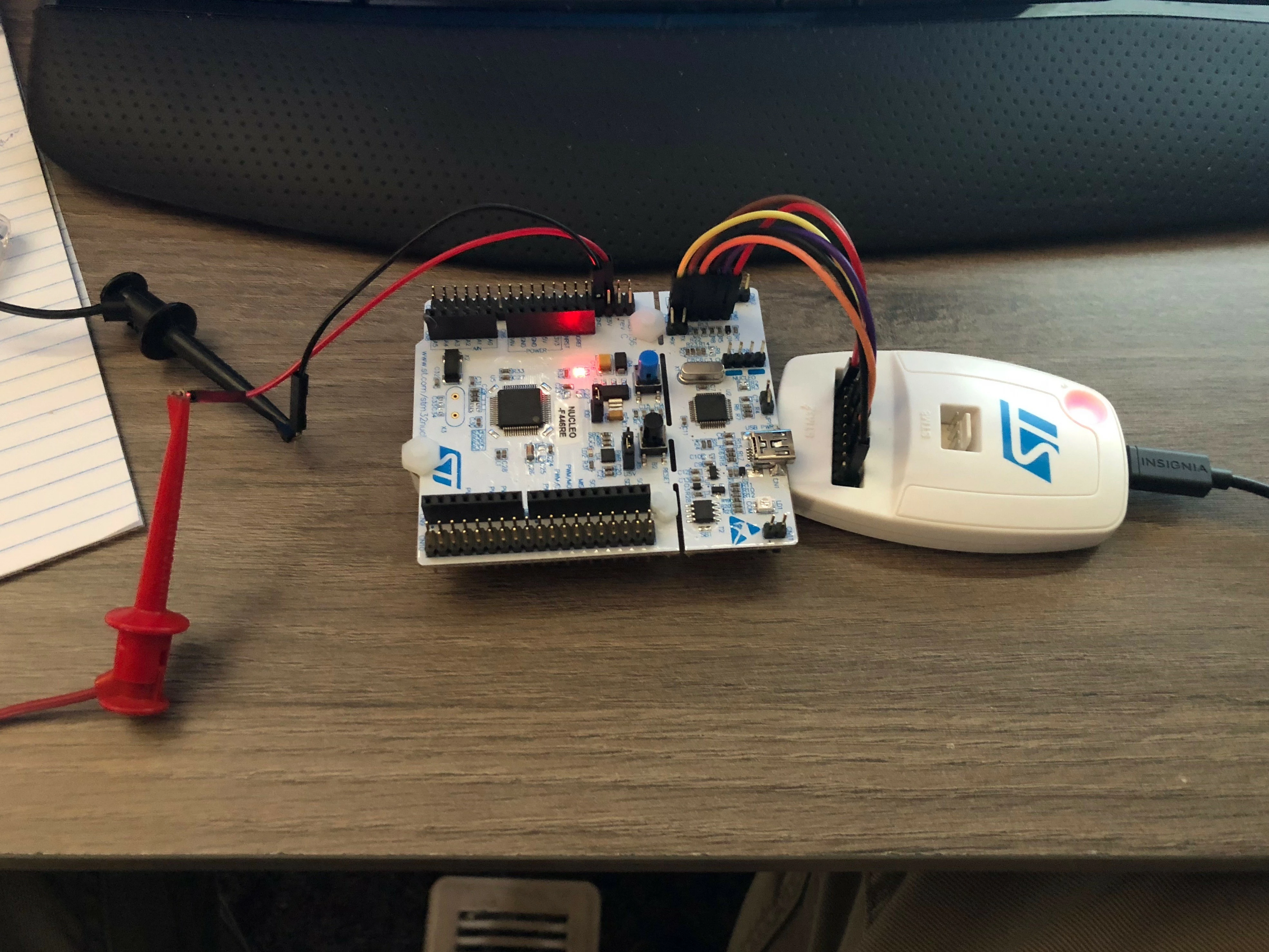
0690X000006BwkrQAC.jpg

Here is my wiring config (CN2 jumpers open) -
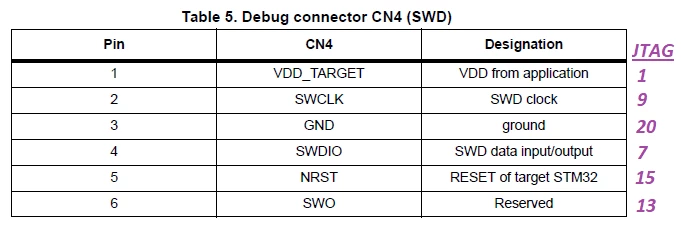
0690X000006BwkwQAC.png

Here is my utility config when I try to connect -
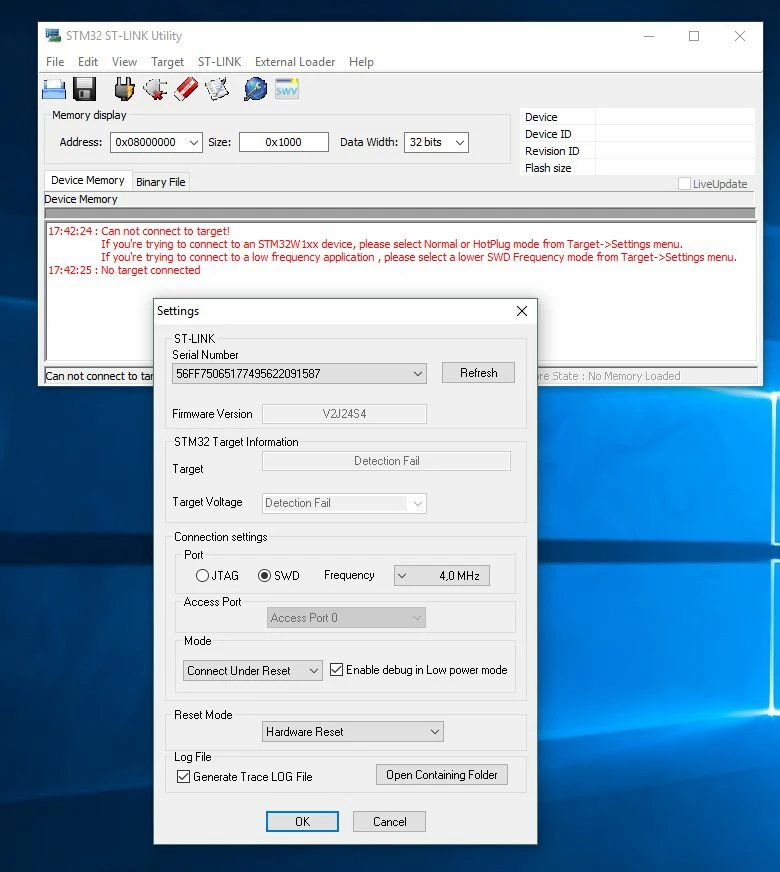
0690X000006BwkmQAC.jpg

Why isn't this working, thoughts?

This topic has been closed for replies.

9 replies

T J
Senior III
August 29, 2018

I connect my Nucleo directly to the USB port on the PC...

Justin1
Justin1Author
Associate III
August 29, 2018

You are using the 'embedded' ST-LINK, I am referring to using an 'external' ST-LINK.

Here is a ref to the ST-LINK you use, if interested -

T J
Senior III
August 29, 2018

did you remove both jumpers on CN2 ?

T J
Senior III
August 30, 2018

does it work today, what was the fix ?

Justin1
Justin1Author
Associate III
August 30, 2018

Both CN2 jumpers are removed. I found this useful ref -

I was not able to get this working with either the external ST-LINK/v2, or my Segger J-Link. Thoughts? I have tried both Nucleo-USB power and external power.

T J
Senior III
August 30, 2018

I have never used the external STlink.

I have used the Nucleo boards extensively, and also to program my custom boards.

but the 6 pin link is from the F103(nucleo) chip to my custom board.

in your case, it is backwards.

I remove the jumpers on CN2 so that the F446 chip in your case, is removed from the SWD and the Custom board is directly attached to the F103 nucleo chip.

that implies that with the jumpers removed the 446 is not connected to that External STlink

I think you should reinstall the two jumpers on CN2 and desolder the F103. <- your fix today

or else, of course,

did you make a custom board yet ?

put the 6 pin SWD on your PCB

the external STlink should just work.

Tesla DeLorean
Guru
August 30, 2018

I've cover this topic several times already.

The header you're using doesn't connect to the Target properly

Connect SWDIO and SWCLK on the TARGET side of the CN2 jumper/header, review the schematic it will help understanding the connectivity.

Tips, Buy me a coffee, or three.. PayPal Venmo (See Profile) Up vote any posts that you find helpful, it shows what's working..
EZamo.1
Associate III
April 16, 2020

According to the pdf, you can use the Nucleo/Discovery's built-in St-Link to program an external chip via the SWD CN4 connector (remove CN2 jumpers).. but what advantage is there to using an external StLink-V3/J-Link to program the Nucleo/Discovery's STM32?

In any case, to do it, looks like you'd have to remove the CN2 jumpers, but connect your external stlinkv3 to the Zio/Morpho/Arduino header(s).

Tesla DeLorean
Guru
April 16, 2020

Two year old thread.

The target's SWDIO and SWCLK are exposed at CN2.

Why people want to do this is anyone's guess but it is a recurring theme.​

Tips, Buy me a coffee, or three.. PayPal Venmo (See Profile) Up vote any posts that you find helpful, it shows what's working..