Echel.1
Associate II
June 22, 2022
Solved

Hello, i am new in this community. Is there anybody who use the SWO console on the Nucleo-STM32U575 ? Because I can't get it to work I add the write finction : int _write(int file, char *ptr, int len) // printf function Thank you

  • June 22, 2022
  • 13 replies
  • 6768 views

..

This topic has been closed for replies.
Best answer by Tesla DeLorean

0693W00000NsedXQAR.jpg

13 replies

Brian TIDAL
Technical Moderator
June 23, 2022

Hi,

which IDE do you use? Keil, IAR or STM32CubeIDE?

Rgds

BT

In order to give better visibility on the answered topics, please click on Accept as Solution on the reply which solved your issue or answered your question.
Echel.1
Echel.1Author
Associate II
June 23, 2022

Hello,

I use STM32CubeIDE V1.9.0

I do the same operations on the Nucleo-STM32L552 and it work correctly.

But impossible on the Nucleo-STM32U575.

Thank you

Brian TIDAL
Technical Moderator
June 23, 2022

Hi,

I would suggest to check the following points:

  • make sure PB3 is assigned to SWO and not used for another purpose. If using STM32CubeMX, check that the Debug Mode is set to "Trace Asynchronous Sw" (in Trace and Debug) and check the assignment in the Pinout view:0693W00000NsdE7QAJ.jpg
  • In STM32CubeIDE debug configuration, make sure to enable the Serial Wire Viewer and to configure the proper core clock (if using STM32CubeMX, check the Clock configuration tab). In my case the core clock is 160 MHz0693W00000NsdHpQAJ.jpg
  • In debug mode, enable the SWV ITM Data Console and click on the configure trace 0693W00000NsdKKQAZ.jpgIn this configuration window, check that the Port 0 is enabled:0693W00000NsdKoQAJ.jpg
  • then, make sure to start the trace by clicking on the Red button of the SWV ITM Data Console (the button should be highlighted when the trace is enabled)0693W00000NsdLSQAZ.jpg

Hope this helps

Rgds

BT

In order to give better visibility on the answered topics, please click on Accept as Solution on the reply which solved your issue or answered your question.
Echel.1
Echel.1Author
Associate II
June 23, 2022

Hello Brian,

Many thanks for your speed answer.

I check, point by point all your recommendations, and everything is ok.

But it don't work.

If i put a breakpoint in my _write function, it never stop here

int _write(int file, char *ptr, int len)      // printf function

{int i;

 for(i=0; i<len; i++)

 ITM_SendChar((*ptr++));

 return(len);

}

Maybe it would be easier to understand if I send you the project ?

Thank you

Brian TIDAL
Technical Moderator
June 23, 2022

Hi Elio,

if the breakpoint in _write is not hit, this means that the problem is probably not inside the ITM.

Anyway, let's first make sure the ITM is properly functional: can you add the following line in your main after the HAL_Init and SystemClock_Config (typically in user code begin 2 if you have generated from STM32CubeMX):

 ITM_SendChar('O');

 ITM_SendChar('K');

 ITM_SendChar('\r');

 ITM_SendChar('\n');

Can you confirm you see the "OK" on the  SWV ITM Data Console?

If it is OK, can you confirm that you have a syscall.c file in your project? can you confirm that the following function is inside this file: __attribute__((weak)) int _write(int file, char *ptr, int len)?

Can you set a breakpoint in this function and is the breakpoint hit during printf?

Can you also check that your program has not fallen into an exception and is not stuck in the hard fault handler loop?

Rgds

BT

In order to give better visibility on the answered topics, please click on Accept as Solution on the reply which solved your issue or answered your question.
Tesla DeLorean
Guru
June 23, 2022

+1

Definitely check the ITM_SendChar() outside of the plumbing for the STDIO

I'll check the NUCLEO-U575ZI this evening

Tips, Buy me a coffee, or three.. PayPal VenmoUp vote any posts that you find helpful, it shows what's working..
Echel.1
Echel.1Author
Associate II
June 23, 2022

Hello,

Thank you very much for your help.

I put after the user code begin 2 those code lignes

 ITM_SendChar('O');

 ITM_SendChar('K');

 ITM_SendChar('\r');

 ITM_SendChar('\n');

And the "OK" don't appear on the SWV ITM Data Console.

Thank you

Brian TIDAL
Technical Moderator
June 23, 2022

Hi,

can you confirm that your program reach the  ITM_SendChar lines i.e. can you confirm that your program is no stuck before due to some error? Can you check that the SystemClock_Config returns properly?

Rgds

BT

In order to give better visibility on the answered topics, please click on Accept as Solution on the reply which solved your issue or answered your question.
Echel.1
Echel.1Author
Associate II
June 23, 2022

Hello again Brian,

I go in all the lignes of the ITM_SendChar program :

__STATIC_INLINE uint32_t ITM_SendChar (uint32_t ch)

{

 if (((ITM->TCR & ITM_TCR_ITMENA_Msk) != 0UL) &&     /* ITM enabled */

     ((ITM->TER & 1UL              ) != 0UL)  )    /* ITM Port #0 enabled */

 { while (ITM->PORT[0U].u32 == 0UL)

   {  __NOP();

   }

   ITM->PORT[0U].u8 = (uint8_t)ch;

 }

 return (ch);

}

And i verify that SystemClock_Config returns properly, there is no error.

My program is no stuck.

Thank you for your help.

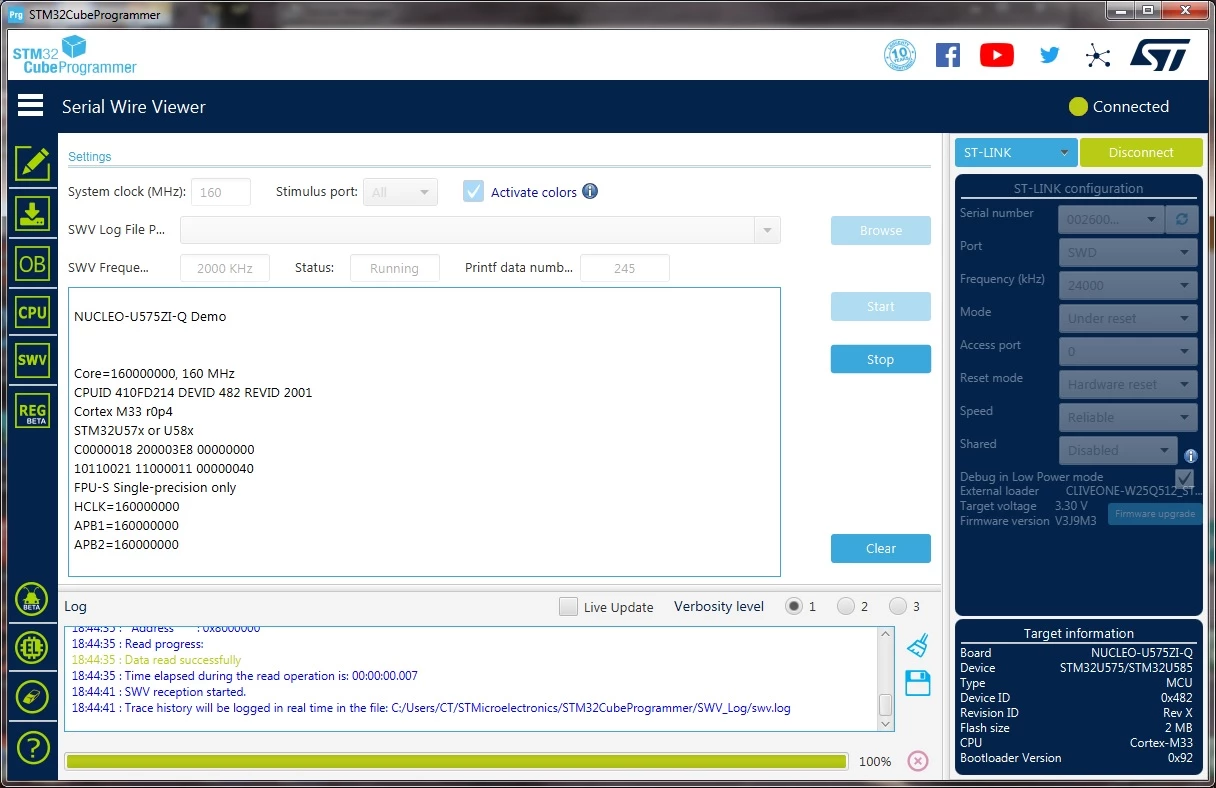
Tesla DeLorean
Tesla DeLoreanBest answer
Guru
June 23, 2022

0693W00000NsedXQAR.jpg

Tips, Buy me a coffee, or three.. PayPal VenmoUp vote any posts that you find helpful, it shows what's working..
Brian TIDAL
Technical Moderator
June 24, 2022

Hi Elio,

Can you load the hex file provided by Clive (@Community member​: thanks for your help :thumbs_up: ) and check that your able to see the ITM logs on your setup?

Regarding your program, can you display the value of SystemCoreClock in the debugger after SystemClock_Config and check this value is aligned with ClockCore value for the SWV in the debug configuration?

On your board, can you check that SB44 is present (SB44 is on the bottom close to PA0)? A solder bridge should be present.

Rgds

BT

In order to give better visibility on the answered topics, please click on Accept as Solution on the reply which solved your issue or answered your question.