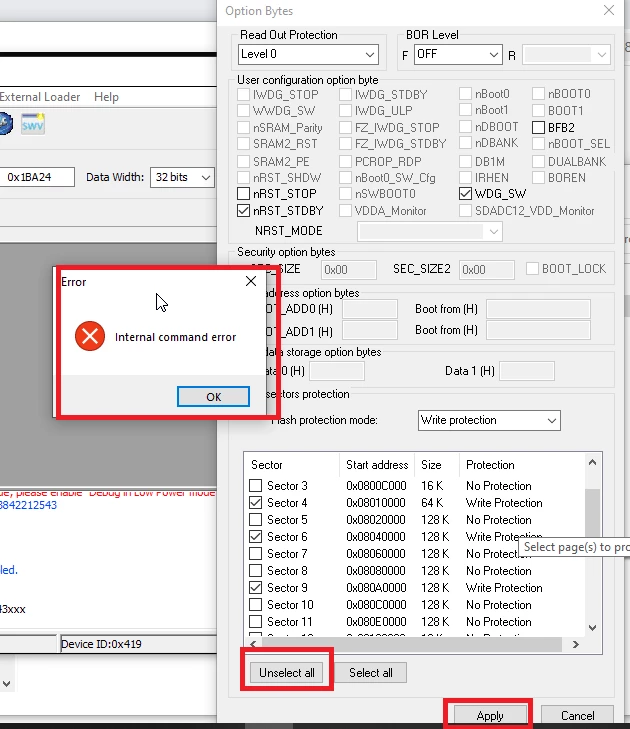
Flash programming erase step marking few sectors write protection
I am having an issue with the firmware update on STM32F427 MCU by using the ST-Link utility tool and Keil debugging functionality. When I reload the new program on MCU, sporadically flash erase step marking few sectors are write-protected. I used the Option Bytes option to unselect all->Apply command, but the command threw an internal command error.
I tried with ST_Link command utility also, it does not help
ST-LINK_CLI.exe -ME
STM32 ST-LINK CLI v3.6.0.0
STM32 ST-LINK Command Line Interface
ST-LINK SN: 39FF6E064D42343842212543
ST-LINK Firmware version: V2J29S7
Connected via SWD.
SWD Frequency = 4000K.
Target voltage = 1.9 V
Connection mode: Normal
Reset mode: Hardware reset
Device ID: 0x419
Device flash Size: 2048 Kbytes
Device family: STM32F42xxx/F43xxx
Full chip erase...
Internal command error
Read out protection is activated
ST-LINK_CLI.exe -c HOTPLUG -OB RDP=1